

The GIGABYTE Gaming A18 laptop is one of the best gaming laptops that offers an 18-inch 2560 × 1600 display, a 165Hz refresh rate, a Ryzen 7 260 processor, and RTX 5070 graphics.
And surprisingly, all this comes without the ultra-premium price tag. You need not worry about the budget, as you can get certain configurations of this giant in the range of $1,500 to $2,000.
In this article, I have provided a complete review of the GIGABYTE Gaming A18 laptop alongside breaking down its gaming performance and upgradability.
What Is the GIGABYTE Gaming A18?
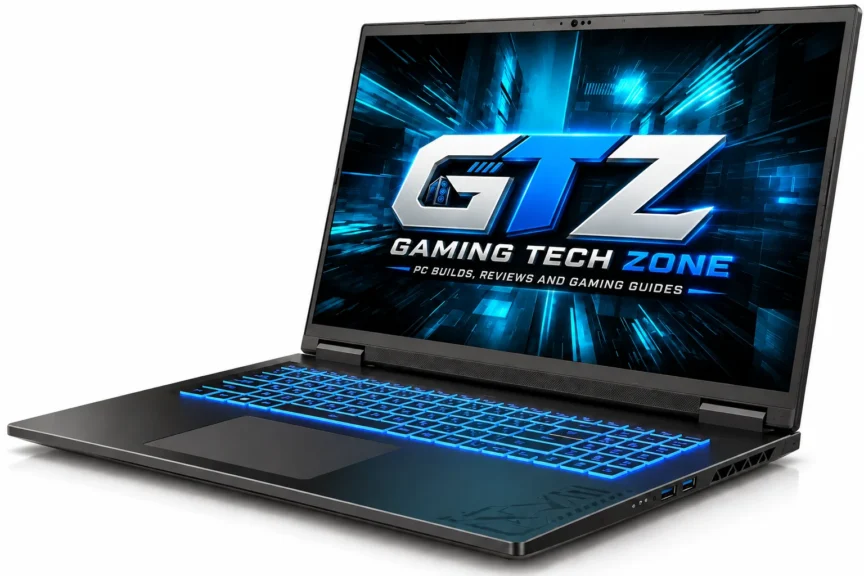
The GIGABYTE Gaming A18 is an 18-inch gaming laptop aimed at buyers who want a large display and solid RTX 50-series performance without paying flagship prices. Its main configuration combines Ryzen 7 260, RTX 5070, 32GB RAM, and a 165Hz WQXGA display.
Different Configurations of GIGABYTE Gaming A18
According to the official GIGABYTE site, the following configurations of the Gaming A18 laptops are available.
| Configurations | CPU | GPU | Memory | Storage |
|---|---|---|---|---|
| GIGABYTE GAMING A18 3WH | AMD Ryzen™ 7 260 | NVIDIA GeForce RTX 5070 Laptop GPU 8GB GDDR7 | Up to 64GB DDR5 5600MHz | 1x PCIe Gen4x4 M.2 slot1x PCIe Gen4x2 M.2 slotUp to 4TB PCIe NVMe™ M.2 SSD |
| GIGABYTE GAMING A18 3VH | AMD Ryzen™ 7 260 | NVIDIA GeForce RTX 5060 Laptop GPU 8GB GDDR7 | Up to 64GB DDR5 5600MHz | 1x PCIe Gen4x4 M.2 slot1x PCIe Gen4x2 M.2 slotUp to 4TB PCIe NVMe™ M.2 SSD |
| GIGABYTE GAMING A18 3TH | AMD Ryzen™ 7 260 | NVIDIA GeForce RTX 5050 Laptop GPU 8GB GDDR7 | Up to 64GB DDR5 5600MHz | 1x PCIe Gen4x4 M.2 slot1x PCIe Gen4x2 M.2 slotUp to 4TB PCIe NVMe™ M.2 SSD |
How Much Does GIGABYTE Gaming A18 Cost?
The GIGABYTE Gaming A18 costs $1838.89 on Amazon for the following specific build:
- Processor: AMD Ryzen 7 260 (16MB cache, up to 5.1 GHz, 8 cores, 16 threads)
- GPU: NVIDIA GeForce RTX 5070 Laptop GPU 8GB GDDR7
- Memory: 32 GB
- Storage: 1 TB
- Operating System: Windows 11 Home
Pricing varies by region and configuration, but the RTX 5070 version has recently been listed around $1,600–1,850 in the US, which makes it relatively affordable for an 18-inch gaming laptop.
GIGABYTE Gaming A18 Specifications
The specifications below refer to the GIGABYTE GAMING A18 3WH configuration. Exact hardware can vary by country and regional SKU, particularly RAM, storage, and operating system. GIGABYTE officially lists the Ryzen 7 260, RTX 5070, 18-inch WQXGA display, dual SO-DIMM slots and dual M.2 storage slots.
| Specification | GIGABYTE Gaming A18 |
|---|---|
| CPU | AMD Ryzen 7 260 |
| CPU Cores / Threads | 8 / 16 |
| CPU Boost | Up to 5.1GHz |
| GPU | NVIDIA GeForce RTX 5070 Laptop GPU |
| GPU VRAM | 8GB GDDR7 |
| Display | 18-inch 16:10 IPS WQXGA |
| Resolution | 2560 × 1600 |
| Refresh Rate | 165Hz |
| Response Time | 3ms |
| Color Coverage | 100% DCI-P3 |
| Brightness | 300 nits typical |
| RAM | Up to 64GB DDR5-5600 |
| Storage | Up to 4TB PCIe NVMe SSD |
| SSD Slots | 2 × M.2 |
| Battery | 76Wh |
| Wireless | Wi-Fi 6E |
| Ethernet | 1GbE |
| Webcam | 1080p FHD IR |
| Keyboard | 1-zone RGB |
| Audio | 2 × 2W speakers, Dolby Atmos |
| Operating System | Windows 11 |
| Weight | Approximately 2.8kg |
| Adapter | 150W |
1. The 18-Inch Screen
If you’ve been gaming on a 15- or 16-inch laptop like the ASUS ROG Strix SCAR 16 G635LW, the Gaming A18’s 18-inch panel immediately gives you more room. Its 2560 × 1600 resolution, 16:10 aspect ratio, and 165Hz refresh rate make it useful for both gaming and everyday work.
The display also has:
- 3ms response time
- 100% DCI-P3 coverage
- 300-nit typical brightness
- MUX Switch
The 165Hz refresh rate is particularly useful in competitive games where the RTX 5070 can push high frame rates.
For demanding AAA games, however, you shouldn’t expect to use the full 165Hz refresh rate at maximum settings and native resolution in every title.
2. Excellent Connectivity
The Gaming A18 has enough physical connectivity for a typical gaming desk without requiring a pile of adapters.
| Port / Connection | Available |
|---|---|
| USB-C | USB4 with DisplayPort 1.4 and Power Delivery 3.0 |
| USB-A | 2 × USB 3.2 Gen 1 |
| USB-A | 1 × USB 2.0 |
| HDMI | HDMI 2.1 |
| Ethernet | RJ-45 Gigabit LAN |
| Audio | 3.5mm combo jack |
| Wireless | Wi-Fi 6E |
| Bluetooth | Bluetooth 5.3 |
The USB4 port with DisplayPort support is particularly useful if you’re connecting an external monitor, while HDMI 2.1 gives you another display-output option.

3. Ryzen 7 260 CPU
The Ryzen 7 260 has 8 cores and 16 threads, with boost speeds of up to 5.1GHz. It isn’t positioned as an extreme workstation CPU, but it is a sensible pairing for the RTX 5070.
For gaming, streaming, everyday multitasking, and normal content creation, it has enough capability. The more interesting question is whether you’re buying the A18 primarily for professional CPU-heavy workloads.
If you mainly do extremely demanding rendering, compilation, or workstation workloads, there are gaming laptops with considerably stronger HX-class processors, like Razer Blade 16 or MSI Raider 18 HX AI.
That distinction matters because the A18’s strengths are screen size and gaming value, not workstation-class CPU performance.
4. GPU Power
The RTX 5070 Laptop GPU in the Gaming A18 is reportedly configured at around 85W, which is considerably more restrictive than some competing RTX 5070 implementations.
That doesn’t make the GPU bad. It simply means an RTX 5070 in this laptop shouldn’t automatically be compared with a high-power RTX 5070 in a thicker, more expensive machine.
LaptopMedia’s testing recorded a 3DMark Time Spy Graphics score of 14,304 for the RTX 5070 configuration, while independent gaming tests show that the laptop remains capable of running modern titles at playable frame rates.
5. Keyboard and Trackpad
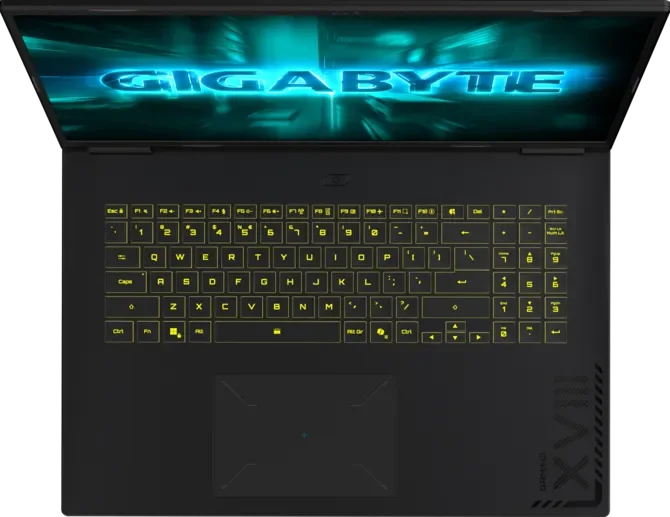
The Gaming A18 uses a 1-zone RGB backlit keyboard with up to 1.7mm key travel. It doesn’t offer the elaborate per-key RGB system found on more expensive gaming laptops, but it keeps the focus on practical gaming functionality rather than unnecessary extras.
The 18-inch chassis also gives the keyboard plenty of space, which is useful if you’re moving from a smaller laptop.
6. Design and Build
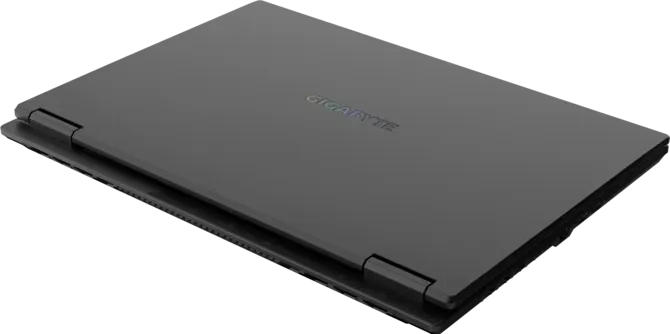
The Gaming A18 uses a Black Steel chassis measuring approximately 403.68 × 293.4 × 20–24.99mm.
At around 2.8kg, it is substantial but not unusual for an 18-inch gaming machine. Its large body leaves room for the hardware and cooling system while keeping the overall design relatively straightforward.
7. Battery
The Gaming A18 uses a 76Wh battery, which is smaller than the 90Wh-plus batteries found in many premium gaming laptops. GIGABYTE lists the 76Wh battery across the GA83H platform.
Despite the relatively modest capacity, independent testing of the A18 platform has shown respectable light-use endurance for a gaming laptop. But gaming is a completely different situation.
Running the RTX 5070 away from the charger will drain the battery quickly, and performance is also limited compared with plugged-in operation. So don’t buy the A18 expecting all-day gaming away from an outlet.
It is still fundamentally a desk-first gaming laptop.
GIGABYTE Gaming A18 Gaming Performance
The Gaming A18’s performance story is more nuanced than simply saying high-end gaming.
The RTX 5070 is capable of strong 1080p and respectable 1600p gaming, but the A18’s approximately 85W GPU configuration limits its maximum performance compared with higher-powered implementations.
That becomes especially obvious in demanding ray-traced games.
For example, independent testing of the A18 3VH recorded 75 FPS in Cyberpunk 2077 at 1080p without ray tracing, but only 29 FPS with ray tracing enabled. Activating RT alongside DLSS raised the result to 82 FPS.
That’s a good demonstration of how much modern NVIDIA technologies can matter on this machine.
| Game | Settings | Approx. FPS |
|---|---|---|
| Cyberpunk 2077 | 1080p Ultra | ~75 FPS |
| Cyberpunk 2077 | 1080p RT + DLSS | ~82 FPS |
| Assassin’s Creed Mirage | 1080p | ~86 FPS |
| Forza Motorsport | 1080p | ~70 FPS |
| Forza Motorsport | 1080p RT + DLSS | ~52 FPS |
| Forspoken | 1080p | ~61 FPS |
| Horizon Zero Dawn Remastered | 1080p | ~51 FPS |
| Horizon Zero Dawn Remastered + DLSS | 1080p | ~87 FPS |
| Metro Exodus | 1080p | ~75 FPS |
| Immortals Fenyx Rising | 1080p | ~80 FPS |
These figures should be treated as configuration-specific rather than guaranteed results for every Gaming A18. The exact CPU/GPU power profile, drivers, game version and settings can change the result.
Does the Gaming A18 Get Hot?
It can become warm under sustained gaming, but the bigger concern is fan noise.
The A18’s cooling system has to dissipate heat from the Ryzen 7 processor and RTX 5070 inside a relatively large chassis. The large body gives GIGABYTE more physical room for cooling hardware, but high-performance modes can still make the fans noticeable.
User reports have also mentioned fan and heat concerns, although individual experiences vary and shouldn’t be treated as representative of every unit.
To avoid external noise, you should use headphones like Corsair Void V2 or Logitech G321 during demanding gaming for a better experience.
What About 1600p Gaming?
The native 2560 × 1600 resolution is attractive, but you shouldn’t assume every AAA game will comfortably run at maximum settings at that resolution. For demanding titles, DLSS is your friend.
Less demanding games and esports titles can make much better use of the 165Hz panel, while graphically intensive AAA games or 4K gaming on a laptop may require High rather than Ultra settings.
Does It Support Ray Tracing?
Yes. The RTX 5070 supports hardware-accelerated ray tracing, but demanding ray-traced games can quickly consume the available GPU performance.
If you’re playing Cyberpunk 2077 or similarly demanding games with heavy ray tracing, DLSS becomes particularly useful. Independent testing demonstrated a large performance difference between native ray tracing and RT combined with DLSS.
Does It Have Gaming Glitches?
There is no fundamental Windows gaming compatibility problem with the Gaming A18. It uses standard AMD and NVIDIA laptop hardware and supports modern PC games.
However, individual games can behave differently depending on drivers, ray tracing, DLSS, frame generation, and game optimization.
Does It Have Gaming Compatibility Problems?
There is no fundamental Windows gaming compatibility issue with the A18. It uses conventional AMD and NVIDIA laptop hardware and runs Windows 11.
Performance differences between games are normal, particularly when ray tracing, DLSS, frame generation, and different graphics APIs are involved.
Is the 165Hz Display Actually Useful?
Yes, but mostly in games capable of producing high frame rates. Competitive titles and lighter games can take advantage of the 165Hz refresh rate much more easily than demanding AAA games.
That’s why the A18’s display and GPU are best viewed as a balanced combination rather than expecting the RTX 5070 to deliver 165 FPS in every modern game.
Is Connectivity Good Enough for Gaming?
Yes. The combination of USB4, HDMI 2.1, USB-A, Gigabit Ethernet, Wi-Fi 6E and Bluetooth 5.3 gives the Gaming A18 enough connectivity for gaming peripherals, external displays, wired networking and everyday accessories.
Does Battery Power Reduce Gaming Performance?
Yes. The laptop is designed to provide its best gaming performance while connected to its power adapter.
Running demanding games from the 76Wh battery will drain it quickly and can reduce the available power budget. If you’re buying the A18 for RTX 5070 gaming, the charger should be considered part of the gaming setup.
Is the GIGABYTE Gaming A18 Worth It?
The Gaming A18 makes sense if your priority is getting a large 18-inch gaming laptop without stepping into the expensive flagship category. Its 1600p 165Hz display, RTX 5070 graphics, Ryzen 7 processor, upgradeable RAM, and dual SSD slots make it a practical gaming machine.
Who Should Buy It?
You should buy the GIGABYTE Gaming A18 laptop if you:
- Want an 18-inch gaming laptop.
- Prefer a large 16:10 display.
- Want RTX 5070 graphics.
- Primarily game at a desk.
- Want a 165Hz display.
- Need expandable RAM and storage.
- Want dual M.2 SSD slots.
- Need a large screen for gaming and productivity.
Who Shouldn’t Buy It?
There is no point purchasing this laptop if you:
- Need a lightweight gaming laptop.
- Carry your laptop around every day.
- Want an OLED or Mini-LED display.
- Want the fastest possible RTX 5070 implementation.
- Need exceptional battery life.
- Mostly play lightweight games.
- Want a premium per-key RGB keyboard.
- Prefer a compact 14- or 16-inch machine.
Can You Upgrade GIGABYTE Gaming A18 Components?
Yes. The Gaming A18 is reasonably upgrade-friendly, with two SO-DIMM slots supporting up to 64GB DDR5-5600 and two M.2 slots for SSD storage. GIGABYTE lists support for up to 4TB of PCIe NVMe storage, although actual configurations can vary by region.
| Component | Upgradeable? | Details |
|---|---|---|
| RAM | Yes | 2 × SO-DIMM slots, up to 64GB |
| SSD | Yes | 2 × M.2 slots |
| Storage | Yes | Up to 4TB supported |
| CPU | No | Not designed for user replacement |
| GPU | No | Soldered laptop GPU |
| Wi-Fi | Serviceable | Internal wireless hardware |
| Battery | Serviceable | Replaceable when required |
The two M.2 slots are particularly useful because you can add storage without necessarily replacing the original SSD.
Final Thoughts
The GIGABYTE Gaming A18 isn’t trying to beat every premium gaming laptop on specifications. It gives you a huge 18-inch 2560 × 1600 display, a 165Hz refresh rate, RTX 50 graphics, and useful upgrade options without forcing you into flagship pricing.
The RTX 5070’s power configuration means it isn’t necessarily the fastest RTX 5070 laptop you can buy, and the 2.8kg chassis won’t win any portability contests. But if your laptop spends most of its time on a desk and you want a genuinely large gaming screen, the A18 makes a compelling case.
You’re essentially paying for screen size and solid gaming hardware rather than unnecessary premium extras.
