

You can tell when a gaming laptop is built around performance first. The ASUS ROG Strix SCAR 16 G635LW is one of those machines.
You just open the lid, and you get a 16-inch 240Hz Mini-LED display. Look underneath, and there is an Intel Core Ultra 9 275HX paired with an RTX 5080 Laptop GPU. That combination is serious hardware.
But powerful gaming laptops always come with compromises. The SCAR 16 is heavy, the fans can get loud, and battery life isn’t exactly its selling point.
In this guide, I will explain its specs and features so you can assess whether all that performance, cooling, and display quality make sense for the way you actually plan to use it.
What is ASUS ROG Strix SCAR 16 G635LW?
The ASUS ROG Strix SCAR 16 G635LW is a high-end 16-inch gaming laptop featuring an Intel Core Ultra 9 275HX processor, NVIDIA GeForce RTX 5080 Laptop GPU, 240Hz Mini-LED display, fast DDR5 memory, and upgradeable storage for demanding gaming and creative workloads.
What is the Price of the ASUS ROG Strix SCAR 16 G635LW?
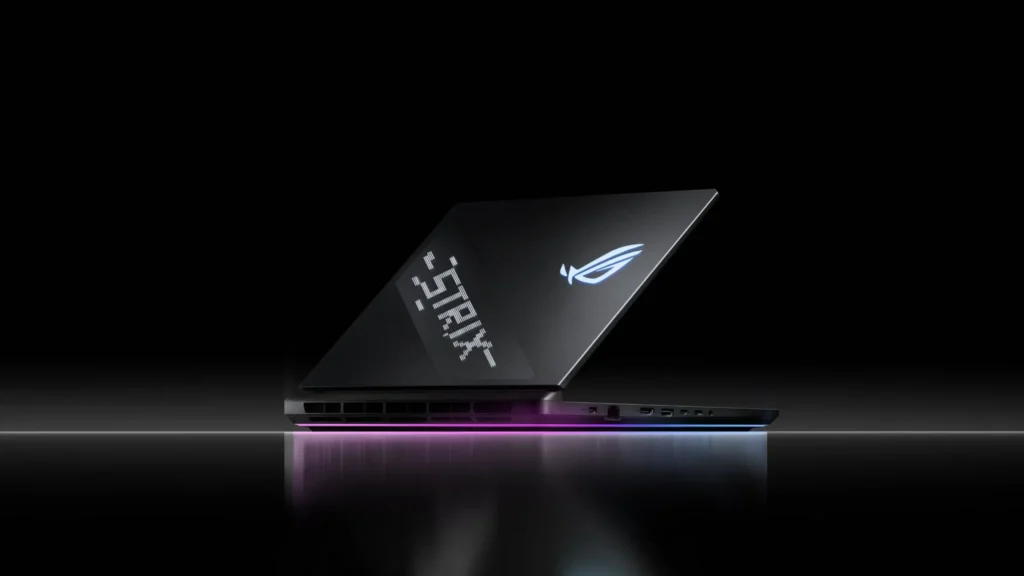
The price of the ASUS ROG Strix SCAR 16 G635LW is around $3,299.99 at different retailers for the following configuration:
- GPU: NVIDIA GeForce RTX 5080
- CPU: Intel Core Ultra 9 275 HX
- Memory: 32 GB DDR5
- Storage: 2TB PCIe Gen 4 SSD
What Makes the ASUS ROG Strix SCAR 16 G635LW Different?
The combination of RTX 5080, 240Hz Mini-LED, Core Ultra 9 275HX, and a high-power cooling system makes the G635LW a machine aimed at someone who actually intends to push the hardware.
ASUS gives the RTX 5080 up to 175W, while the chassis uses a vapor chamber, multiple fans, and Conductonaut Extreme liquid metal cooling on the CPU and GPU.
In other words, this isn’t a thin gaming laptop pretending to be powerful. It has the cooling and power delivery to let the hardware run hard.
ASUS ROG Strix SCAR 16 G635LW Specs in One Look
The following are the specifications of the ASUS ROG Strix SCAR 16 G635LW (2025), as per the official site.
| Components | Specifications |
|---|---|
| CPU | Intel Core Ultra 9 275HX |
| GPU | GeForce RTX 5080 Laptop GPU |
| GPU VRAM | 16GB GDDR7 |
| Display | 16-inch 2560 × 1600 Mini-LED |
| Refresh rate | 240Hz |
| RAM | 32GB DDR5-5600 |
| Storage | 1TB or 2TB depending on configuration |
| Battery | 90Wh |
| Wi-Fi | Wi-Fi 7 |
| LAN | 2.5Gb Ethernet |
| OS | Windows 11 |
1. Display May Be the Real Reason to Buy It
A lot of premium gaming laptops have moved toward OLED. ASUS went another direction with ROG Strix SCAR 16 G635LW and retained a matte Mini-LED Nebula HDR panel.
You get:
- 2560 × 1600 resolution
- 16:10 aspect ratio
- 240Hz refresh rate
- 3ms response time
- 100% DCI-P3 coverage according to ASUS
- G-SYNC
- Pantone validation
- Mini-LED backlighting
- MUX Switch and NVIDIA Advanced Optimus
Tom’s Hardware measured 457.2 nits in SDR and more than 1,200 nits in HDR on its review unit. That gives the SCAR 16 a very different personality from an OLED gaming laptop.
The matte surface is useful if you’re gaming in a bright room, while Mini-LED can provide excellent HDR brightness without the same OLED burn-in considerations. On the other hand, someone who prioritizes perfect blacks and OLED’s characteristic contrast may prefer an OLED machine.
So this isn’t simply a case of “Mini-LED is better.” It depends on what you value.
2. Connectivity Is One of Its Strong Points
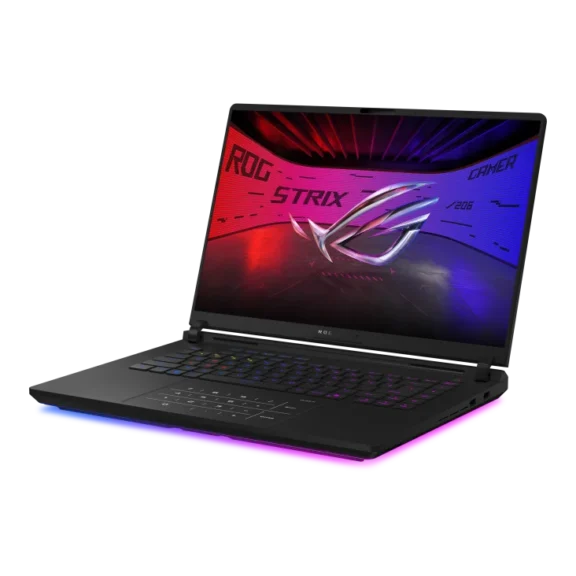
You don’t need a USB hub just because you own a SCAR 16. The G635LW provides:
- 3 × USB 3.2 Gen 2 Type-A
- 2 × Thunderbolt 5
- 2.5Gb Ethernet
- 3.5mm combo audio jack
- Wi-Fi 7
- Bluetooth
- Display output through supported USB-C/Thunderbolt connectivity
ASUS lists Thunderbolt 5 ports with DisplayPort, power delivery and G-SYNC support, alongside 2.5Gb Ethernet.
That’s especially useful if you’re building a desk setup with external monitors, wired networking, multiple peripherals and fast external storage.
3. Keyboard, RGB and AniMe Vision
This is where ASUS clearly wants the SCAR 16 Strix G635LW to feel like a gaming machine.
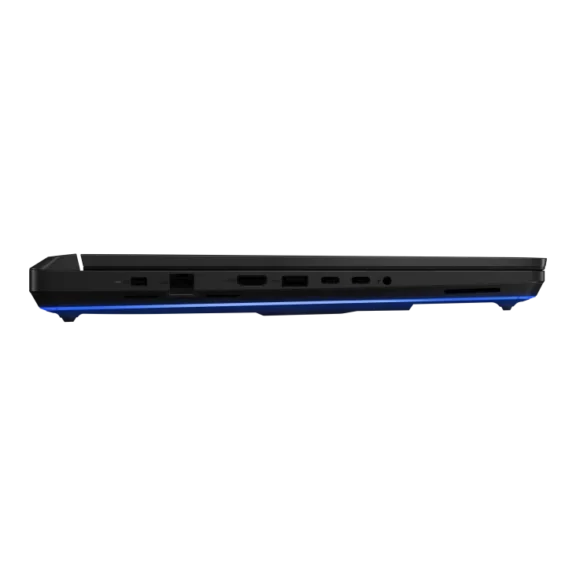
The laptop includes customizable RGB lighting and ASUS’s AniMe Vision display on the lid, which lets you customize the exterior with animations and graphics. Armoury Crate controls performance profiles, lighting and related system functions.
The keyboard itself is designed for gaming but remains practical for everyday typing. The large touchpad also makes Windows navigation considerably more comfortable than on many performance-focused gaming laptops.
If you want a laptop that looks completely business-like, this isn’t it. If you enjoy gaming aesthetics, the SCAR 16 embraces them.

4. Future Proofing: Can You Upgrade the G635LW?
Yes, and this is one of the SCAR 16’s better long-term characteristics.
The chassis provides two DDR5 SO-DIMM slots and two M.2 PCIe slots. ASUS lists memory support up to 64GB on some G635LW configurations, while certain regional G635 variants support higher capacities.
| Component | Upgradeable? | Details |
|---|---|---|
| RAM | Yes | Two SO-DIMM slots |
| SSD | Yes | Two M.2 slots |
| Second SSD | Yes | Useful for expanding game storage |
| CPU | No | Not a practical user upgrade |
| GPU | No | Soldered laptop GPU |
| Battery | Serviceable | Replaceable when required |
| Wi-Fi | Serviceable | Hardware can be accessed |
One particularly useful feature is the second M.2 slot, and ASUS supports PCIe 5.0 on the platform, although the included drive can vary by configuration.
Is the ASUS ROG Strix SCAR 16 G635LW With RTX 5080 Actually Good for 1600p Gaming?
Yes. The 2560 × 1600 resolution is arguably the sweet spot for this configuration.
In Tom’s Hardware testing, the SCAR 16 produced 103 FPS in Far Cry 6 at 1600p Ultra, 77 FPS in Red Dead Redemption 2 at 1600p Medium, and 113 FPS in Borderlands 3 at 1600p Badass settings.
That’s important because you don’t have to drop the resolution to 1080p just to make demanding games playable.
The RTX 5080 also brings DLSS and frame-generation features that can help in games where native rendering becomes particularly demanding.
Gaming Performance at a Glance
| Game | Tested/Reported Setting | 1600p Result |
|---|---|---|
| Far Cry 6 | Ultra | 103 FPS |
| Red Dead Redemption 2 | Medium | 77 FPS |
| Borderlands 3 | Badass | 113 FPS |
| Cyberpunk 2077 | Ray Tracing Ultra | ~61 FPS* |
Tom’s Hardware reported 61 FPS at 1600p in its Cyberpunk 2077 testing setup. However, the real-world results vary by driver, DLSS/frame generation configuration, and game version.
The important point is that the SCAR 16 isn’t relying on the 240Hz panel being useful only in lightweight esports games. The RTX 5080 has enough horsepower to make high-refresh gaming relevant across a much wider range of titles.
Does the SCAR 16 Get Hot?
Yes, but the more important question is whether the heat causes performance problems.
In independent testing, the G635LW’s CPU reached roughly 90°C and the GPU around 80°C under sustained demanding workloads. Despite those temperatures, testing reported that the cooling system handled the hardware without thermal throttling or heat-induced performance loss.
The cooling system is considerably more sophisticated than what you find in many mainstream gaming laptops.
ASUS uses:
- Vapor-chamber cooling
- Two high-capacity fans
- An additional central fan
- Conductonaut Extreme liquid metal
- Large rear heatsink coverage
How Loud Is the ASUS ROG Strix Scar 16 G635LW?
The primary trade-off is noise. Ultrabookreview has found that the measured noise varies considerably according to the performance profile:
| Mode | Approx. Noise |
|---|---|
| Silent | <35 dBA |
| Performance | 40–42 dBA |
| Turbo | ~48 dBA |
| Manual / maximum fans | ~52 dBA |
So if you want the maximum performance available, expect to hear the cooling system. That’s normal for a high-power RTX 5080 laptop, but it’s something to know before buying.
Battery Life: Don’t Buy It for This
The SCAR 16 has a 90Wh battery, as compared to the 99Wh battery available in the MSI Raider HX 18. While it can run for longer sessions, the combination of a powerful HX processor and Mini-LED display consumes considerably more power than a conventional productivity laptop.
- Tom’s Hardware measured 6 hours and 30 minutes in its web/video/light OpenGL battery test.
- Notebookcheck‘s testing produced around 6.5 hours in its Wi-Fi test at 150 nits, but only around 2 hours 44 minutes at maximum brightness.
And gaming away from the charger is a completely different story.
Independent testing recorded roughly one hour of gaming on battery under a Witcher 3 workload. So think of the SCAR 16 as a portable desktop replacement, not a gaming ultrabook.
Is the G635LW Good for More Than Gaming?
Absolutely. The Core Ultra 9 275HX gives this laptop substantial CPU headroom for workloads such as:
- 4K video editing
- 3D rendering
- CAD
- Software development
- Virtual machines
- Photo editing
- Large multitasking workloads
- AI-assisted applications
In Tom’s Hardware’s HandBrake test, the SCAR 16 completed a 4K-to-1080p video transcode in 2 minutes 22 seconds, which shows that its performance isn’t limited to gaming.
The 16-inch 1600p display also gives you more vertical workspace than a conventional 16:9 gaming panel, which is useful when you’re working with timelines, documents or large application interfaces.
What are the Downsides of ASUS ROG Strix G635LW?
The G635LW is powerful, but it isn’t perfect. Below, I have mentioned the important downsides of this laptop.
- It’s Heavy: The SCAR 16 isn’t something I’d recommend to someone who spends every day carrying a laptop between classes, offices, and coffee shops.
- Fans Are Audible: The cooling system does its job, but high-performance modes can reach around 48–52 dBA in testing.
- Battery Life Is Average: 6-plus hours in a controlled light-use test isn’t terrible for this class, but gaming battery life is dramatically shorter.
- The Webcam Isn’t Special: The 1080p camera is usable for meetings, but Tom’s Hardware found its image quality somewhat grainy. For serious streaming, a dedicated webcam makes more sense.
- It Is Expensive: The RTX 5080 configuration reviewed by Tom’s Hardware was priced at $3,299.99, while its RTX 5090 counterpart was listed at $4,299.
That puts the SCAR 16 firmly into premium gaming-laptop territory.
Should You Buy ASUS ROG Strix SCAR 16 (G635LW)?
Buy it if you:
- Want an RTX 5080 gaming laptop.
- Primarily game at 1600p.
- Want a 240Hz display.
- Prefer Mini-LED over OLED.
- Want strong HDR brightness.
- Need upgradeable RAM and storage.
- Want plenty of high-speed ports.
- Also use your laptop for demanding professional workloads.
Look elsewhere if you:
- Need something lightweight.
- Prioritize long unplugged gaming sessions.
- Want a silent gaming laptop under heavy load.
- Specifically want an OLED display.
- Want the best possible webcam.
- Have a limited budget.
- Mostly play lightweight esports games.
Final Thoughts
The ASUS ROG Strix SCAR 16 G635LW is not trying to be a thin-and-light gaming laptop, and that’s actually the point.
It gives the Core Ultra 9 275HX and RTX 5080 enough power and cooling to deliver strong 1600p gaming performance, while the 240Hz Mini-LED display is arguably its biggest differentiator.
The price, weight, fan noise, and modest battery life are the trade-offs. But if you’re sitting at a desk most of the time and want a machine that can handle modern games, content creation, and demanding workloads without immediately reaching its limits, the G635LW makes a lot more sense than its flashy RGB-heavy design might initially suggest
