

I get skeptical when a gaming handheld costs more than many gaming laptops. The AYANEO 3 asks for exactly that kind of money, so I dug into what you really get for it.
In this article, I’ll cover AYANEO 3 specs, the Magic Modules, benchmark numbers and the battery problem you shouldn’t ignore. I also compare it with the ROG Ally X and the Steam Deck.
My Quick Answer
The AYANEO 3 is an excellent gaming handheld PC. It pairs strong performance with a premium build, hot-swappable Magic Modules, full Windows 11 access and surprisingly good speakers. Price and battery life are the two reasons most people will skip it. If your budget allows, this is a handheld you can buy with confidence.
What Is the AYANEO 3?
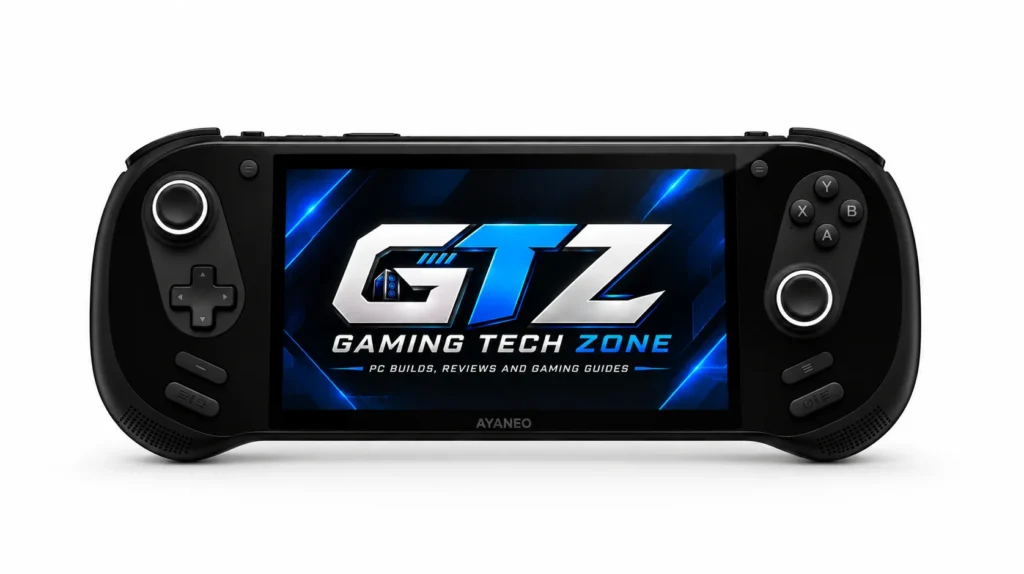
The AYANEO 3 is a 7-inch gaming handheld built around swappable controller modules. You pick a Ryzen 7 8840U or a Ryzen AI 9 HX 370 chip, an OLED or LCD screen, and up to 64GB of RAM. It runs AYANEO’s own AYASpace software on top of Windows.
When Did the AYANEO 3 Launch?
AYANEO launched the AYANEO 3 on January 24, 2025, with orders opening the same day on Indiegogo.
How Many Variants Are There of the AYANEO 3?
At launch, AYANEO sold seven hardware configurations. Each came with a choice of OLED or LCD, which makes 14 SKUs in total. The lineup spans two chips, 16GB to 64GB of RAM and 512GB to 4TB of storage.
How the Lineup Breaks Down:
- Ryzen 7 8840U: 16GB/512GB, 32GB/1TB and 64GB/2TB (Retro Power, with Magic Modules).
- Ryzen AI 9 HX 370: 32GB/1TB, 64GB/2TB, 64GB/2TB Retro Power and 64GB/4TB Retro Power.
- Screens: A 7-inch 1080p OLED or LCD. The panel choice did not change the price at launch.
Consider: When I checked on October 10, 2026, AYANEO’s own shop listed every Ryzen 7 8840U configuration as sold out. Confirm stock before you plan a purchase.
Specifications of the AYANEO 3
| Spec | Details |
|---|---|
| Display | 7-inch 1920×1080 touchscreen. OLED up to 144Hz, or LCD up to 120Hz |
| Processor | Ryzen AI 9 HX 370 (12 cores, up to 5.1GHz) or Ryzen 7 8840U (8 cores, up to 5.1GHz) |
| Graphics | Radeon 890M (16 cores, up to 2,900MHz) or Radeon 780M (12 cores, up to 2,700MHz) |
| Memory | 16GB, 32GB or 64GB LPDDR5X-7500 |
| Storage | 512GB to 4TB M.2 2280 NVMe (PCIe 4.0), plus microSD |
| Battery and charging | 49Wh battery, 65W USB-C Power Delivery, battery bypass |
| Ports | 2x USB4 (40Gbps), 1x OCuLink (64Gbps), microSD, 3.5mm jack |
| Wireless | Bluetooth 5.3 |
| Controls | Hall effect sticks, swappable Magic Modules, dual six-axis gyros, adjustable trigger travel |
| Audio | Dual front-facing HyperSound 2.0 speakers |
| Size and weight | About 289.8 x 115 x 22.4mm, roughly 690g |
| Software | Windows 11 with AYASpace |
| Colors | Starry Black, Sky White, Retro Power |
Compiled from AYANEO’s listings, PCGamesN.
Features of the AYANEO 3 Gaming Handheld PC
The AYANEO 3 stands out for its OLED screen, motorized Magic Modules and loud, clear speakers. These features justify its premium positioning, so they matter more than the spec sheet.
1. Design and Build Quality
The AYANEO 3 is a comfortable, premium handheld shaped like a controller. At about 690g, it feels balanced rather than heavy. The Starry Black finish collects fingerprints fast.
What Stands Out:
- Two pronounced rear grip humps sit in the hand
- Hall effect sticks lower the risk of stick drift.
- Sky White and Retro Power reportedly hide smudges better than Starry Black.
- Time Extension found it bulkier than a Steam Deck.
- Your hands get tired after long gaming sessions.
2. Display
The 7-inch 1080p OLED is the best part of the AYANEO 3. It runs up to 144Hz, supports HDR and delivers deep blacks. The LCD version tops out at 120Hz but adds VRR.
- Best For: dark, cinematic games like Cyberpunk 2077.
- Tip: Windows ships scaled to 175%, and PCGamesN found 125% a better fit.
3. Magic Controls
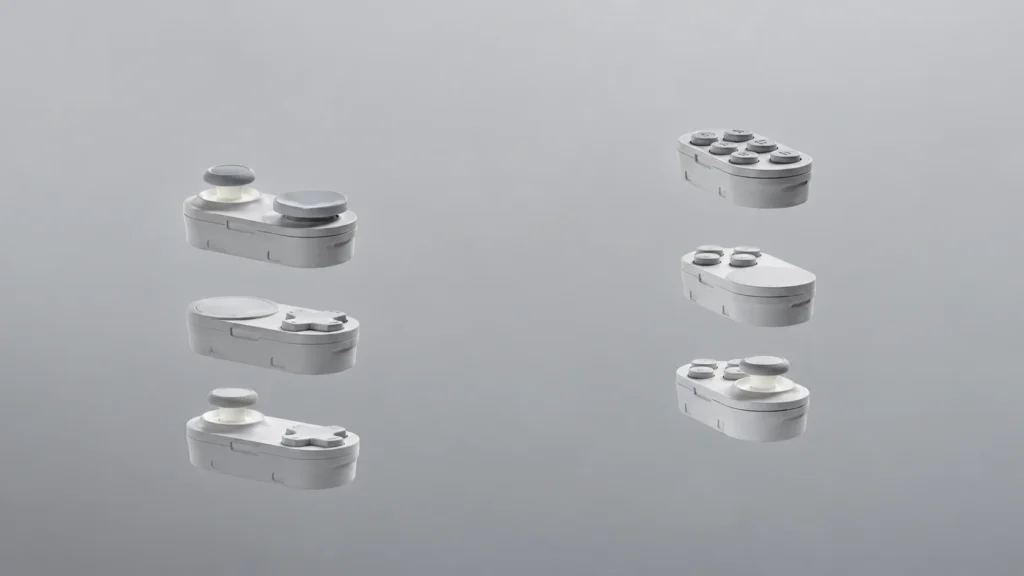
Magic modules are what set the AYANEO 3 apart. Press a button on the bottom edge, and motors pop out the left and right control module.
What You Can Do:
- Swap sticks for Steam Deck-style trackpads or a disc D-pad.
- Rotate most modules 180 degrees to flip the layout.
- Add a six-button module for fighting games like Street Fighter 6.
4. Full Windows 11 Support
Windows 11 opens the AYANEO 3 to Steam, Epic Games Store, Xbox Game Pass and emulators. It also puts a desktop operating system on a gamepad, which takes some patience.
5. Excellent Speaker Quality
The front-facing HyperSound 2.0 speakers are loud and clear. PCGamesN measured an 86.5dB peak at 30cm, against 76.1dB from the MSI Claw 8 AI+ in the same game.
Suitable For: Playing without headphones.
Gaming Performance Benchmarks
The AYANEO 3 delivers 60 to 80 FPS in demanding games at 35W when you use upscaling and frame generation. These results come from the Ryzen AI 9 HX 370 model with 32GB of RAM.
| Game | AYANEO 3 | Power | Test settings |
|---|---|---|---|
| Black Myth: Wukong | 60 FPS | 35W | 900p, frame generation |
| Cyberpunk 2077 | 80 FPS | 35W | 1080p, FSR Balanced, frame generation |
| Hogwarts Legacy | 80 FPS | 35W | 1080p |
Note:
- 35W Needs the Charger: 30W is the highest limit on battery.
- Frame Generation Adds Latency: It lifts FPS counts, so test it before using it in competitive shooters.
What Is the Price of the AYANEO 3?
| Version | Price | Status (Current) |
|---|---|---|
| Ryzen 7 8840U, 16GB / 512GB (LCD or OLED) | $899 | Sold out |
| Ryzen 7 8840U, 32GB / 1TB (LCD or OLED) | $1,099 | Sold out |
| Ryzen AI 9 HX 370, 32GB / 1TB (the benchmarked model) | From $1,499 | Sold out |
| Ryzen 7 8840U, 64GB / 2TB Retro Power, with Magic Modules | $1,399 at launch | Unavailable |
Check stock and warranty terms before buying from any third-party seller.
The Biggest Drawbacks of the AYANEO 3
The AYANEO 3’s biggest drawback is battery life. Its 49Wh battery runs down in under an hour at high power, and in my opinion it is worse than a Steam Deck. The other weak spots are Windows 11 with a controller and loud fans under heavy gaming.
Battery Numbers to Expect:
- About 40 minutes in Cyberpunk 2077 at 30W
- 57 minutes in a Cinebench loop at 28W
- Around three hours in a lighter game at 18W (PCGamesN).
- For comparison, ASUS rates the ROG Ally X’s 80Wh battery at over 2.7 hours of heavy AAA gaming.
Other Problems:
- Windows With a Controller: The AYASpace menu can load slowly, and some games won’t stretch lower resolutions to fill the screen.
- Fan Noise: The fans get extremely loud at full speed. Reviewers recorded 68dB in a stress test.
Tip: Turn on battery bypass when docked or running near 35W, so the battery isn’t drained while plugged in.
My Insights on the AYANEO 3
| What I Like | What I Dislike |
|---|---|
| OLED display up to 144Hz | Battery drains in under an hour at high power |
| Swappable Magic Modules | High price, with modules extra on most versions |
| Strong performance at 35W | Windows 11 is awkward with controls |
| Loud, clear speakers | Fans get loud under load |
| Full PC game library |
AYANEO 3 vs Competitors
The AYANEO 3 wins on raw performance, screen quality and customization. The ROG Ally X beats it on battery life and price, and the Steam Deck wins on simplicity.
| Specs | AYANEO 3 | ROG Ally X | Steam Deck OLED |
|---|---|---|---|
| Chip | Ryzen AI 9 HX 370 or Ryzen 7 8840U | Ryzen Z1 Extreme | Custom Zen 2 APU |
| Display | 7-inch 1080p, OLED 144Hz or LCD 120Hz | 7-inch 1080p LCD, 120Hz | 7.4-inch 800p OLED, up to 90Hz |
| RAM | 16GB to 64GB | 24GB | 16GB |
| Battery | 49Wh | 80Wh | 50Wh |
| Power limit | 35W (tested) | 25W, or 30W plugged in | 4W to 15W |
| OS | Windows 11 | Windows 11 | SteamOS 3 |
| Price | $899 to $1,499 (sold out) | $799 at launch | $789 for 512GB |
Specs from AMD, ASUS and Valve.
Asus ROG Ally X
The AYANEO 3 is faster and has the better screen, but the ROG Ally X lasts longer and costs less. Its 80Wh battery is far bigger than the AYANEO’s 49Wh.
| Game | Avg FPS | Test settings |
|---|---|---|
| 007 First Light | ~40 | 17W Performance mode, FSR on |
| Black Myth: Wukong | ~60 | 720p, FSR 3 with frame generation, 30W |
| Cyberpunk 2077 | ~65 | 1080p, FSR 3, 30W |
| Forza Horizon 6 | ~60 | 1080p, FSR 3 Balanced, 30W |
On the Two Shared Games:
- Black Myth: Wukong: Both land near 60 FPS, but the AYANEO 3 renders 900p at 35W while the Ally X runs 720p at 30W.
- Cyberpunk 2077: About 80 FPS on the AYANEO 3 against about 65 FPS on the Ally X, with different upscaling settings.
Winner: AYANEO 3 for performance and display.
Steam Deck
The AYANEO 3 is far more powerful, but the Steam Deck is simpler and cheaper. Valve’s OLED model uses a 4W to 15W APU, and its 512GB version costs $789 after the May 2026 price increase.
| Game | Approx. FPS |
|---|---|
| God of War Ragnarok | ~35 |
| Resident Evil 4 | ~38 |
| Ghost of Tsushima | ~40 |
| The Last of Us Part II | ~35 |
| Helldivers 2 | ~40 |
Winner: AYANEO 3 for power and display. The Steam Deck wins on price and ease of use because SteamOS needs far less tinkering than Windows.
Who Should Buy the AYANEO 3?
Buy it if:
- You want a 1080p OLED screen and 60+ FPS in AAA games.
- You play fighting games or racers and want custom controls.
- You play near a charger or stick to lighter games at lower power.
- You want Steam, Epic Games Store and Xbox Game Pass in one place.
Skip it if:
- You want a handheld that lasts a full evening on AAA games.
- You prefer console-style simplicity, which SteamOS does better.
Mistakes to Avoid:
- Forgetting that the module pack costs extra on most versions.
- Skipping battery bypass while docked.
- Buying from a seller with no clear warranty, since AYANEO’s own store is sold out.
My Final Assessment
The AYANEO 3 is an excellent handheld. It delivers some of the best gaming performance you can get at this size, and the Magic Modules give you control options few handhelds can match.
Battery life and price are the big problems, and they’re why many people won’t recommend it. That’s fair, but the decision is yours, because the money comes out of your own pocket.
