

A gaming laptop gets confusing when every flagship CPU sounds the same. I went through Intel’s spec sheet and independent laptop reviews to see what the Core Ultra 9 285HX really delivers.
It is Intel’s top laptop chip, and you will find it inside machines like the MSI Raider 18 HX AI.
In this review, I cover specs, benchmark scores, gaming FPS and a head-to-head with the 275HX. You will leave knowing whether this 24-core processor suits your games, workload and budget.
My Quick Overview
The Intel Core Ultra 9 285HX is a great gaming processor and a very fast all-round performer. Laptops like the MSI Raider 18 HX AI pair it with an RTX 5080 and reach strong 1080p frame rates in heavy games. The main problem is heat, fan noise and price.
What Is the Intel Core Ultra 9 285HX?
The Core Ultra 9 285HX is Intel’s flagship HX-series processor for laptops, built on the Arrow Lake design. It targets large gaming laptops and workstation-style machines.
When Did the 285HX Launch?
Intel introduced the Core Ultra 200HX family, including the 285HX, at CES in January 2025.
What Is It Mainly Made For?
The 285HX is a mobile processor made for laptops and, in some cases, compact mini PCs. It cannot be used in a full desktop PC. It uses a BGA package (FCBGA2114) attached by the manufacturer, unlike the socketed LGA1851 desktop Core Ultra 9 285K.
What that means for you
- It is not a drop-in upgrade for a desktop motherboard.
- You cannot swap it later, so choose the laptop carefully.
- Performance depends heavily on the laptop’s cooling and power limits.
Specifications of the Intel Core Ultra 9 285HX
These specs are derived from Intel’s official product page.
| Specification | Intel Core Ultra 9 285HX |
|---|---|
| Collection / codename | Core Ultra (Series 2) / Arrow Lake |
| Segment | Mobile |
| Launch | Q1 2025 |
| Cores | 24 (8 P-cores + 16 E-cores) |
| Threads | 24 (no Hyper-Threading) |
| P-core clock | 2.8 GHz base, up to 5.5 GHz |
| E-core clock | 2.1 GHz base, up to 4.6 GHz |
| Cache | 36 MB Intel Smart Cache (L3) + 40 MB L2 |
| Base power | 55 W |
| Maximum turbo power | 160 W |
| Minimum assured power | 45 W |
| Process | TSMC N3B (compute tile) |
| Memory | Up to DDR5-6400, 2 channels, ECC supported |
| Maximum memory | 256 GB (Intel) |
| Integrated graphics | Intel Graphics, 4 Xe-cores, 300 MHz to 2 GHz |
| NPU | Intel AI Boost, 13 TOPS (36 TOPS combined peak) |
| Expansion | PCIe 5.0 and 4.0, up to 24 lanes; Thunderbolt 4 |
| Max operating temperature | 105 °C |
| Package | FCBGA2114, 37.5 x 30.2 mm |
Key Features of The 285HX
Below are the features of the 285HX including its architecture, clock speeds, graphics, memory, support, TDP and threads.
1. Architecture
The 285HX uses Intel’s Arrow Lake design with Lion Cove performance cores and Skymont efficiency cores. TweakTown notes that it shares its silicon with the desktop 285K, differing mainly in clocks and power.
2. Clock Speed
Performance cores run from 2.8 GHz base up to 5.5 GHz. Efficiency cores run from 2.1 GHz base up to 4.6 GHz. Those are maximums, so your laptop’s cooling decides how long it holds them.
3. Graphics
The 285HX includes Intel Graphics with 4 Xe-cores. It helps in handling desktop work, video playback and AV1 encoding. The laptops dedicated GPU run the games, such as the RTX 5080 in the Raider 18 HX AI.
What The Integrated Graphics Support?
- Hardware encode and decode for AV1, HEVC and H.264, plus Quick Sync Video.
- Intel says Arc branding depends on the laptop maker’s configuration, including at least 16 GB of dual-channel memory.
4. Memory and Support
The 285HX supports dual-channel DDR5 up to 6,400 MT/s with ECC support. Intel lists a 256 GB maximum. It also offers PCIe 5.0 and 4.0 (up to 24 lanes) and Thunderbolt 4.
Check before you buy:
- Confirm the laptop’s real RAM speed. One Raider 18 HX AI listing tracked by PassMark shows DDR5-5600, below the chip’s 6,400 limit.
- Make sure the RAM runs in dual-channel mode.
- The NPU delivers 13 TOPS, and Intel counts 36 TOPS across CPU, GPU and NPU combined.
5. TDP
Intel lists 55 W base power, 45 W minimum assured power and 160 W maximum turbo power. Laptop makers set their own limits. Reviewers saw a brief spike above 200 W in the MSI Titan 18 HX AI before power settled at 160 W.
Heat and Noise
- Maximum operating temperature is 105°C.
- Titan 18 HX AI held about 100°C long-term, with fans running at high RPM under heavy load.
6. Core Count & Threads
The 285HX has 24 cores and threads, which are divided as eight performance cores and sixteen efficiency cores. The cache is 36 MB shared with L3 Plus and 40 MB L2, and there is no hyper-threading.
How Do the Cores Split the Work?
- P-cores handle games and single-thread tasks. PassMark rates single-thread speed at 4,599.
- E-cores add muscle to rendering, encoding and background tasks.
Benchmarks of the Ultra 9 285HX
Below are the performance and compression tests of the 285 HX.
1. Blender Performance
In Blender testing, the 285HX finished only 12 seconds behind the desktop Core Ultra 9 285K. The test ran for more than six and a half minutes and scored 387 points where the 285K scored 399, which is a very strong result for a laptop chip.
Test setup:
- Laptop: MSI Titan 18 HX AI with an RTX 5090 and 64 GB of DDR5-6400.
- Best For: 3D artists who render on the CPU while traveling.
Important Note: Expect loud fans on long renders.
2. 3DMark
3DMark CPU Profile gives the 285HX a median score of 17,476, ranking it 11th on UL’s chart. It is almost equal to the newer 290HX Plus in terms of power and is just behind AMD’s Ryzen 9 9950X3D desktop chip.
| Processor | 3DMark CPU Profile (max threads) |
|---|---|
| Ryzen 9 9950X3D (desktop) | 17,697 |
| Core Ultra 9 290HX Plus | 17,480 |
| Core Ultra 9 285HX | 17,476 |
| Ryzen 9 9950X (desktop) | 17,402 |
| Core Ultra 9 285 (desktop) | 16,925 |
3. 7-Zip Compression
Individual reviews show the 285HX reaching 128,778 MIPS in 7-Zip multi-thread and 6,822 MIPS single-thread at best. The average sits around 110,000 to 114,000 MIPS multi-thread and roughly 6,700 single-thread.
Takeaway
- TweakTown says 7-Zip scales with thread count and reacts to memory speed and latency.
- Faster, properly configured RAM can lift your own results.
4. PassMark and Everyday Productivity
PassMark gives the 285HX a CPU Mark of 56,426 from 897 samples. That ranks it 6th among 1,652 laptop CPUs in its database.
| Processor | PassMark CPU Mark |
|---|---|
| Ryzen 9 9955HX3D | 62,157 |
| Core Ultra 9 290HX Plus | 58,538 |
| Core Ultra 9 285HX | 56,426 |
| Ryzen 9 9955HX | 56,254 |
| Core Ultra 9 275HX | 55,700 |
| Ryzen 9 8940HX | 49,483 |
| Core Ultra 7 255HX | 47,943 |
Gaming Benchmarks of The 285 HX
The 285HX handles modern games well when paired with a strong GPU. These results come from the MSI Raider 18 HX AI at 1080p. The RTX 5080 does most of the work, so treat the numbers as a guide, not a promise.
| Game | Test setting | FPS |
|---|---|---|
| Assassin’s Creed Mirage | 1080p | 153 FPS |
| Far Cry 6 | 1080p | 118 FPS |
| Shadow of the Tomb Raider | 1080p | 183 FPS |
| Monster Hunter Wilds | 1080p | 81 FPS |
| Black Myth: Wukong | Cinematic, 1080p | 79 FPS |
| Cyberpunk 2077 | 1080p | 64 FPS |
| Red Dead Redemption 2 | Ultra, 1080p | 59 FPS |
Note: These numbers come from a specific RTX 5080 and Ultra 9 285HX review configuration, so they should not be treated as guaranteed results for every Raider 18 HX AI SKU.
Intel Core Ultra 9 275HX vs Ultra 9 285HX
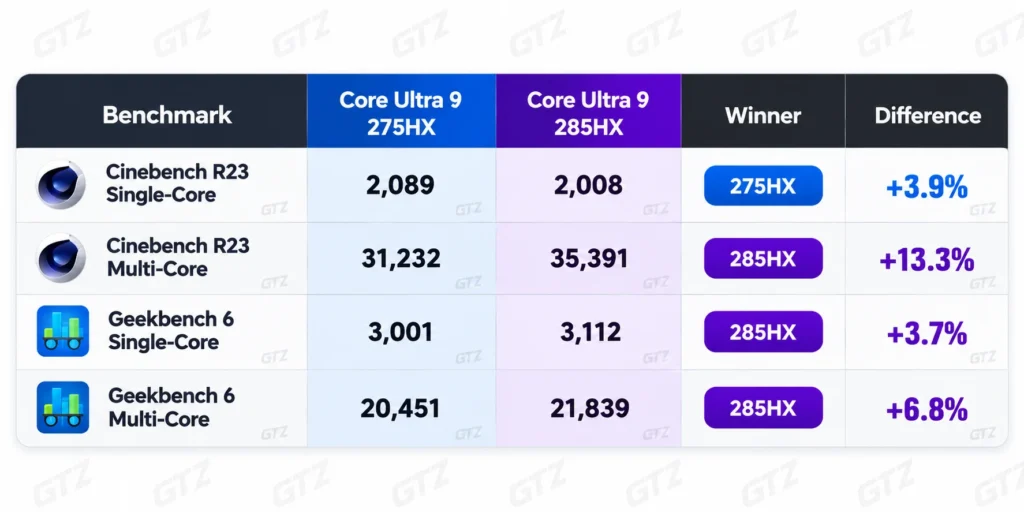
What They Share:
- Intel Graphics with 4 Xe-cores and a 300 MHz base clock.
- DDR5-6400 memory support.
- 24 cores and 24 threads, with P-core boost of 5.4 GHz (275HX) versus 5.5 GHz (285HX).
- A 192 GB maximum memory figure in the comparison data. Intel’s own page now lists 256 GB for the 285HX.
My take: The winner between them is the 285HX. Still, these scores come from different laptops, so cooling affects them. That probably explains the single-core flip. It averages only a 1.3% gap (55,700 vs 56,426), so a cheaper 275HX laptop can be the smarter buy.
Who Should Choose This CPU?
Buy It:
- Gamers chasing RTX 5080-class laptops: This CPU is best for someone who wants 150-plus FPS in games without owning a desktop.
- Creators who render and encode: A video editor who games at night and exports client projects by day benefits from 24 cores.
- Power users who compress and multitask: The 7-Zip and PassMark numbers show real headroom.
Skip It:
- Buyers who carry their laptop daily: TweakTown says a laptop like the Titan 18 is not something to carry for long.
- Budget buyers: PassMark’s tracked Amazon listings on October 5, 2026 showed Raider 18 configs with an RTX 5080 at $3,499 to $3,799. Prices change.
- Anyone who can build a desktop: TweakTown notes desktops are more powerful, more upgradeable and may be cheaper.
- Light esports players: In my view, a cheaper chip serves them equally well.
Pros and Cons of The 285 HX
| What I Like | What I Dislike |
|---|---|
| 24 cores with up to 5.5 GHz boost | No Hyper-Threading |
| Blender result close to the desktop 285K | Fan noise and heat under load |
| 3DMark CPU score near the Ryzen 9 9950X | Early throttling in short tests |
| DDR5-6400, PCIe 5.0, Thunderbolt 4 | Laptops with it are expensive |
| Strong 1080p gaming with an RTX 5080 | Ranks below the 9955HX3D in PassMark gaming |
Buying Guide: What to Check Before You Pay?
- GPU First: Frame rates depend mostly on the graphics card.
- Cooling and Power Limits: Look for reviews that show sustained wattage.
- RAM Speed and Channels: Confirm dual-channel DDR5 at the speed you expect.
- Display Resolution: Higher resolution shifts the load to the GPU.
- Alternatives: Compare 275HX and 290HX Plus laptops on price.
My Final Answer
The Core Ultra 9 285HX wins its flagship label, handling heavy games, Blender renders and big archives, and it stays within close distance to the desktop 285K in several tests.
In my view, the best 285HX laptop is the one with the best cooling and RAM, not the longest spec sheet. You should skip it if you carry your laptop daily or care about price per frame. A 275HX model could save real money for about a 1% gap in PassMark.
Before you buy, check sustained power limits, RAM speed and whether a 290HX Plus model fits your budget. Tell me your budget and favorite games in the comments, and I will help you narrow the choice.
