

If you have $800 to spend on a gaming PC in 2026, I wouldn’t immediately tell you to spend every dollar. You can build a capable 1080p system at this price, but whether $800 is actually enough depends on how long you want to keep the PC and what games you plan to play.
In this guide, I’ll show you what $800 can realistically get you, compare the best prebuilt and DIY options, and explain where the compromises start to matter. I’ll also give you my honest take on whether I’d spend $800 today, or save more for a system with a better platform and longer upgrade path.
What to Expect From a Gaming PC Under $800?
Before we get into specific picks, let’s set realistic expectations. This price range doesn’t get you a 4K beast — but it absolutely gets you a machine that handles 1080p gaming at high settings in virtually every modern title.
Here’s a realistic performance baseline for 2026 builds at this price:
- Esports titles (Valorant, CS2, Fortnite, Apex): 144–300+ FPS at 1080p
- AAA games (Cyberpunk 2077, The Witcher 4): 60–100 FPS at 1080p high settings
- 1440p gaming: Possible at medium-to-high settings with the right GPU
- VR gaming: Achievable — builds with an RTX 5060 meet the requirements for the Meta Quest 3S and Valve Index
The GPU remains the single most important component. An RTX 5060 or RX 9060 XT paired with a solid 6-core CPU and 16GB DDR4/DDR5 RAM is the sweet spot for this budget in 2026.
Best Prebuilt Gaming PCs Under $800 (2026)
These are the 3 best gaming PCs on the market under $800.
1. iBUYPOWER Trace 9
The iBUYPOWER Trace 9 is arguably the strongest prebuilt you can find near the $800 mark right now. It comes equipped with an RTX 5060, 16GB DDR5 RAM, and a 1TB NVMe SSD inside a tempered glass mid-tower with decent cable management — rare at this price.

Specs at a glance:
- GPU: NVIDIA RTX 5060 8GB
- CPU: Intel Core i5 (14th Gen)
- RAM: 16GB DDR5
- Storage: 1TB NVMe SSD
- Case: Tempered glass mid-tower with RGB
Pros:
- RTX 5060 handles 1080p and 1440p gaming with ease
- DLSS 4 support gives you a major FPS boost in supported titles
- Easy to upgrade RAM and storage later
- Better-than-average build quality for a prebuilt
Cons:
- PSU quality isn’t always disclosed — verify before upgrading the GPU later
- Ships with a basic cooler; consider an aftermarket swap under heavy loads
- Stock can be inconsistent; prices shift week to week
Best for: Gamers who want to plug in and play without touching a screwdriver.
2. CyberPowerPC Gamer Xtreme VR
CyberPowerPC has earned its reputation as a reliable budget builder, and the Gamer Xtreme VR keeps that streak alive. This AMD-based system pairs a Ryzen 5 processor with either an RX 9060 XT or an RTX 5060 depending on current stock, giving you excellent 1080p performance at a competitive price.

Specs at a glance:
- GPU: AMD RX 9060 XT 8GB (or RTX 5060 depending on variant)
- CPU: AMD Ryzen 5 (7000 series)
- RAM: 16GB DDR5
- Storage: 1TB NVMe SSD
Pros:
- Solid CPU + GPU combo for the price
- AMD’s FSR 3.1 upscaling works across more games than DLSS
- Reputable brand with actual customer support
- Good 1080p performance in tested AAA titles
Cons:
- VR branding is marketing — performance is entry-level VR at best
- Some units ship with single-channel RAM (check before buying)
- Case airflow can be average; monitor temps on heavy sessions
Best for: AMD loyalists and anyone who wants brand-name reliability without overpaying.
3. HP Pavilion Gaming TG01
If you’d rather have HP’s warranty network and customer service over a boutique builder, the Pavilion Gaming TG01 delivers decent specs with the peace of mind of a major brand. The smaller SSD (typically 512GB) is a drawback, but adding a second drive is a cheap fix.

Pros:
- HP’s nationwide support network is a genuine advantage
- Clean, professional build quality
- Easy to add storage or RAM later
Cons:
- Smaller base SSD than competitors
- GPU tier may lag slightly behind boutique builders at the same price
- Less customization flexibility
Best for: Buyers who prioritize warranty support and post-purchase help over raw specs.
Best Example DIY Build for Gaming PC Under $800
If you’re willing to spend a weekend on YouTube and assemble the parts yourself, a custom build almost always beats a prebuilt dollar-for-dollar. Here’s a parts list that delivers real performance for under $800:
| Component | Part | Approx. Cost |
|---|---|---|
| CPU | AMD Ryzen 5 5600 | ~$100 |
| GPU | Gigabyte RTX 5060 8GB | ~$300 |
| RAM | G.SKILL Ripjaws V 16GB DDR4 3600MHz | ~$45 |
| Storage | KLEVV 1TB NVMe Gen 4 SSD | ~$70 |
| Motherboard | B550 or B450 AM4 board | ~$80 |
| Case | Okinos Cypress 5 ATX | ~$65 |
| PSU | Thermaltake 750W 80+ Gold | ~$80 |
| Total | ~$740 |
What you get: Max settings at 1080p in virtually every game, 100+ FPS in demanding AAA titles, DLSS 4 support, and room in the budget for a 144Hz monitor.
One honest caveat: Assembly takes 3–5 hours for a first-timer. If you’ve never built before, follow a step-by-step guide for your specific motherboard. It’s very doable — just don’t rush it.
Which One Should You Choose Between Prebuilt and DIY?
| Factor | Prebuilt | DIY Build |
|---|---|---|
| Convenience | ✅ Plug and play | ❌ Requires assembly |
| Value for money | ⚠️ Slightly lower | ✅ Better specs per dollar |
| Warranty | ✅ Single unit warranty | ⚠️ Per-component warranties |
| Upgradeability | ⚠️ Depends on PSU/case | ✅ Fully flexible |
| Risk | ✅ Lower | ⚠️ Small chance of DOA parts |
| Best for | Beginners, busy buyers | Enthusiasts, value hunters |
One thing worth knowing: a $750 prebuilt with an RTX 5060 can look like a steal until you dig deeper and find a 450W Bronze PSU that won’t safely handle a GPU upgrade, or 16GB of RAM running in single-channel mode because they installed two slots worth of 8GB sticks incorrectly. Always check the fine print before buying.
What Key Specs to Look in Gaming PC under $800?
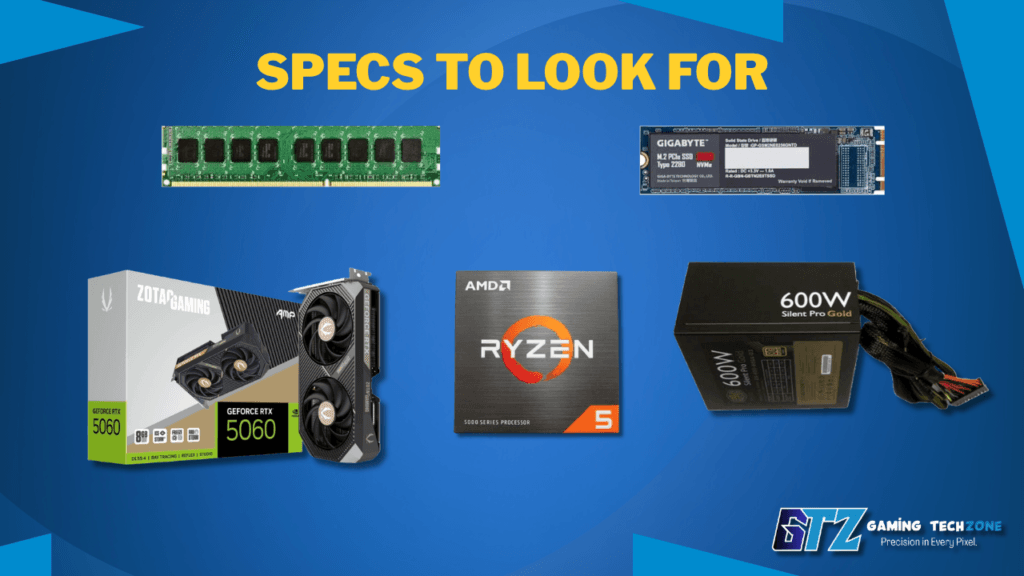
Don’t get distracted by RGB lighting and case aesthetics. These are the numbers that actually matter:
- GPU (most important): RTX 5060 or RX 9060 XT minimum. Older GPUs like the RTX 3060 or RX 6700 XT are still viable but represent a previous generation.
- CPU: Any 6-core processor from AMD Ryzen 5 (5000/7000 series) or Intel Core i5 (12th–14th Gen). More cores help with streaming and multitasking.
- RAM: 16GB is the sweet spot for gaming in 2026. Make sure it’s running in dual-channel mode (two sticks, not one).
- Storage: A 1TB NVMe SSD is the baseline. Avoid systems that ship with HDDs as the primary drive — load times will frustrate you.
- PSU: At least 600W, 80+ Gold rated. This is the most overlooked component in prebuilts and the one most likely to cause problems later.
Quick Comparison Table
| System | GPU | RAM | Storage | Best For | ~Price |
|---|---|---|---|---|---|
| iBUYPOWER Trace 9 | RTX 5060 | 16GB DDR5 | 1TB NVMe | Best overall prebuilt | ~$780 |
| CyberPowerPC Gamer Xtreme VR | RX 9060 XT | 16GB DDR5 | 1TB NVMe | AMD users | ~$760 |
| HP Pavilion TG01 | RTX 5060 | 16GB DDR5 | 512GB NVMe | Brand support | ~$750 |
| DIY Ryzen 5 5600 + RTX 5060 | RTX 5060 | 16GB DDR4 | 1TB NVMe | Best value | ~$740 |
Is $800 Enough for a Gaming PC? My Recommendation
I think $800 is a good starting budget, but I wouldn’t call it enough for a truly future-proof gaming PC in 2026. You can build a capable 1080p system at this price, but getting there often means making compromises on the platform, components, or upgrade path.
- For light gaming: $800 is more than enough. If you mainly play esports, indie games, or older titles, you can get a very enjoyable system without spending more.
- For a short-term PC: If you only plan to use the PC for around a year, $800 can be a sensible budget. You don’t need to pay a premium for hardware you’ll replace relatively soon.
- For serious AAA gaming: I’d want to spend more. An $800 build can handle 1080p gaming, but you may need to compromise on settings as newer games become more demanding.
- For future-proofing: This is where I have concerns. To stay under $800, you may end up relying on older or aftermarket components, which can limit the system’s upgrade path.
- Compared with $500–$600: I’d definitely choose $800. The extra $200–$300 gives you much more room for a better GPU, CPU, RAM, and storage.
- For a long-term build: If you’re expecting the PC to remain strong for several years, I’d save more rather than forcing everything into an $800 budget.
Gamers Often Ask About $800 Gaming PC
$800 is a solid budget for 1080p gaming in 2026. You can expect smooth performance in modern AAA titles at high settings, and esports titles will run well above 144 FPS. It’s not a 4K or ultra-high-refresh-rate machine, but it’s more than capable for most gamers.
If you want convenience and warranty simplicity, go prebuilt. If you want the best performance for your money and don’t mind spending a few hours on assembly, a DIY build will stretch your $800 further — typically giving you better components and easier upgrades down the line.
In 2026, the RTX 5060 (8GB) or AMD RX 9060 XT (8GB) are the recommended GPUs at this price point. Both support modern upscaling (DLSS 4 and FSR 3.1 respectively) and deliver smooth 1080p performance in demanding titles.
Realistically, an $800 gaming PC built or purchased in 2026 should remain capable at 1080p for 3–4 years. The CPU and motherboard platform typically outlast the GPU. Swapping the graphics card after 3 years is the most cost-effective upgrade path.
Yes — 16GB is the recommended minimum for gaming in 2026. Most games use 8–12GB under load, and 16GB gives you headroom for background apps and browser tabs. Make sure it’s running in dual-channel mode (two sticks of 8GB) for the best performance.
So Should You Buy a Gaming PC Under $800?
After looking at the current options, I think $800 is a good starting point for a gaming PC, but I wouldn’t consider it an ideal long-term budget in 2026. It can get you a capable 1080p gaming machine, but staying under this limit often means making compromises that can affect how well the system ages.
For me, the biggest question is how long you plan to keep the PC.
If you’re a budget buyer, $800 is much better than $500 or $600, and it can deliver a genuinely enjoyable gaming experience. But if your goal is to build one PC and keep it competitive for several years, I’d save more and increase the budget rather than compromising too heavily on the platform and components.
Ready to buy? Explore our Best Gaming PCs for Every Budget guide to find the right gaming PC without overspending
