

When you’re building a gaming PC with a powerful processor, choosing the right CPU cooler can be challenging. You may want
- Low temperatures
- Reliable performance
- Attractive lighting
You can get all this without spending money on features you don’t need. The MSI MAG CoreLiquid M360 aims to deliver that balance with a 360mm radiator, three ARGB fans, and a 3,100 RPM pump.
Unlike premium liquid coolers with LCD displays, the M360 focuses on essential cooling hardware and customizable lighting. But how well do its specifications translate into everyday performance, and is it a sensible choice for your next PC build?
Let’s examine its cooling design, noise, CPU compatibility, installation requirements, and overall value.
What is MSI MAG CoreLiquid M360?
The MSI MAG CoreLiquid M360 is a closed-loop liquid CPU cooler designed for gaming PCs and other systems that need substantial processor cooling.
It combines:
- An aluminum 360mm radiator
- Three 120mm ARGB fans
- A copper-based cold plate
- A pump rated at 3,100 RPM.
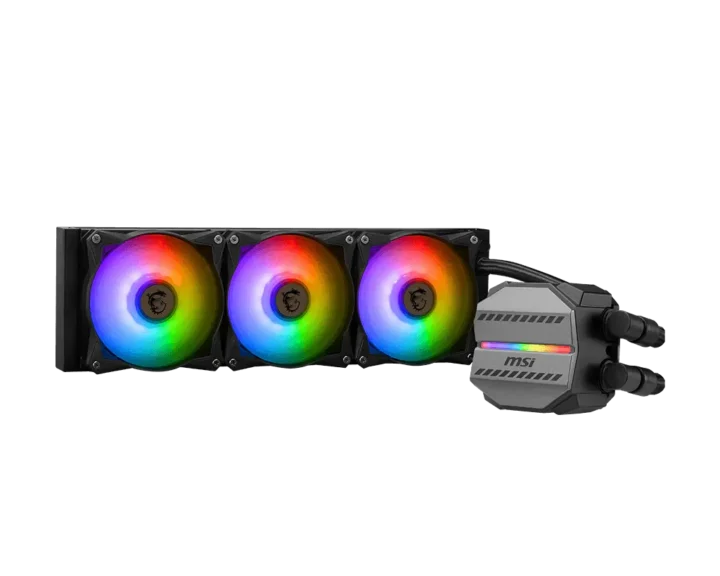
Its main attraction is the combination of a large radiator and customizable lighting. The three fans help move heat away from the radiator, while the pump circulates coolant between the CPU block and radiator.
The pump block itself has a relatively compact footprint, measuring approximately 67.26 × 59.95 × 55.9mm. MSI also uses reinforced, mesh-covered tubing designed to resist evaporation.
The cooler supports PWM fan control and works with MSI Mystic Light-compatible ARGB setups, which allows you to synchronize lighting with compatible components.
My Assessment: What I Like and What I Don’t Like?
| What I Like | What I Don’t Like |
|---|---|
| 360mm radiator | Requires a case with 360mm radiator support |
| Three ARGB fans included | No integrated LCD display |
| 3,100 RPM pump rating | Published specifications don’t establish comparative cooling performance |
| PWM fan control | Three fans can become audible at higher speeds |
| Mystic Light compatibility | Requires compatible 5V ARGB connections for lighting control |
| Supports AM4 and AM5 | Mounting hardware should be verified for older stock |
| Supports LGA1700 and LGA1851 | May be excessive for low-power CPUs |
| Reinforced mesh-covered tubing | Radiator and fan thickness can restrict case clearance |
MSI MAG CoreLiquid M360 Specifications
| Specification | Details |
|---|---|
| Cooler type | 360mm AIO liquid CPU cooler |
| Radiator material | Aluminum |
| Radiator dimensions | 397 × 120 × 27mm |
| Pump speed | 3,100 RPM ±10% |
| Pump noise rating | 20 dBA |
| Pump connector | 3-pin |
| Cold plate | Copper and plastic construction |
| Fans | 3 × 120mm |
| Fan dimensions | 120 × 120 × 25mm |
| Fan speed | Up to 2,000 RPM |
| Airflow | 21.63–78.73 CFM |
| Fan bearing | Two-ball bearing |
| Fan control | PWM |
| Fan lighting | ARGB |
| Tubing | Black rubber with mesh exterior |
| Block dimensions | 67.26 × 59.95 × 55.9mm |
| Intel socket support | LGA1150, LGA1151, LGA1155, LGA1156, LGA1200, LGA1700, LGA1851, LGA2011, LGA2011-3, LGA2066 |
| AMD socket support | AM4, AM5, TR4 |
Below are the details about the specs of the MSI MAG CoreLiquid M360. The data is taken from MSI’s official specifications and product documentation. The manufacturer’s published specifications can vary by region or product revision.
1. Cooling Performance
The MSI MAG CoreLiquid M360’s cooling potential comes from three main components:
- 360mm radiator
- Three 120mm fans
- A 3,100 RPM pump
The radiator measures 397 × 120 × 27mm and uses a 12-pathway design intended to improve heat dissipation. MSI rates the fans for airflow of up to 78.73 CFM and speeds reaching 2,000 RPM.
These specifications make the M360 a reasonable candidate for systems with demanding CPUs, provided the case has adequate airflow.
In practical terms, the M360’s 360mm radiator gives it more cooling surface area than a typical 240mm AIO. That can be useful when a processor sustains high power consumption during gaming, rendering, compiling, or other intensive workloads.
Your results will still depend on the processor, its power limits, room temperature, case airflow, thermal paste, and fan curve. If you’re using a relatively efficient CPU, a good 240mm cooler or air cooler may already provide sufficient cooling.
2. Noise Levels
Noise is another factor to consider before purchasing the M360.
MSI lists the pump noise at 20 dBA and the fans’ maximum speed at 2,000 RPM. The fans use two ball bearings, which MSI specifies with a rated lifespan of 70,000 hours.
Keep in mind that the pump’s rated noise is not the same as the noise of the entire cooler. At high fan speeds, the 3 fans can contribute considerably to the overall sound produced by the system.
For everyday gaming, you can configure a PWM fan curve through your motherboard to reduce fan speeds when the CPU is cool and increase them under heavy loads. This can help balance noise and temperature instead of running the fans at maximum speed all the time.
3. CPU Compatibility of MSI MAG CoreLiquid M360
MSI lists support for AMD AM4 and AM5 processors and a range of Intel sockets, including LGA1700 and LGA1851. It also lists older Intel platforms and AMD TR4.
The following tables give examples of processors that use the supported sockets. They are representative examples, not a claim that MSI has individually tested every listed CPU.
AMD AM4
| Processor family | Compatible CPU examples |
|---|---|
| Ryzen 3000 | Ryzen 5 3600, 3600X; Ryzen 7 3700X, 3800X; Ryzen 9 3900X, 3900XT, 3950X |
| Ryzen 5000 | Ryzen 5 5500, 5600, 5600X; Ryzen 7 5700X, 5700X3D, 5800X, 5800X3D; Ryzen 9 5900X, 5900XT, 5950X |
AMD AM5
| Processor family | Compatible CPU examples |
|---|---|
| Ryzen 7000 | Ryzen 5 7500F, 7600, 7600X; Ryzen 7 7700, 7700X, 7800X3D; Ryzen 9 7900, 7900X, 7900X3D, 7950X, 7950X3D |
| Ryzen 8000G | Ryzen 5 8500G, 8600G; Ryzen 7 8700G |
| Ryzen 9000 | Ryzen 5 9600X; Ryzen 7 9700X, 9800X3D; Ryzen 9 9900X, 9900X3D, 9950X, 9950X3D |
Intel LGA1700
The M360 supports the LGA1700 socket used by Intel’s 12th, 13th, and 14th Gen desktop Core processors.
| Processor generation | Compatible CPU examples |
|---|---|
| 12th Gen Core | Core i5-12600K, Core i7-12700K, Core i9-12900K |
| 13th Gen Core | Core i5-13600K, Core i7-13700K, Core i9-13900K |
| 14th Gen Core | Core i5-14600K, Core i7-14700K, Core i9-14900K |
Intel LGA1851
MSI’s current specification page also lists LGA1851 support, covering Intel’s Core Ultra 200S desktop platform.
Examples include:
- Intel Core Ultra 5 245K
- Intel Core Ultra 7 265K
- Intel Core Ultra 9 285K
Compatibility Note: Confirm the mounting hardware supplied with your particular M360 unit, especially if you’re purchasing older stock. Socket support does not guarantee that every individual processor has been separately tested by MSI.
4. Radiator and Case Compatibility
The M360 uses a 397 × 120 × 27mm radiator. Its three fans are each 25mm thick, and gives a combined radiator-and-fan thickness of approximately 52mm.
Before buying, check that your case supports:
- A 360mm radiator
- Approximately 397mm of radiator length
- 120mm radiator width
- Around 52mm of radiator-and-fan thickness
These measurements describe the cooler itself, not the full clearance required inside every case.
Top mounting can be restricted by RAM height, motherboard heatsinks, or the position of the CPU power connectors. Front mounting can create clearance issues with long graphics cards, particularly when the radiator and fans occupy space inside the front panel.
5. ARGB Lighting and Design
The M360 includes ARGB lighting on all three fans and the cooling block. MSI uses translucent fan blades to display the lighting, while Mystic Light compatibility allows supported lighting effects to be coordinated with other compatible components.
The cooler’s design is relatively straightforward. It doesn’t include a large LCD display or an elaborate screen-based customization system. Instead, it focuses on illuminated fans and a branded pump block.
This can appeal to builders who want an RGB gaming PC without paying for an LCD-equipped cooler. If you prefer a minimalist system, the ARGB lighting can also be configured to use a single color or switched off, subject to the connected lighting controller’s capabilities.
MSI MAG CoreLiquid M360 vs a 240mm AIO
A 360mm AIO uses three 120mm fans and a longer radiator, while a 240mm AIO generally uses two 120mm fans. The larger radiator can provide more heat-dissipation surface area, which may be helpful with processors that consume substantial power.
| Feature | MSI MAG CoreLiquid M360 | Typical 240mm AIO |
|---|---|---|
| Radiator size | 360mm | 240mm |
| Fans | 3 × 120mm | 2 × 120mm |
| Case clearance | Requires 360mm support | Usually easier to fit |
| Cooling potential | More radiator area | Depends on the specific model |
| Lighting | ARGB fans and block | Varies by model |
| Best use | High-performance builds with adequate space | Mainstream gaming and smaller builds |
The M360 is worth considering if your processor can benefit from a larger radiator and your case has enough space. If you’re building around a relatively efficient CPU, a quality 240mm cooler may be sufficient and could free up money for other components.
Is the MSI MAG CoreLiquid M360 Worth Buying?
The MSI MAG CoreLiquid M360 is worth buying, as its strongest selling points are the radiator size, included lighting, and compatibility with current mainstream AMD and Intel desktop platforms.
Who Should Buy the MSI MAG CoreLiquid M360?
The M360 may suit:
- Gaming PC builders who want a 360mm liquid cooler
- Users who prefer ARGB lighting on the fans and pump block
- Owners of compatible AM4 or AM5 systems
- Intel users with supported LGA1700 or LGA1851 motherboards
- Builders who want PWM fan control and motherboard lighting synchronization
- Users whose cases have sufficient room for a 360mm radiator
It may be less suitable for:
- Compact PC builds
- Users who don’t need a 360mm cooler
- Buyers who want an LCD screen on the pump
- People who prioritize independently verified benchmark results before purchasing
- Users whose cases have limited radiator clearance
Final Thoughts
The MSI MAG CoreLiquid M360 is one of the best 360mm AIO CPU coolers and is built around practical cooling hardware and ARGB styling rather than premium display features. Its 397mm aluminum radiator, three 120mm fans, 3,100 RPM pump, and broad socket support make it a candidate for a range of gaming and workstation builds.
Its main limitation is the lack of verified comparative testing in the sources reviewed here. Without reliable independent results, it’s difficult to recommend it over similarly priced alternatives based on cooling performance alone.
