


Building a high-performance gaming PC? Keep in mind that it requires more than a powerful processor and graphics card. Your case needs enough room for those components while providing effective airflow, cooling flexibility, and practical cable management.
The Corsair 5000D Airflow is designed around exactly those requirements. Its mesh front panel, spacious interior, RapidRoute cable management system, and support for multiple 360mm radiators make it particularly appealing for demanding builds.
It also supports large graphics cards and several motherboards such as MSI X670E. But with newer PC cases now offering more features, does the 5000D Airflow still make sense?
Let’s examine its design, cooling, compatibility, noise, price, and overall value, as I have detailed everything in this review article.
Corsair 5000D Airflow At a Glance
Here are important things to know about the Corsair 5000D Airflow:
- Airflow-Focused Design: It uses a perforated front panel designed to provide unrestricted airflow to the internal components.
- 2 Included Fans: The case comes with two CORSAIR AirGuide 120mm fans, one at the front and one at the rear.
- Large Cooling Capacity: You can install up to 10 × 120mm or 4 × 140mm fans.
- Multiple 360mm Radiator Locations: The case supports 360mm radiators at the front, side, and top, with configurations allowing two 360mm radiators simultaneously.
- Large GPU Clearance: Corsair lists maximum GPU clearance of up to 420mm.
- Broad Motherboard Support: It supports Mini-ITX, Micro-ATX, ATX, and E-ATX motherboards up to 305 × 277mm.
- RapidRoute Cable Management: A dedicated routing channel provides 25mm of cable-routing depth behind the motherboard tray.
- Vertical GPU Support: The chassis has two vertical expansion slots, although the required riser cable is sold separately.
What Is Corsair 5000D Airflow?
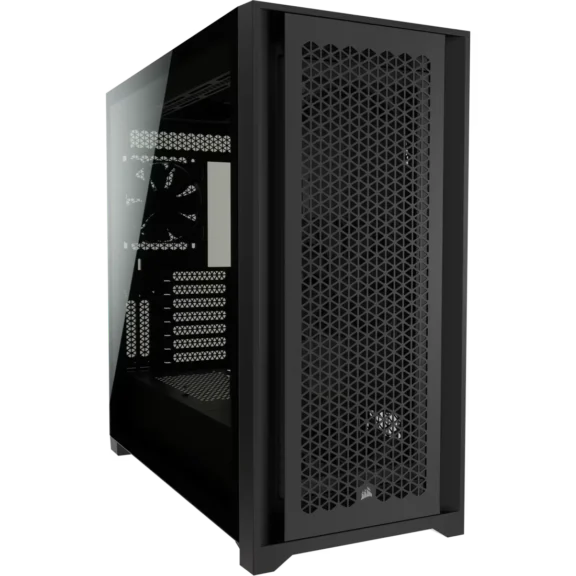
The Corsair 5000D Airflow is a spacious mid-tower PC case designed for high-airflow gaming and workstation builds. It combines a perforated front panel, tempered-glass side panel, extensive fan and radiator support, broad motherboard compatibility, and Corsair’s RapidRoute cable management system.
My Quick Assessment
My quick assessment is that the Corsair 5000D Airflow is primarily a space and cooling-flexibility-focused case rather than a compact mid-tower.
| Category | My Assessment |
|---|---|
| Airflow | Excellent |
| Cooling Flexibility | Excellent |
| GPU Support | Excellent |
| Radiator Support | Excellent |
| Included Fans | Average |
| Build Quality | Very Good |
| Cable Management | Excellent |
| Hardware Compatibility | Excellent |
| Building Experience | Excellent |
| Noise | Good |
| Value | Good |
| Overall | 8.5/10 |
Its biggest advantage is the amount of room available for large components, multiple fans, and custom liquid-cooling configurations.
Is It Good for Gaming PCs?
Yes. The Corsair 5000D Airflow is well suited to gaming PCs, particularly high-end systems that use large graphics cards and powerful CPUs.
Its front mesh panel provides a direct path for fresh air, while the large internal layout gives you considerable freedom to position additional intake and exhaust fans. The case can also accommodate up to 10 × 120mm fans, which gives builders plenty of options for optimizing airflow.
However, remember that the standard 5000D Airflow only includes two 120mm fans. If you want the best possible thermal performance, adding more fans is something to budget for.
How Much Does the Corsair 5000D Airflow Cost?
The Corsair 5000D Airflow originally launched with a $164.99 MSRP. Corsair’s current US listing shows the white model at $174.99, while availability and pricing vary by color and retailer.
Because the 5000D Airflow is an older case design, its actual selling price can be significantly different from its original MSRP.
GPU, CPU Cooler, and Radiator Compatibility of Corsair 5000D Airflow
The 5000D Airflow has generous compatibility for modern gaming hardware and is particularly attractive for large components.
What Motherboards Does It Support?
Corsair lists maximum GPU clearance of 420mm, although the exact usable space can depend on the radiator and fan configuration installed in front of the graphics card.
Motherboard compatibility includes:
- Mini-ITX
- Micro-ATX
- ATX
- E-ATX up to 305 × 277mm
This means you can install standard ATX gaming motherboards from ASUS, MSI, Gigabyte, or ASRock, as well as compatible E-ATX boards that stay within Corsair’s specified dimensions.
CPUs Compatibility
CPU compatibility is largely determined by the motherboard rather than the case itself. The 5000D Airflow can therefore accommodate modern AMD Ryzen and Intel Core processors, provided you use a compatible motherboard and CPU cooler.
This means you can build with modern processors from both AMD and Intel, including:
| CPU Family | Examples | Compatible? |
|---|---|---|
| AMD Ryzen 9000 | Ryzen 9 9950X, Ryzen 7 9700X | Yes |
| AMD Ryzen 7000 | Ryzen 9 7950X, Ryzen 7 7800X3D | Yes |
| AMD Ryzen 5000 | Ryzen 9 5950X, Ryzen 7 5800X3D | Yes |
| Intel Core Ultra | Core Ultra 9, Core Ultra 7, Core Ultra 5 desktop CPUs | Yes |
| Intel 14th Gen | Core i9-14900K, i7-14700K, i5-14600K | Yes |
| Intel 13th Gen | Core i9-13900K, i7-13700K, i5-13600K | Yes |
| Intel 12th Gen | Core i9-12900K, i7-12700K, i5-12600K | Yes |
For high-end CPUs such as the Ryzen 9 9950X or Core i9-14900K, I would recommend a 240mm or 360mm AIO rather than relying solely on an air cooler.
The 5000D Airflow supports 360mm radiators at the front and side, which makes it suitable for the best CPUs and high-performance gaming builds.
What GPUs Can You Install?
The Corsair 5000D Airflow supports graphics cards up to 420mm long, which makes it compatible with most modern GPUs, including:
- NVIDIA GeForce RTX 5090
- NVIDIA GeForce RTX 5080
- AMD Radeon RX 9070 XT models
- NVIDIA GeForce RTX 4090
However, the specific card’s dimensions remain within the available clearance. It also provides seven standard horizontal expansion slots and two vertical slots for vertical GPU installation.
Can It Fit a 360mm AIO Cooler?
Yes. The Corsair 5000D Airflow supports 360mm radiators at the front, side, and top, providing considerable flexibility for 360mm AIO CPU coolers.
The case is particularly interesting for custom liquid-cooling builds because Corsair also describes configurations involving multiple 360mm radiators.
However, radiator placement can affect available GPU clearance and internal airflow, so you should check the specific combination of GPU, radiator, and fans before building.
How Are CPU and GPU Temperatures?
The 5000D Airflow can provide strong CPU and GPU cooling when properly configured, due to its mesh front panel and large number of fan mounting positions.
Independent testing has shown competitive thermal performance, with published testing reporting approximately 41–42°C CPU delta temperatures in one comparison and around 41°C GPU delta under its test conditions.
For the best results, use front or side intake fans to bring cool air into the case and rear/top fans to exhaust heated air.
Corsair 5000D Airflow Specifications
| Specification | Corsair 5000D Airflow |
|---|---|
| Case Type | Mid-Tower |
| Dimensions | 520 × 245 × 520mm |
| Material | Steel, Tempered Glass, Plastic |
| Motherboard Support | Mini-ITX, Micro-ATX, ATX, E-ATX |
| Maximum E-ATX Size | 305 × 277mm |
| Included Fans | 2 × 120mm CORSAIR AirGuide |
| Maximum Fans | Up to 10 × 120mm or 4 × 140mm |
| Front Fan Support | 3 × 120mm / 2 × 140mm |
| Top Fan Support | 3 × 120mm / 2 × 140mm |
| Side Fan Support | 3 × 120mm / 2 × 140mm |
| Rear Fan Support | 1 × 120mm |
| Front Radiator | Up to 360mm |
| Side Radiator | Up to 360mm |
| Rear Radiator | Up to 120mm |
| Top Radiator | Up to 360mm |
| Maximum GPU Length | 420mm |
| Maximum CPU Cooler Height | 170mm |
| Maximum PSU Length | 250mm |
| Expansion Slots | 7 horizontal + 2 vertical |
| Storage | 2 × 3.5-inch + 4 × 2.5-inch |
| Front I/O | 1 × USB-C, 2 × USB-A, audio |
| Cable Routing Space | 25mm |
| Vertical GPU | Supported, riser sold separately |
| Side Panel | Tempered Glass |
These specifications are based on Corsair’s current product documentation.
1. Design and Build Quality
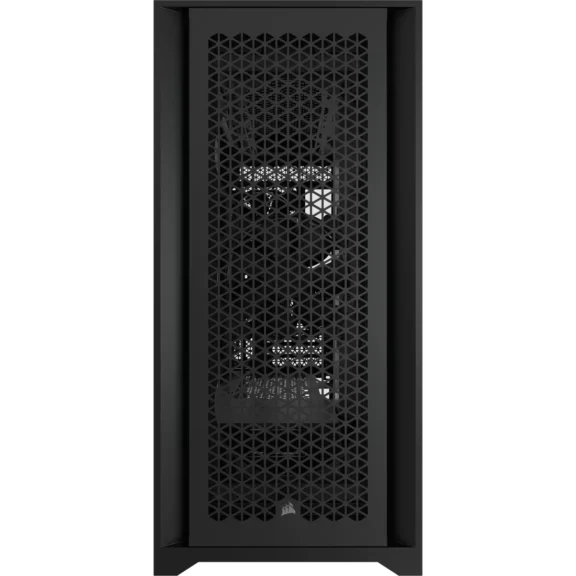
The 5000D Airflow has a relatively straightforward design, but its large chassis gives it a substantial amount of internal space. The left side uses tempered glass, while the front and top panels are heavily ventilated to prioritize airflow.
The case measures 520 × 245 × 520mm, which makes it quite large for a mid-tower. That extra size is useful when installing large graphics cards, tower CPU coolers, multiple radiators, or a custom water-cooling system.
Build quality is generally solid, with a steel chassis, tempered-glass side panel, removable panels, and a practical internal layout. The main tradeoff is that its large footprint may be excessive if you are building a relatively simple PC.
2. Airflow and Thermal Performance
Airflow is one of the 5000D Airflow’s main selling points.
The perforated front panel allows fresh air to enter directly into the chassis, while the case provides numerous mounting positions for additional intake and exhaust fans. Corsair allows up to 10 × 120mm fans or 4 × 140mm fans, which gives you substantial flexibility.
Independent testing has also shown that the 5000D Airflow can deliver strong thermal performance. PC Perspective and other reviewers have highlighted its airflow-focused design and extensive cooling options, while historical testing placed its CPU and GPU thermal performance competitively against other airflow-oriented cases of its generation.
The important point is that the case’s cooling potential depends heavily on how many additional fans you install. The two included fans provide a starting point rather than a fully populated cooling configuration.
3. Included Fans
The standard 5000D Airflow comes with 2 CORSAIR AirGuide 120mm fans. One fan is installed at the front and another at the rear.
Corsair’s AirGuide design uses anti-vortex vanes to concentrate airflow toward the components rather than allowing the air to disperse immediately. 2 fans are sufficient for a basic system, but this is one area where the case falls behind some newer competitors that include four, five, or more fans.
If you’re building a high-end gaming PC, I’d recommend adding additional front, top, or side fans instead of relying only on the included pair.
4. Cable Management and Building Experience
Cable management is one of the strongest aspects of the 5000D Airflow.
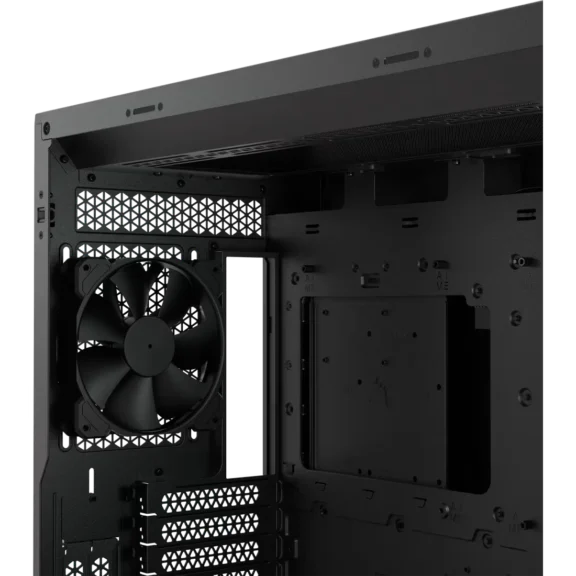
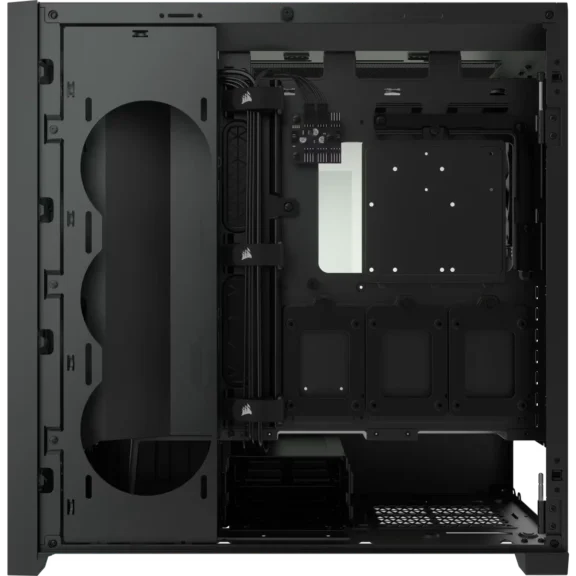
Corsair’s RapidRoute cable management system provides a dedicated routing channel behind the motherboard tray, with approximately 25mm of cable-routing depth. The system is designed to keep major cables organized and make it easier to hide excess wiring.
The spacious interior also gives you more room to work compared with smaller mid-tower cases. This becomes especially useful when installing large GPUs, multiple storage drives, a 360mm AIO, or a custom liquid-cooling system.
For first-time builders, the extra space can make component installation and cable routing considerably less frustrating.
5. Noise Levels
The 5000D Airflow does not have a dedicated acoustic-focused design, but its noise level depends heavily on the fans you install and the fan curves you use.
The two included 120mm fans can be controlled through the motherboard, and Corsair includes a six-port PWM fan repeater with the case. This allows multiple PWM fans to be controlled from a single motherboard fan header.
Adding several high-RPM fans can obviously increase noise, particularly if you run them at maximum speed. For a quieter build, a sensible fan curve is preferable to running every fan at 100%.
Corsair 5000D Airflow Pros and Cons
| Pros | Cons |
|---|---|
| Excellent airflow potential | Only two fans included |
| Supports up to 10 × 120mm fans | Large footprint for a mid-tower |
| Supports up to 4 × 140mm fans | Can become expensive after adding several fans |
| Supports multiple 360mm radiators | Some newer cases offer more features |
| Up to 420mm GPU clearance | Not designed for reverse-connector motherboards |
| Excellent cable management | Large size may be unnecessary for basic builds |
| Supports E-ATX motherboards | |
| Excellent hardware compatibility | |
| Vertical GPU support | |
| Spacious interior for building |
Is the Corsair 5000D Airflow Worth Buying?
The Corsair 5000D Airflow is worth considering if you need a large, flexible case for a high-performance gaming PC or liquid-cooled build.
However, its two included fans are a notable limitation. A buyer looking for a ready-to-go cooling setup may need to spend more on additional fans.
The other consideration is its age. Newer cases such as the Lian Li Lancool 217 can offer more modern features, better included fan packages, or improved modularity, so the 5000D Airflow makes the most sense when you find it at a competitive price.
Who Should Buy It?
The Corsair 5000D Airflow is a good fit for:
- High-end gaming PC builders
- Users with large graphics cards
- People installing a 360mm AIO
- Custom water-cooling enthusiasts
- Builders who want extensive fan-placement options
- Users who value easy cable management
- People who need E-ATX support
- Builders who want plenty of internal space
Who Should Avoid It?
You may want to consider another case if you:
- Want a compact mid-tower
- Don’t want to purchase additional fans
- Are building a relatively low-power PC
- Want native reverse-connector motherboard support
- Prefer a case with newer modular features
- Desk has limited space
Final Thoughts
The Corsair 5000D Airflow remains a capable high-airflow PC case for builders who need plenty of space and cooling flexibility.
Its 420mm GPU clearance, 170mm CPU cooler clearance, extensive fan support, multiple 360mm radiator locations, and RapidRoute cable management make it particularly suitable for powerful gaming PCs and liquid-cooled builds.
Its biggest weakness is the inclusion of only two fans, which means a high-end build may require additional spending on cooling. The large footprint can also be unnecessary for simpler systems.
Still, if you need a spacious chassis with excellent hardware compatibility and find the 5000D Airflow at a competitive price, it remains a versatile option for demanding PC builds.
