


I always say that a gaming mouse is highly specific to a particular game or genre. The factors that mainly influence suitability are DPI, polling rate, shape, and controls.
A mouse that works perfectly for competitive FPS can feel completely wrong for MMO gaming, while a feature-packed mouse may be unnecessarily heavy for fast gameplay. That’s why finding the right mouse depends heavily on the games you play.
In this guide, I compare 7 gaming mice based on their performance, design, controls, connectivity, weight, grip suitability, and gaming use cases. Hence, it helps you identify the best gaming mouse that fits your gaming style.
Best Gaming Mouse in 2026 at a Glance
| Gaming Mouse | Weight | Sensor | Max Polling | Buttons | Connectivity | Best For |
|---|---|---|---|---|---|---|
| Razer DeathAdder V4 Pro | 56g | Focus Pro 45K Optical | 8,000Hz | 6 | 2.4GHz / USB | Competitive FPS, ergonomic gaming |
| Logitech G PRO X2 SUPERSTRIKE | 61g | HERO 2 | 8,000Hz | 5 | LIGHTSPEED / USB-C | Competitive FPS, adjustable clicks |
| Corsair SCIMITAR ELITE WIRELESS SE | 114g | Marksman S 33K | 1,000Hz | 16 | 2.4GHz / Bluetooth / USB-C | MMO, MOBA, RPG |
| MCHOSE G3 V2 Pro | 59g | PAW3395 | 1,000Hz | 5 | 2.4GHz / Bluetooth / USB-C | Budget gaming, FPS |
| SteelSeries Aerox 3 Wireless | 68g | TrueMove Air | 1,000Hz | 6 | 2.4GHz / Bluetooth / USB-C | Lightweight FPS, general gaming |
| Logitech G903 | 110g | HERO 25K | 1,000Hz | Up to 11 | LIGHTSPEED / USB | Ambidextrous gaming, palm/claw |
| Razer Viper V2 Pro | 58g | Focus Pro 30K | 8,000Hz* | 6 | 2.4GHz / USB-C | Competitive FPS |
*8,000Hz wireless polling requires the compatible HyperPolling Wireless Dongle.
What to Look For in a Gaming Mouse?
When looking for a mouse, you should pick the one that matches your games, hand size, grip style, preferred weight, connectivity needs, and required controls rather than chasing the highest specifications.
- Weight
- Sensor
- DPI
- Polling rate
- Grip style
- Hand size
- Connectivity
- Buttons
- Switches
- Battery life
- Shape
- Price
What is a Good DPI for a Gaming Mouse?
For most gamers, 800 to 1,600 DPI is a practical range, especially for FPS games. Higher DPI settings are available, but maximum DPI does not automatically improve accuracy or gaming performance.
Is Wired or Wireless Mouse Better for Gaming?
Modern 2.4GHz wireless gaming mice can provide excellent responsiveness without the cable. Wired mice remain simple and reliable, while wireless models provide greater freedom of movement and a cleaner desk.
Is Mouse Acceleration Good for Gaming?
Most competitive FPS players prefer mouse acceleration disabled because consistent physical movement makes aiming more predictable. Acceleration can be useful for desktop navigation or specific playstyles, but it is generally unnecessary for competitive aiming.
How to Measure Hand Size for a Gaming Mouse?
Measure from the tip of your middle finger to the bottom crease of your palm, then compare the measurement with the mouse’s dimensions.
Best gaming mouse for big hands
- Razer DeathAdder V4 Pro
- Logitech G903
- Corsair SCIMITAR ELITE WIRELESS SE
Best gaming mouse for small hands
- MCHOSE G3 V2 Pro
- Razer Viper V2 Pro
- SteelSeries Aerox 3
Which Gaming Mouse Should You Buy?
| Your Priority | Mouse to Consider | Why |
|---|---|---|
| Competitive FPS | Razer DeathAdder V4 Pro | Lightweight ergonomic design and high-end sensor |
| Adjustable click actuation | Logitech G PRO X2 SUPERSTRIKE | HITS and Rapid Trigger controls |
| MMO/MOBA | Corsair SCIMITAR ELITE WIRELESS SE | 16 programmable buttons and adjustable side panel |
| Budget wireless gaming | MCHOSE G3 V2 Pro | Lightweight design and PAW3395 sensor |
| Lightweight symmetrical gaming | Razer Viper V2 Pro | 58g body and FPS-focused design |
| Lightweight with Bluetooth | SteelSeries Aerox 3 Wireless | 2.4GHz, Bluetooth, and lightweight design |
| Ambidextrous gaming | Logitech G903 | Ambidextrous shape and programmable controls |
| Palm grip | Razer DeathAdder V4 Pro | Ergonomic shape and low weight |
| Large hands | Logitech G903 | Larger, substantial body |
| MMO gaming | Corsair SCIMITAR ELITE WIRELESS SE | Extensive programmable controls |
What’s the Best Wireless Mouse for Gaming?
The Razer DeathAdder V4 Pro is the strongest choice here for gamers who want lightweight wireless performance, while the Logitech G PRO X2 SUPERSTRIKE is better suited to players who specifically want advanced click controls.
What is the Best Gaming Mouse for PC Gaming?
The Razer DeathAdder V4 Pro is a strong all-around PC gaming choice because its lightweight ergonomic design works particularly well across FPS, action, RPG, and general gaming.
What is the Best Gaming Mouse for Mac?
The SteelSeries Aerox 3 Wireless is a flexible choice for Mac users because it supports Bluetooth alongside 2.4GHz wireless and can also be used through USB. Its lightweight design also works well for everyday use.
What is the Best Gaming Mouse for Different Grip Styles?
- For palm grip, consider the DeathAdder V4 Pro or G903.
- For claw grip, the Viper V2 Pro or G3 V2 Pro are suitable options.
- Fingertip users can consider the Viper V2 Pro or Aerox 3.
What’s the Best Gaming Keyboard and Mouse Combo?
The Razer Viper V2 Pro and AULA F75 are a strong gaming combination for players who want a lightweight competitive mouse and a compact mechanical keyboard.
- The Viper V2 Pro suits fast FPS games.
- The AULA F75 provides a compact layout that leaves more desk space for mouse movement.
7 Best Gaming Mice in 2026 for Every Gamer
These seven mice cover different gaming priorities rather than competing for exactly the same type of user. The selection includes lightweight FPS mice, a competitive mouse with adjustable click technology, an MMO-focused mouse, a budget wireless option, and versatile designs for everyday PC gaming.
1. Razer DeathAdder V4 Pro
The Razer DeathAdder V4 Pro combines an ergonomic shape with an extremely lightweight 56g design. Its high-end optical sensor and 8,000Hz polling make it particularly suitable for competitive FPS players who love a palm grip mouse and want fast movement without sacrificing a comfortable right-handed shape.
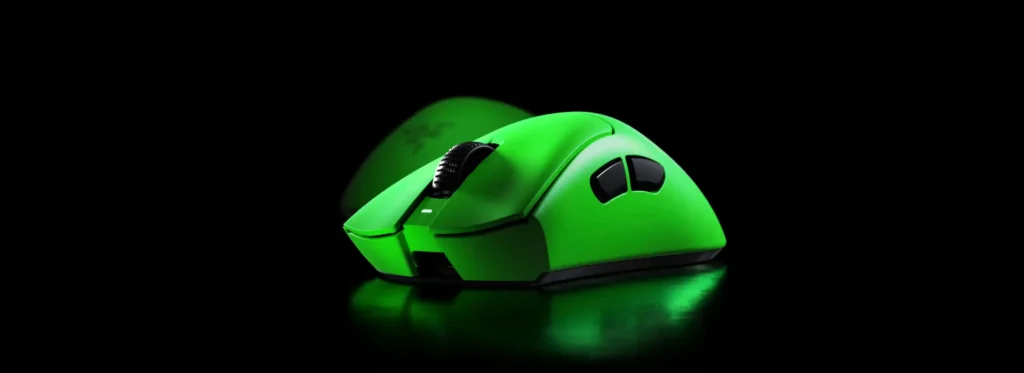
Key Features
- 56g lightweight design
- Focus Pro 45K optical sensor
- Up to 8,000Hz polling
- Ergonomic right-handed shape
- HyperSpeed wireless connectivity
| Pros | Cons |
|---|---|
| Very lightweight | Premium price |
| Ergonomic design | Limited programmable controls |
| High-end sensor | |
| 8,000Hz polling | |
| Excellent FPS performance |
2. Logitech G PRO X2 SUPERSTRIKE
The Logitech G PRO X2 SUPERSTRIKE focuses on competitive control with HITS technology, adjustable click actuation, and Rapid Trigger functionality. Its 61g body and HERO 2 sensor also make it suitable for fast FPS games on gaming PCs where precise movement and responsive clicks matter.
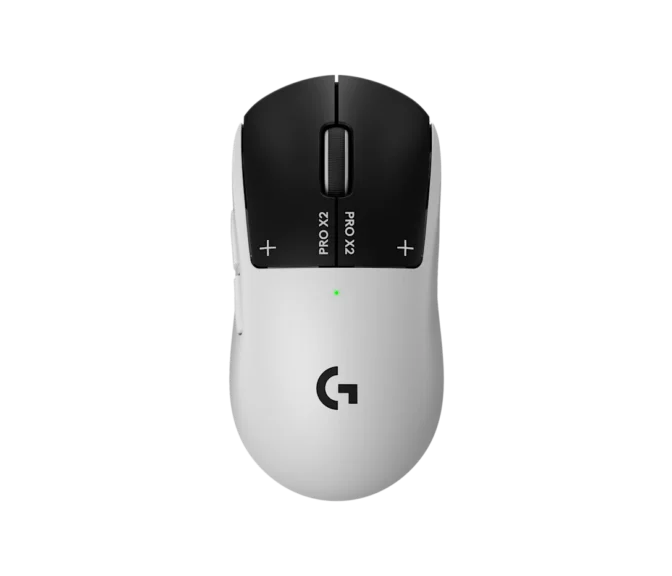
Key Features
- 61g lightweight design
- HERO 2 sensor
- HITS technology
- Rapid Trigger controls
- Up to 8,000Hz wireless polling
| Pros | Cons |
|---|---|
| Adjustable click actuation | Advanced features may not suit everyone |
| HITS technology | |
| 61g weight | |
| High polling rate | |
| Strong competitive performance |
3. Corsair SCIMITAR ELITE WIRELESS SE
The Corsair SCIMITAR ELITE WIRELESS SE is designed for gamers who need more controls than a conventional six-button mouse provides. Its 16 programmable buttons and adjustable side panel make it particularly useful for MMOs, MOBAs, RPGs, and macro-heavy games.
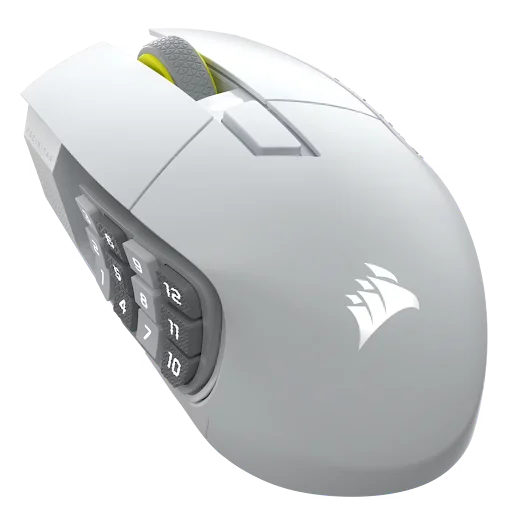
Key Features
- 16 programmable buttons
- Adjustable 12-button side panel
- Marksman S 33K sensor
- 2.4GHz and Bluetooth
- Up to 150-hour 2.4GHz battery life
| Pros | Cons |
|---|---|
| 16 programmable buttons | Heavy |
| Adjustable side panel | |
| Strong MMO performance | |
| Long battery life | |
| Multiple connectivity options |
4. MCHOSE G3 V2 Pro
The MCHOSE G3 V2 Pro offers a lightweight 59g body, PAW3395 sensor, tri-mode connectivity, and an 800mAh battery. It is particularly attractive to gamers who want modern wireless gaming performance without moving into the higher price range of premium flagship mice.
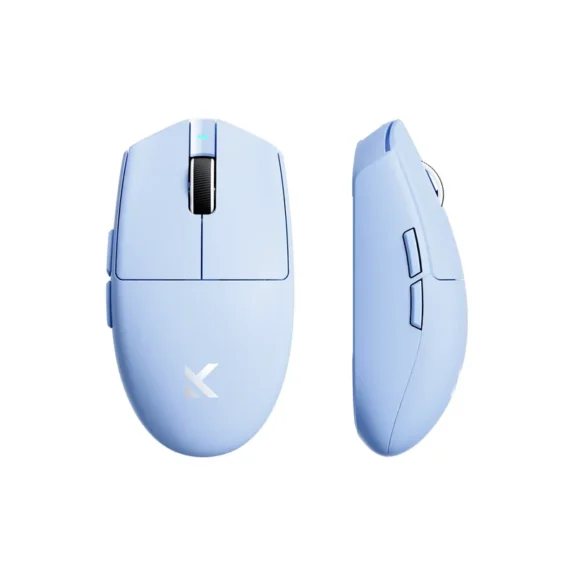
Key Features
- 59g lightweight body
- PAW3395 sensor
- 26,000 DPI
- 2.4GHz, Bluetooth, and USB-C
- 800mAh battery
| Pros | Cons |
|---|---|
| Lightweight design | Compact for large hands |
| PAW3395 sensor | 1,000Hz maximum polling |
| Affordable | |
| Tri-mode connectivity | |
| Large battery |
5. SteelSeries Aerox 3 Wireless
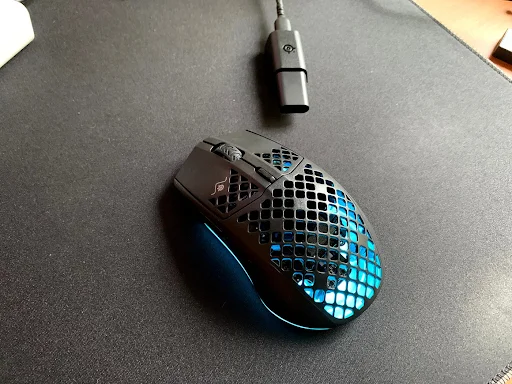
The SteelSeries Aerox 3 Wireless uses a lightweight perforated design to reduce weight while retaining wireless connectivity. The RGB lighting of this mouse makes it best for showcase PCs, especially when combined with an RGB keyboard, like the Aula F75. Its 68g body, 2.4GHz connection, Bluetooth support, and TrueMove Air sensor make it suitable for FPS and general PC gaming.
Key Features
- 68g lightweight design
- TrueMove Air sensor
- 2.4GHz wireless
- Bluetooth 5.0
- Up to 200-hour battery life
| Pros | Cons |
|---|---|
| Lightweight | Honeycomb design is not for everyone |
| Bluetooth support | |
| Long battery life | |
| RGB lighting | |
| Good FPS performance |
6. Logitech G903
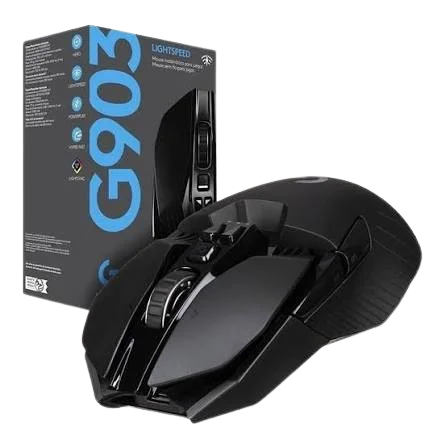
The Logitech G903 is a substantial ambidextrous gaming mouse designed for players who prefer a larger and heavier body. Its HERO 25K sensor, LIGHTSPEED wireless, programmable controls, and POWERPLAY compatibility make it versatile across FPS, MMO, RPG, and everyday gaming.
Key Features
- Ambidextrous design
- HERO 25K sensor
- LIGHTSPEED wireless
- Programmable buttons
- POWERPLAY compatibility
| Pros | Cons |
|---|---|
| Ambidextrous design | Heavy |
| Excellent wireless performance | |
| Strong sensor | |
| Programmable controls | |
| POWERPLAY support |
7. Razer Viper V2 Pro
The Razer Viper V2 Pro is built around lightweight competitive performance. Its symmetrical body, Focus Pro 30K sensor, optical switches, and HyperSpeed wireless connection make it particularly well suited to FPS players who prefer claw or fingertip-style control. The 58g weight also makes it easy to carry with gaming laptops on the go.

Key Features
- 58g lightweight design
- Focus Pro 30K sensor
- Optical switches
- HyperSpeed wireless
- Up to 8,000Hz polling
| Pros | Cons |
|---|---|
| Extremely lightweight | 8K requires separate dongle |
| Excellent FPS performance | |
| 30K sensor | |
| Optical switches | |
| Strong wireless performance |
What is the Best Gaming Mouse for Different Games?
Different games place different demands on a mouse. Competitive FPS titles benefit from low weight and precise tracking, while MMOs and MOBAs can benefit more from additional programmable controls.
| Game / Category | Best Choice | Why |
|---|---|---|
| FPS | Razer DeathAdder V4 Pro | Lightweight ergonomic design and high-end sensor |
| eSports | Logitech G PRO X2 SUPERSTRIKE | Competitive click controls and lightweight design |
| Fortnite | Razer Viper V2 Pro | Lightweight symmetrical design for fast movement |
| Minecraft PvP | Razer Viper V2 Pro | Lightweight body and responsive optical switches |
| CS2 | Logitech G PRO X2 SUPERSTRIKE | Adjustable actuation and competitive performance |
| Call of Duty / Warzone | Razer DeathAdder V4 Pro | Lightweight design and precise tracking |
| Valorant | Logitech G PRO X2 SUPERSTRIKE | Adjustable click actuation |
| Apex Legends | Razer Viper V2 Pro | Lightweight design and strong sensor |
| GTA V | Logitech G903 | Versatile design and programmable controls |
| MMO | Corsair SCIMITAR ELITE WIRELESS SE | 16 programmable buttons |
| MOBA | Corsair SCIMITAR ELITE WIRELESS SE | Extensive side controls |
| RPG / Adventure | Logitech G903 | Versatile controls and comfortable, substantial design |
| Casual Gaming | MCHOSE G3 V2 Pro | Lightweight, wireless, and affordable |
Final Thoughts
The best gaming mouse in 2026 depends on how you play rather than one universal specification.
- Competitive FPS players should prioritize weight, shape, sensor performance, and click responsiveness, which makes the DeathAdder V4 Pro, PRO X2 SUPERSTRIKE, and Viper V2 Pro strong choices.
- MMO and MOBA players have different requirements, with the SCIMITAR ELITE WIRELESS SE offering substantially more programmable controls.
- The MCHOSE G3 V2 Pro is a practical budget option, while the Aerox 3 Wireless adds Bluetooth and RGB to a lightweight design.
- The Logitech G903 remains suitable for gamers who prefer an ambidextrous and heavier mouse.
Ultimately, choose the model that matches your games, hand size, grip, and preferred features.
