

A gaming laptop usually forces you to compromise somewhere. You either get the performance but carry around a bulky machine, or choose something slimmer and accept weaker hardware. The Alienware 16X Aurora takes a different approach.
It packs powerful Intel Core Ultra processors, NVIDIA RTX 50-series graphics, a 16-inch 240Hz OLED display, and a substantial cooling system into a machine that still looks surprisingly restrained for an Alienware laptop.
But this is a heavy machine, and depending on the configuration, the price climbs quickly. So before you spend thousands of dollars, let’s see what the Alienware 16X Aurora actually offers.
In this guide, I have provided complete details about the specifications, performance, and pricing.
What Is the Alienware 16X Aurora?
The Alienware 16X Aurora is a premium 16-inch gaming laptop from Dell’s Alienware lineup. The 2026 model combines Intel Core Ultra HX processors, NVIDIA RTX 50-series graphics, a 240Hz OLED display, DDR5 memory, and a 96Wh battery.

How Much Does It Cost?
For the high-end gaming configuration, the Dell Alienware Aurora 16X costs $6,629. You will get the following components:
- Processor: Intel Core Ultra 9 290HX Plus (24-Core, 36 MB Cache, 2.7 GHz to 5.5 GHz)
- Operating System: Windows 11 Pro
- Graphics Card: NVIDIA GeForce RTX 5070 Ti 12 GB DDR7
- Memory: 64 GB, 2×32 GB, DDR5, up to 5600MT/s
- Storage: 4 TB Gen 5
If you want a specific configuration, you can check the pricing on the official page of the Alienware Aurora 16X.
How Powerful Is It for Gaming?
The Alienware 16X Aurora is a high-performance gaming laptop designed for demanding 1440p-class gaming. RTX 5070 Ti configurations provide strong performance, while DLSS and frame generation can further improve performance in supported games.
Alienware 16X Aurora Specifications
The specifications below refer to the 2026 Alienware 16X Aurora (AC16251). Exact specifications vary according to the configuration and region. Dell currently lists multiple CPU, GPU, memory, and storage combinations.
| Specification | Alienware 16X Aurora |
|---|---|
| Model | AC16251 |
| Display | 16-inch WQXGA OLED |
| Resolution | 2560 × 1600 |
| Refresh Rate | 240Hz |
| Display Color | 120% DCI-P3 color volume |
| HDR Brightness | Up to 620 nits |
| CPU Options | Intel Core Ultra 7 270HX Plus / Ultra 9 290HX Plus |
| GPU Options | RTX 5060 / RTX 5070 / RTX 5070 Ti |
| GPU Memory | Up to 12GB GDDR7 |
| RAM | Up to 64GB DDR5 |
| Storage | Up to 4TB |
| Operating System | Windows 11 |
| Battery | 96Wh |
| Webcam | 1080p FHD RGB-IR HDR |
| Wireless | Wi-Fi 7, Bluetooth |
| Ethernet | 1Gbps RJ45 |
| Keyboard | Single-zone backlighting |
| Starting Weight | 5.66 lb / 2.57 kg |
| Maximum Weight | 5.76 lb / 2.61 kg |
| Color | Interstellar Indigo |
Dell’s official specifications confirm the 2560×1600 240Hz OLED panel, RTX 50-series graphics, DDR5 memory, Wi-Fi 7, 96Wh battery, and approximately 2.57kg starting weight.
1. Build Quality and Design
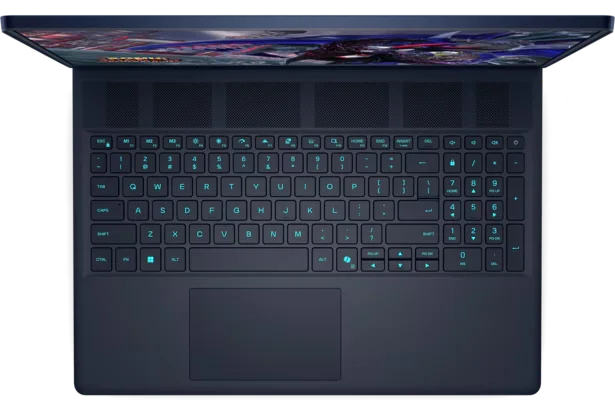
The 16X Aurora uses an understated Interstellar Indigo chassis rather than the exaggerated styling traditionally associated with gaming laptops. Its construction feels sturdy and premium, although the 2.57kg starting weight makes it more suitable for desk use than frequent travel.
2. Display
The 16-inch 2560×1600 OLED panel is one of the laptop’s biggest attractions. It combines a 240Hz refresh rate, 120% DCI-P3 color volume, up to 620 nits HDR brightness, ComfortView+, and NVIDIA G-SYNC. These aspects make it suitable for both gaming and visual work.

3. Processors
The 2026 model can be configured with Intel’s Core Ultra 7 270HX Plus or Core Ultra 9 290HX Plus. The latter has 24 cores and reaches up to 5.5GHz, which provides substantial processing capacity for gaming, rendering, editing, compiling, and other demanding workloads.
4. Graphics Processing Unit
Graphics options include NVIDIA’s RTX 5060, RTX 5070, and RTX 5070 Ti laptop GPUs. The RTX 5070 Ti configuration gets 12GB of GDDR7 memory and offers a meaningful performance increase over the RTX 5070, particularly for demanding games and higher-resolution workloads.
5. Battery
The Alienware 16X Aurora includes a large 96Wh battery, but its powerful hardware and 240Hz OLED display mean battery life is not its strongest feature.
Independent testing from Tom’s Hardware characterizes its battery life as middling. This makes the laptop better suited to plugged-in gaming than long periods away from an outlet.
6. Ports
Connectivity is one of the Aurora’s strengths. It includes:
- USB-A
- USB-C
- Thunderbolt 4
- HDMI 2.1
- A 3.5mm audio jack
- Gigabit Ethernet
- A dedicated power connection
This makes it practical for external monitors, wired networking, gaming peripherals, and storage devices.
Is the Alienware 16X Aurora Worth It?
The Alienware 16X Aurora is totally worth it for gaming because it offers a strong combination of gaming performance, OLED display quality, build quality, connectivity, and upgradeability.
Its main compromises are weight, battery life, and the rapidly increasing price of higher-end configurations.
Who Should Buy It?
- Gamers wanting a high-refresh-rate OLED display
- Users who want RTX 50-series graphics
- Desktop replacement buyers
- Content creators needing powerful hardware
- Gamers who value upgradeability
- Users who primarily game while plugged in
- Buyers who want a premium Alienware design
Who Shouldn’t Buy It?
- Travelers who want a lightweight gaming laptop
- Buyers prioritizing maximum battery life
- Users looking for the cheapest performance
- Casual gamers who don’t need powerful hardware
- People who prefer compact 14-inch or 15-inch laptops
- Buyers uncomfortable with a 2.5 kg-plus chassis
Which Alienware 16X Aurora Configuration Should You Buy?
The Dell Alienware Aurora 16X offers different configurations. For most demanding gamers, an RTX 5070 Ti configuration with 32GB RAM provides a strong balance of graphics performance, memory, and long-term usability.
| Configuration | Best For | Recommendation |
|---|---|---|
| Core Ultra 7 + RTX 5060 + 16GB | Mainstream gaming | Budget-oriented option |
| Core Ultra 7 + RTX 5070 + 16GB | 1440p gaming | Balanced configuration |
| Core Ultra 9 + RTX 5070 + 32GB | Gaming + productivity | Power users |
| Core Ultra 9 + RTX 5070 Ti + 32GB | High-end gaming | Enthusiast option |
| Core Ultra 9 + RTX 5070 Ti + 64GB | Gaming + heavy professional workloads | Maximum memory configuration |
Dell’s current configurator lists Core Ultra 7 270HX Plus and Core Ultra 9 290HX Plus processors, RTX 5060, RTX 5070, and RTX 5070 Ti graphics, and memory configurations reaching 64GB.
Can You Upgrade Alienware 16X Aurora Components?
Yes. The Alienware 16X Aurora offers considerably better upgrade potential than many thin gaming laptops.
This aspect makes it count among the best gaming laptops. RAM and storage can be upgraded, with configurations supporting up to 64GB of memory and up to 4TB of SSD storage.
| Component | Upgradeable? | Details |
|---|---|---|
| RAM | Yes | Up to 64GB DDR5 using two modules |
| SSD | Yes | Storage can be expanded/replaced |
| CPU | No | Not designed as a user-replaceable component |
| GPU | No | Soldered laptop GPU |
| Wi-Fi | Yes/Serviceable | Wireless card is serviceable |
| Battery | Serviceable | Can be replaced when necessary |
| Display | Not recommended | Requires compatible replacement hardware |
Final Thoughts
The Alienware 16X Aurora is a gaming laptop built to deliver desktop-class performance without making the design look like a giant gaming machine.
Its 240Hz OLED display is a major attraction, while the Core Ultra HX processors, RTX 50-series graphics, strong connectivity, and upgradeable memory and storage give it plenty of room for demanding workloads.
The tradeoffs are equally clear. At around 2.57kg before the charger, it is heavy, and its battery life is only middling. Higher configurations can also become expensive quickly.
For gamers who mainly use their laptop at a desk, however, the Aurora’s combination of performance and display makes it a serious high-end option.
