

Are you tired of gaming mice that feel heavy after a few hours, drag across your mousepad, or simply don’t give you the control you need in fast-paced FPS games?
Maybe you’re considering the SteelSeries Aerox 3 because of its lightweight body and honeycomb design, but you’re wondering whether it actually feels as good as it looks. That’s exactly what I am going to explain in this guide.
Instead of throwing specifications at you, I’ll break down how the Aerox 3 performs in everyday gaming, from comfort and clicks to sensor accuracy, wireless performance, and battery life, so you can decide if it’s the right mouse for you.
Note: Because the Aerox 3 family includes both wired and wireless versions, the battery and wireless sections below specifically refer to the SteelSeries Aerox 3 Wireless (2022 Edition). The wired Aerox 3 does not have a battery or wireless connection.
What Is SteelSeries Aerox 3?
The SteelSeries Aerox 3 is a lightweight gaming mouse designed around speed, low weight, and comfortable control. The 2022 wired version weighs 59g, while the Aerox 3 Wireless weighs 68g and adds 2.4GHz and Bluetooth connectivity.
My Quick Assessment
Rather than judging the Aerox 3 only from its specification sheet, I would look at what those specifications actually mean when you are using the mouse every day.
| Real-World Assessment | My Rating | What You Should Know |
|---|---|---|
| FPS gaming | 9/10 | Lightweight design, accurate tracking, and responsive clicks make it particularly strong for FPS games. |
| Comfort | 8.5/10 | The symmetrical shape works especially well with claw and fingertip grips. |
| Weight | 9/10 | The 59g wired and 68g wireless versions are easy to move during fast swipes. |
| Build quality | 8/10 | The 2022 version feels more solid than the original, although the honeycomb construction will not appeal to everyone. |
| Wireless performance | 8.5/10 | The Wireless version provides both 2.4GHz and Bluetooth connectivity with reliable performance. |
| Overall value | 8/10 | Still attractive for lightweight gaming, although newer mice offer stronger raw specifications. |
Independent testing also rates the Aerox 3 Wireless (2022) highly for FPS gaming, particularly because of its low click latency, lightweight design, comfortable shape, and smooth PTFE feet.
Is SteelSeries Aerox 3 Good for FPS Gaming?
Yes, the SteelSeries Aerox 3 is very good for FPS gaming because its lightweight construction, accurate sensor, low click latency, and smooth glide make quick aim adjustments and rapid mouse movements easier.
When you are playing an FPS game, you do not necessarily want a mouse packed with buttons or unnecessary features. You want something that feels predictable when you flick, track an enemy, or make a rapid 180-degree turn.
The Aerox 3’s lightweight body helps with exactly that. The wireless version weighs 68g, while the wired 2022 model drops to just 59g. No doubt, they are considered lightweight but not lighter than the Razer Viper V2 Pro, which goes further to 58g.
The TrueMove Air sensor in the Wireless version also offers up to 18,000 CPI, 400 IPS tracking, and 40G acceleration, which is more than enough for competitive FPS gaming.
Is SteelSeries Aerox 3 Worth It?
The Aerox 3 is worth considering if you specifically want a lightweight mouse with a comfortable symmetrical shape, RGB lighting, and reliable gaming performance, but newer competitors can offer better performance-to-weight ratios.
That distinction is important. The Aerox 3 is not a bad mouse by today’s standards. In fact, its fundamentals remain strong. What has changed is the competition around it.
Modern gaming mice have become extremely lightweight while simultaneously improving sensors, polling rates, wireless performance, and battery efficiency. So you should not buy the Aerox 3 simply because it says “ultralight” on the box.
You should buy it if you like its shape, want SteelSeries GG software, prefer its RGB design, or find it at a competitive price.
SteelSeries Aerox 3 Specifications
Here are the key specifications of the Aerox 3 Wireless (2022 Edition):
| Specification | SteelSeries Aerox 3 Wireless |
|---|---|
| Weight | 68g |
| Sensor | TrueMove Air |
| Maximum CPI | 18,000 |
| Tracking Speed | 400 IPS |
| Acceleration | 40G |
| Connectivity | 2.4GHz wireless + Bluetooth |
| Battery Life | Up to 200 hours |
| Buttons | 6 |
| Main Switches | Golden Micro IP54 |
| Switch Rating | 80 million clicks |
| Glide Skates | 100% virgin-grade PTFE |
| Water/Dust Resistance | IP54 |
| RGB | 3-zone |
| Charging Port | USB-C |
| Shape | Symmetrical |
| Software | SteelSeries GG |
These specifications are based on SteelSeries’ published specifications for the Aerox 3 Wireless 2022 Edition.
1. Design
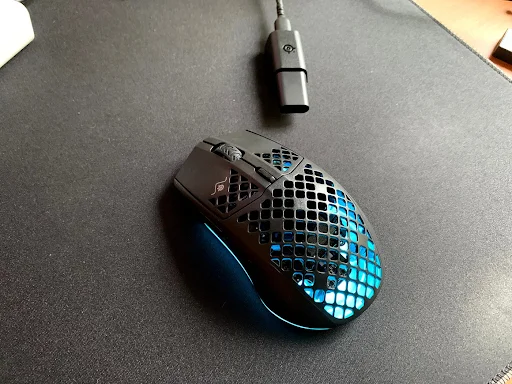
The Aerox 3’s biggest visual feature is its honeycomb-style shell. Instead of using a completely solid exterior, SteelSeries uses cutouts throughout the body to reduce weight.
I actually think this design works well for the mouse’s purpose. You immediately get the impression that it was built for speed rather than maximum bulk.
The shape is symmetrical, although the side buttons are positioned on the left side. This makes it a perfect claw grip mouse.
RTINGS also found the 2022 Wireless model comfortable for nearly all hand sizes with those grips, although users with smaller hands may have some difficulty reaching the buttons with a fingertip grip.
Another interesting feature is the IP54 rating. SteelSeries uses its AquaBarrier design to protect the internal components against water and dust exposure despite the open shell.
2. Build Quality
The build quality is one area where the Aerox 3 deserves some context. The original Aerox 3 Wireless received criticism for some body flex and creaking. The 2022 version addressed this with a more solid-feeling body and improved PTFE feet.
So, if you are comparing the original with the 2022 version, you should choose the newer model.
That said, the honeycomb construction inevitably creates a different feel from a completely solid mouse. If you tend to squeeze your mouse aggressively during intense gameplay, you may prefer a conventional solid-shell design.
For normal gaming use, however, the 2022 Aerox 3 Wireless feels sufficiently robust while retaining its lightweight character.
3. Weight and Comfort
This is probably my favorite part of the Aerox 3. At 68g, the Aerox 3 Wireless is light enough to move quickly without feeling like you are constantly fighting the mouse. The wired 2022 model goes even further at 59g.
That makes a noticeable difference in FPS games. If you use a lower sensitivity and rely on large arm movements, a lightweight mouse can make those movements feel less tiring. It is also useful when making repeated flicks and tracking movements.
The shape is best suited to claw grip and fingertip grip, although palm grip users may also find it comfortable depending on hand size.
4. Buttons and Switches
The Aerox 3 Wireless uses SteelSeries Golden Micro IP54 switches rated for up to 80 million clicks. The switches are designed to resist dust and water exposure while providing long-term durability.
You get 6 buttons in total, which is enough for FPS gaming without turning the mouse into an MMO-focused device.
The main clicks feel responsive, and the low click latency measured in independent testing is another reason I consider the Aerox 3 a strong FPS option.
The limitation is button count. If you play games where you need numerous commands immediately available, there are better choices with additional side buttons.
5. Lighting
The Aerox 3 features three-zone RGB lighting, which is one of the areas where SteelSeries clearly gives the mouse some personality.
The RGB lighting can be customized through SteelSeries GG, and the honeycomb shell allows the illumination to shine through the mouse rather than simply appearing as a small light strip, an aesthetic feature you won’t get with options like Logitech G903.
I would not call RGB a performance feature, of course. But if you care about matching your mouse to the rest of your gaming setup, the Aerox 3 does a good job.
Performance Benchmarks of SteelSeries Aerox 3
The Aerox 3 Wireless delivers strong gaming performance, combining a TrueMove Air sensor rated at 18,000 CPI, 400 IPS, and 40G with low click latency, lightweight handling, smooth PTFE feet, and dependable wireless connectivity.
1. Sensor and Gaming Performance
The TrueMove Air sensor is one of the strongest reasons to consider the Aerox 3 Wireless. Its 18,000 CPI maximum, 400 IPS tracking speed, and 40G acceleration specifications are already far beyond what most gamers will practically need.
What matters more to me is consistency. You can have a mouse advertising an enormous CPI number, but that number alone does not make it a better gaming mouse. For FPS gaming, accurate tracking and predictable movement matter much more.
Independent testing found the Aerox 3 Wireless (2022) has good click latency and performs very well for FPS gaming. So whether you are playing Valorant, Counter-Strike, Apex Legends, Call of Duty, or another competitive shooter, the sensor is not likely to be the component holding you back.
2. Battery Life
The Aerox 3 Wireless is rated for up to 200 hours of battery life, which is one of its more impressive specifications. SteelSeries says the 2022 Wireless version can deliver that figure in either 2.4GHz or Bluetooth modes.
Of course, real-world battery life while playing on gaming PCs and gaming laptops can vary depending on how you configure the mouse and use its lighting and wireless features.
Still, even if your actual result is lower than the advertised maximum, the 200-hour rating means you are not dealing with a mouse that needs constant charging. And because the mouse uses USB-C, topping it up is convenient.
3. Wireless Performance
The Aerox 3 Wireless supports both 2.4GHz wireless and Bluetooth.
For gaming, you should use the 2.4GHz connection. It is the option designed for low-latency gaming performance, while Bluetooth is more useful when you want to connect to a laptop or another compatible device without using the receiver.
SteelSeries calls the wireless system Quantum 2.0 Dual Wireless, and independent testing found the Aerox 3 Wireless responsive and suitable for FPS gaming.
This is also where wireless becomes a genuine advantage rather than simply a convenience. There is no mouse cable dragging across your desk while you are trying to make a large swipe.
Pros and Cons of SteelSeries Aerox 3
| Pros | Cons |
|---|---|
| Very lightweight design | Honeycomb shell is not for everyone |
| Excellent option for FPS gaming | – |
| Accurate TrueMove sensor | – |
| Low click latency | – |
| Comfortable symmetrical shape | – |
The Aerox 3 Wireless Gen 2 now exists and is a considerably newer product. It retains the general Aerox 3 concept but upgrades the sensor to TrueMove 26K and raises the maximum wireless polling rate to 4,000Hz.
So if you are shopping today, make sure you know whether you are looking at the original Aerox 3 Wireless, the 2022 Edition, or the newer Gen 2.
Concluding Thoughts on SteelSeries Aerox 3
The SteelSeries Aerox 3 remains a very capable gaming mouse, particularly if your priority is lightweight FPS performance rather than having dozens of programmable buttons.
I like its comfortable shape, responsive clicks, accurate sensor, smooth PTFE feet, and cable-free movement. The 2022 Wireless version is especially practical because its 68g body combines low weight with 2.4GHz and Bluetooth connectivity and up to 200 hours of advertised battery life.
However, newer lightweight mice have raised the performance bar. So I would recommend the Aerox 3 when its price is attractive or if you specifically prefer its shape and RGB design.
