

While I was comparing my RTX 3080’s gaming performance with other cards, one name kept jumping out: the 4090 graphics card. I expected a modest gap. Then I studied the specs, worked out the numbers, and the difference honestly shocked me.
Even now, almost four years after launch, this GPU still sits near the top of the charts. So is it still worth chasing in 2026?
In this guide, I’ll break down its specs, real 4K and 8K frame rates, current price, and owner feedback. By the end, you’ll know whether the RTX 4090 fits your build and your budget.
My Quick Review
The RTX 4090 earns the “superpowers” label. Whether you play at max 4K or push toward 8K with DLSS 3, the card itself will rarely hold you back. If something bottlenecks you, it will usually be your CPU.
Where it falls short is simple: its huge size, no NVLink like the 3090ti had, and the price.
But still, even after almost four years, this is a card you buy for performance and rarely complain about.
What Is the Nvidia RTX 4090?
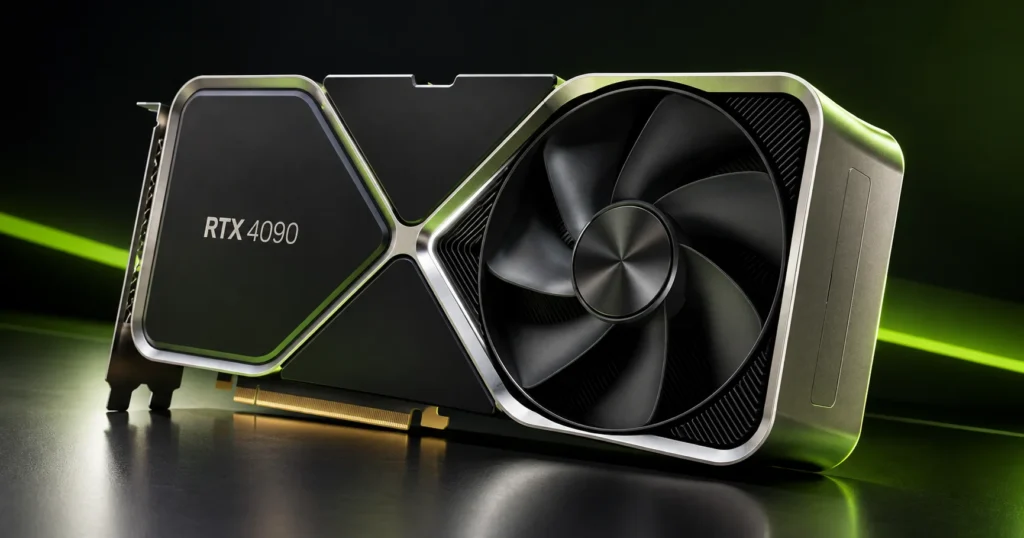
The Nvidia GeForce RTX 4090 is a flagship graphics card built on the Ada Lovelace architecture. It packs 16,384 CUDA cores and 24 GB of GDDR6X memory, and it targets 4K gaming, high-refresh play, and heavy creative work.
When Did Nvidia RTX 4090 Come Out?
Nvidia announced the RTX 4090 on September 20, 2022, and launched it on October 12, 2022. That makes it almost four years old, and it turns four on October 12, 2026.
Note: Reports say the card was discontinued around October 2024, so most units for sale today are used or leftover stock. I couldn’t find a formal Nvidia notice, so treat that date as reported, not confirmed.
Specifications of the RTX 4090
These specs come from Nvidia’s official product page.
| Spec | Details |
|---|---|
| CUDA cores | 16,384 |
| Architecture | Ada Lovelace |
| Shader performance | 83 TFLOPS |
| Ray tracing cores | 3rd gen, 191 TFLOPS |
| Tensor cores (AI) | 4th gen, 1,321 AI TOPS |
| Base / boost clock | 2.23 GHz / 2.52 GHz |
| VRAM | 24 GB GDDR6X |
| Memory interface | 384-bit |
| DLSS | DLSS 3.5: Super Resolution, DLAA, Ray Reconstruction, Frame Generation |
| Other Nvidia tech | Reflex, Broadcast, G-SYNC, ShadowPlay, Studio Drivers, Omniverse |
| PCIe / Resizable BAR | Gen 4 / Yes |
| NVLink | No |
| Video engines | 2x 8th-gen NVENC, 5th-gen NVDEC, AV1 encode and decode |
| APIs | DirectX 12 Ultimate, Vulkan RT, OpenGL 4.6, CUDA capability 8.9 |
| Max output | 4K at 240Hz or 8K at 60Hz with DSC, HDR |
| Ports | HDMI 2.1, 3x DisplayPort 1.4a |
| Multi-monitor | Up to 4 displays, HDCP 2.3 |
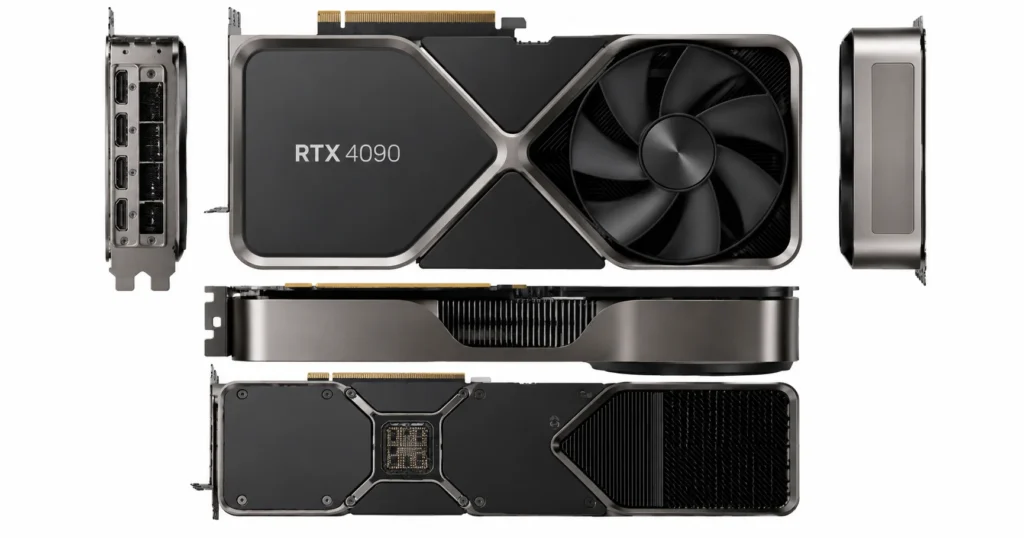
| Dimensions | 304 mm long, 137 mm wide, 3-slot (61 mm) |
| Total graphics power | 450W |
| Average gaming power | 315W |
| Idle / video playback | 19W / 25W |
| Max GPU temperature | 90°C |
| Recommended PSU | 850W |
| Power connectors | 3x PCIe 8-pin (adapter in box) or 450W+ PCIe Gen 5 cable |
Partner cards from ASUS, MSI, and others can vary in size and clocks, so always check your exact model.
Features of the RTX 4090 GPU
The RTX 4090 stands out for more than raw speed. Its VRAM, efficiency, DLSS support, creator tools, and 8K output each solve a real problem. Here’s how each one helps in daily use.
1. 24 GB VRAM
The RTX 4090 carries 24 GB of GDDR6X on a 384-bit bus, which works out to about 1 TB/s of memory bandwidth. That is 8 GB more than the RTX 5080’s 16 GB, and it gives max-texture 4K gaming real breathing room.
Why 24 GB matters:
- It leaves headroom for max-texture 4K and mods, since VRAM use climbs with resolution.
- It helps at 8K and with heavy ray tracing.
- It fits large 3D scenes, video timelines, and local AI models.
Best for: 4K and 8K gamers, plus creators.
Most games at 1080p and 1440p won’t come near 24 GB. Read our guide on how much VRAM you need for gaming before paying extra.
2. Better Power Consumption
The RTX 4090 uses less power than you’d expect for its speed, but not less than every older card. It draws less than the RTX 3090 Ti and delivers far more frames per watt, even though its 450W rating tops the RTX 3090’s 350W.
Power numbers to know:
- Rated power: 450W total graphics power, with Nvidia listing 315W as average gaming power.
- Measured draw: KitGuru recorded a 389W average at 4K and 461W in its heaviest ray-traced test.
- Efficiency: At 4K, KitGuru measured over 80% better performance per watt than the RTX 3090 Ti.
- PSU: Nvidia recommends 850W.
Best for: Anyone leaving a 3090 Ti or an older flagship.
Important: Absolute wattage still exceeds most older cards, so check your PSU and case airflow.
3. DLSS Technology
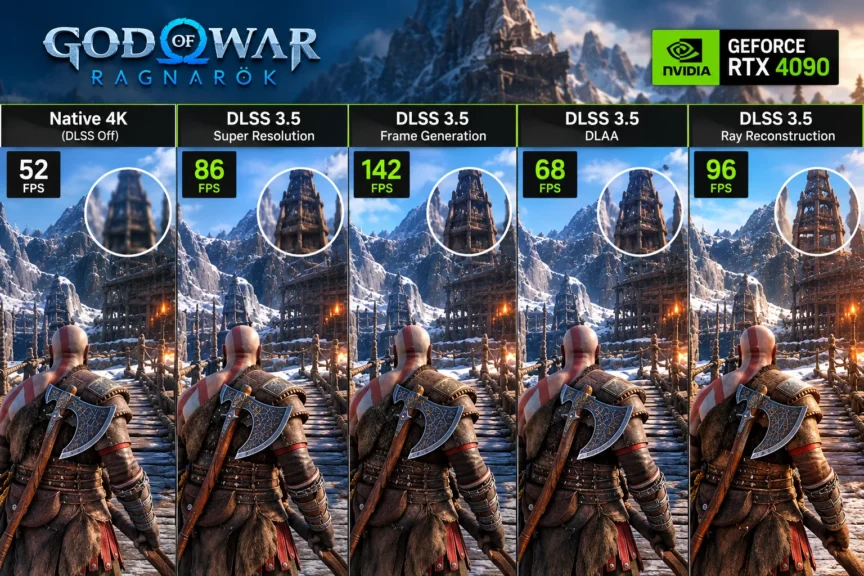
The RTX 4090 supports DLSS 3.5, including Super Resolution, Frame Generation, DLAA, and Ray Reconstruction. DLSS 5 is not live on RTX 40 cards yet. Nvidia says it plans to expand official support to the RTX 40 Series once RTX 50 performance is more fully tuned.
What you get today:
- Super Resolution: It renders fewer pixels, then upscales for higher fps at 4K and 8K.
- Frame Generation: It adds AI-made frames.
- Ray Reconstruction: It cleans up ray-traced lighting.
- DLSS 5: It is RTX 50 only for now, with no public RTX 40 date.
Tip: Frame generation adds latency, so competitive players often skip it.
4. Excellent Creativity Performance
For creators, the 4090 pairs 24 GB of VRAM with dual 8th-gen NVENC encoders and AV1 support. That speeds up exports, renders, and AI tools. Post Perspective’s editor review found a clear generational gain over the RTX 3090.
Where creators benefit:
- That review cited Nvidia figures showing a Magic Mask job finishing in 17 seconds on the 4090 versus 29 on the 3090.
- Dual NVENC and AV1 encoding help with exports and streaming.
- Studio Drivers target stability in creative apps.
Best for: Video editors, 3D artists, and streamers.
Problem: With no NVLink, you can’t link two cards the way 3090 owners could.
5. 8K HDR Gaming
Nvidia lists 8K at 60Hz with DSC and HDR support for the RTX 4090. The card can send that signal, but real frame rates at native 8K depend heavily on the game. DLSS is what makes 8K practical.
8K reality check:
- 8K has four times the pixels of 4K, so demand jumps sharply.
- The same card can drive 4K at up to 240Hz.
- You need an 8K display with a compatible input.
Best for: Enthusiasts with an 8K TV or monitor.
Recommendation: For most players, 4K at 120Hz or higher is the smarter target.
Gaming Performance of the RTX 4090
The RTX 4090 is built for 4K and above.
4K Gaming Benchmarks
At 4K with max settings and DLSS/FSR off, the RTX 4090 averaged roughly 95 to 140 fps across five demanding games. GPU usage stayed at 97% or higher, so the card, not the CPU, set the limit. That is the ideal 4K result.
| Game | FPS | GPU usage (%) | Temp (°C) |
|---|---|---|---|
| 007 First Light | ~95 | ~98 | ~70 |
| Resident Evil Requiem | ~140 | ~97 | ~70 |
| God of War Ragnarök | ~120 | ~100 | ~77 |
| Ghost of Tsushima | ~140 | ~99 | ~80 |
| Assassin’s Creed Mirage | ~140 | ~99 | ~77 |
Tested at 4K max settings with DLSS and FSR off. Figures are approximate.
Source: Mark PC YouTube Channel.
8K Gaming Benchmarks
At 8K, the RTX 4090 managed about 52 fps in Cyberpunk 2077, 45 in The Witcher 3, and 34 in Assassin’s Creed Valhalla. That is playable in some games, but 8K is still a stretch even for this card.
| Game | FPS | GPU usage (%) | Temp (°C) |
|---|---|---|---|
| Cyberpunk 2077 | ~52 | ~98 | ~65 |
| The Witcher 3 | ~45 | ~99 | ~64 |
| Assassin’s Creed Valhalla | ~34 | ~98 | ~60 |
8K results vary a lot with upscaling and settings, so treat these as reference points.
Source: Benchmarks For Gamers YouTube channel.
How to get better 8K results:
- Turn on DLSS Super Resolution to cut the pixels the GPU renders.
- Lower one or two heavy settings, such as shadows, before dropping resolution.
- Pair the card with a fast CPU so it doesn’t cap your frame rate.
For a full walkthrough, see our guide to optimizing your gaming PC for 8K gaming.
What Is the Price of the RTX 4090?
Nvidia listed the RTX 4090 at $1,599, but current prices run far higher. The card is no longer in production, and a wider memory shortage has pushed GPU prices up. For a decent deal on the 4090 graphics card, expect to pay roughly $500 to $800 over MSRP.
What to expect when you shop:
- MSRP: $1,599.
- Decent deals: About $2,100 to $2,400.
- Wider range: One tracker of eBay sold listings recorded used prices between $2,000 and about $3,010.
- Availability: New-in-box stock is scarce, so most buyers see used or open-box listings.
Important note: Prices swing week to week, so check current listings. Buy with return protection, and test the card right away. If prices land far above these ranges, price out the RTX 5080 first.
Public Opinions on the RTX 4090
While researching, I scrolled through Reddit to see what owners really think. The mood was overwhelmingly positive, with a few useful warnings.
What owners were saying:
- Many called it the second-best card after the RTX 5090.
- Others said it’s best when you find it at a lower price.
- Some ranked it above older flagships like the GTX 1080 Ti.
- One commenter bought at $1,600 and listed at $2,700, a profit of roughly $1,100.
- Many argued that selling a 4090 to buy an RTX 5080 is a downgrade, because the 5080 has 8 GB less VRAM, and modern games at max 4K and 8K demand plenty.
- One owner said his card died while he packed it for a move.
In the threads I read, I didn’t find complaints about performance. The dead-card story stood out, but one failure says little about the whole model, and I can’t know the cause. Still, if you buy used, test the card immediately.
What Is the 48GB VRAM 4090?
The 48 GB RTX 4090 is not an official Nvidia product. It is a modded card, reportedly rebuilt from existing 4090 hardware and sold in China. Its extra memory suits AI work, not gaming.
The reports date back to 2025. A Russian YouTuber tested a blower-style unit, and VideoCardz reported nearly 65 dB in Unigine Superposition, while a comfortable level sits around 30 to 40 dB. I couldn’t find any response from Nvidia.
48GB 4090 at a glance:
- Status: Unofficial, so expect no official Nvidia warranty or support.
- Noise: Nearly 65 dB under load, which is extremely loud.
- Gaming value: Reviews noted that most games don’t exceed 24 GB, so gamers gain little.
- Best for: AI and large-model work.
What I Liked and Disliked About the RTX 4090
After digging into the numbers, here is what stood out, good and bad. The tables sum up the trade-offs at a glance.
What I Liked the Most
| Pro | Why it matters |
|---|---|
| Huge upgrade over the 3090 series | KitGuru measured about 80% higher 4K fps than the RTX 3090 on average |
| DLSS 3.5 today, DLSS 5 planned | Frame Generation now, and Nvidia confirms RTX 40 support is coming |
| Better efficiency than the 3090 series | Over 80% better performance per watt than the 3090 Ti at 4K |
| Not that loud for its size | KitGuru measured 41 dBA at one foot, against a 32 dBA noise floor |
| Longevity | 24 GB of VRAM and raw power keep it relevant almost four years on |
What I Disliked
| Con | Why it matters |
|---|---|
| High price | $1,599 MSRP, and roughly $500 to $800 more in 2026 |
| Huge size | 304 mm long and three slots wide, so check your case. |
| CPU bottleneck at 1080p | It is a really fast GPU. |
| No NVLink | The 3090 had it, which matters mainly for pro workloads |
To cover the CPU issue, play mostly at 1440p or higher, and pair the card with a fast processor. I’d recommend the Ryzen 7 9800X3D, and you can read our Ryzen 7 9800X3D review for the details.
Who Should Buy This GPU?
I’d buy the 4090 graphics card if you want max 4K performance, need 24 GB of VRAM, and can find one near MSRP. Skip it if you play at 1080p, have a small case or a weak PSU, or can’t stomach 2026 pricing.
| You are… | Verdict | Why |
|---|---|---|
| A 4K max-settings gamer | Buy | About 95 to 140 fps in the 4K tests, plus 24 GB of VRAM |
| A creator or AI hobbyist | Buy | 24 GB VRAM, dual NVENC, AV1 |
| Upgrading from an RTX 3080 or 3090 | Worth it | A big generational jump |
| A 1080p or 1440p gamer | Skip | CPU-limited and overkill |
| Someone who wants a new-card warranty | Think twice | Reportedly out of production, so most stock is used |
Quick comparison:
- RTX 5080: It has 16 GB of VRAM and Multi Frame Generation, but individual testing found the 4090 ahead in several 4K games.
- RTX 5090: It offers 32 GB of GDDR7 and more speed, but at a higher price.
- RTX 4080 Super: It’s worth weighing if 24 GB isn’t essential, and our RTX 4080 vs 4080 Super comparison covers it.
Buying Guide: 5 Mistakes to Avoid
A few avoidable mistakes cost 4090 buyers the most time and money.
- Skipping the PSU check. Nvidia recommends 850W. The card needs three 8-pin cables through the included adapter, or a 450W-plus PCIe Gen 5 cable. Seat the connector fully. Our guide on how to choose PC parts helps you match the rest of the build.
- Ignoring case fit. The card measures 304 mm long and fills three slots. Measure your clearance first.
- Pairing it with a weak CPU or a 1080p monitor. You’ll leave performance unused.
- Buying used without testing. Run a stress test, and watch temperatures and fan behavior. Learn how to check GPU health before you trust a used card.
- Buying for DLSS 5. It isn’t live on RTX 40 yet. Buy for what the card does today.
My Final Answer
Even after almost four years, the RTX 4090 keeps earning attention. Nvidia built something other companies still chase. In the 4K and 8K tests, it delivered strong frame rates, and its 24 GB of VRAM keeps it relevant. Beyond price, size, and CPU demands, I didn’t find a dealbreaker.
In my opinion, if you find the 4090 graphics card near MSRP and you’re not going for the 50 series, get it. If prices stay far above MSRP, compare the RTX 5080 before you decide.
