

When you buy RAM for a PC, you get different speed options such as 3200 MT/s, 3600 MT/s, and 6000 MT/s. This technical information used to confuse me. So, I’m going to break it all down for you in simple words. RAM speed simply means how quickly the memory can transfer data.
You may already have heard of its importance, but does it really matter for gaming? The quick answer is yes, it does matter for gaming.
But you have to understand different factors in order to understand it properly. So, in this article, I will explain the role of RAM speed in gaming in detail. Let’s begin.
My Quick Answer
Yes, RAM speed matters for gaming, but its impact on FPS is usually small. Faster RAM matters more in CPU-limited games like Minecraft, high-FPS gaming, and systems using integrated graphics. For most gamers, getting enough RAM at a good speed is more important than paying extra for the fastest memory available.
What is RAM Speed?
RAM speed refers to how quickly your memory can transfer data. It is usually shown in MT/s, such as 3200 MT/s, 4800 MT/s, or 6000 MT/s.
You may also see RAM advertised using terms like DDR4-3200 or DDR5-6000. The number gives you an idea of the memory’s data transfer rate.
Faster RAM can move data between the RAM and CPU more quickly. This can help the CPU get the information it needs with less waiting.
RAM also has latency, which affects how quickly it responds to requests. So, RAM speed is not the only factor that affects memory performance. For gaming, you do not need to focus on every RAM specification. Just choose a speed and timings that work well with your CPU and motherboard.
Does RAM Speed Matter for Gaming?
Yes, RAM speed can matter for gaming, but its effect on FPS depends heavily on your hardware.
If your graphics card is doing most of the work, increasing RAM speed may only provide a small FPS improvement. Your GPU can remain the main limit, so faster RAM does not have much opportunity to improve performance.
The difference can become more noticeable when the CPU is handling a large amount of work. Faster RAM can give the CPU quicker access to data, which may improve average FPS and, in some cases, minimum FPS.
For example, moving from relatively slow RAM to a faster kit can make a noticeable difference in some CPU-heavy games. Moving from already-fast RAM to an even faster kit usually produces a much smaller improvement.
So, RAM speed matters, but it is not usually the first component you should upgrade for more gaming performance.
How Much Does RAM Speed Affect FPS?
There is no single FPS increase that applies to every game or PC.
The difference can range from almost nothing to noticeable, depending on your CPU, GPU, game, resolution, and RAM setup.
If your GPU is the main limit at 1440p, faster RAM may barely change your FPS. At lower resolutions, the CPU has more influence, which makes RAM speed more relevant.
Faster RAM can also improve 1% lows, helping reduce dips and making gameplay feel more consistent. However, higher RAM speed does not always mean a large FPS increase.
When Does Faster RAM Matter Most?
Faster RAM tends to be more useful in certain gaming situations.
1. CPU-Limited Gaming
RAM speed matters more when your CPU is limiting your FPS.
This often happens when you play at lower resolutions or use a powerful graphics card that can produce very high frame rates. In these situations, the CPU has to process more game data quickly, so memory performance can have a greater effect.
If your GPU is already sitting below full usage because the CPU cannot keep up, faster RAM may help improve performance.
2. Integrated Graphics
RAM speed can matter a lot more when you use integrated graphics. For example: Ryzen 7 8700G.
Integrated GPUs share system RAM with the CPU instead of having their own dedicated video memory. Faster memory can therefore give the integrated GPU more memory bandwidth to work with.
This can make a bigger difference than it would on a gaming PC with a dedicated graphics card.
If you are using an integrated GPU for gaming, choosing reasonably fast RAM is especially important. Using two RAM sticks can also help because dual-channel memory provides more memory bandwidth.
3. High-FPS Gaming
If you are playing competitive games at 1080p and aiming for 144 FPS, 240 FPS, or higher, RAM speed can become more relevant.
At these frame rates, the CPU often becomes a bigger performance factor. Small improvements in CPU and memory performance can therefore translate into higher FPS.
This does not mean you need extremely expensive RAM. A good CPU paired with reasonably fast memory is usually more important than buying the fastest RAM available.
4. Simulation and CPU-Heavy Games
Some games put a lot of work on the CPU. Large simulations, strategy games, city builders, and games with many characters or objects can fall into this category.
These games may benefit more from faster memory because the CPU has to process a large amount of game data.
The improvement still depends on the specific game and hardware, but RAM speed can have more of an effect here than in a typical GPU-heavy game.
Does RAM Speed Matter More Than RAM Capacity?
Usually, RAM capacity matters more than RAM speed once you start running out of memory.
For example, if a game and your other programs are using almost all of your available RAM, having faster memory will not solve the main problem. You may experience stuttering, slowdowns, or problems when switching between applications.
On the other hand, if you already have enough RAM, increasing the speed can provide a performance improvement in some games.
For a modern gaming PC, 16 GB is still a reasonable starting point, while 32 GB gives you more room for newer games, background applications, browsers, and other tasks.
A simple way to think about it is:
- Not enough RAM: Increase capacity first.
- Enough RAM but relatively slow memory: Faster RAM can help.
- Enough RAM and already-fast memory: Further speed increases usually provide smaller gains.
You should also pay attention to whether your RAM is running in dual-channel mode. Two properly configured sticks can provide better memory bandwidth than a single stick.
RAM Speed Vs RAM Capacity
| RAM Upgrade | What You Can Expect | Priority for Gaming |
|---|---|---|
| Increase RAM capacity | Helps when your system is running out of memory | High |
| Increase RAM speed | Can improve FPS and 1% lows in some games | Medium |
| Upgrade both capacity and speed | Can improve overall memory performance | High if current RAM is lacking |
| Upgrade already sufficient and fast RAM | Usually provides only a small gaming improvement | Low |
What RAM Speed is Best for Gaming?
The best RAM speed depends on your platform.
- For DDR4 gaming PCs, 3200 MT/s to 3600 MT/s is a common range that offers good performance without chasing extreme speeds.
- For DDR5 systems, around 6000 MT/s is a strong target for many modern gaming PCs. You do not necessarily need to buy the fastest DDR5 kit available.
Does this make sense to you? I’m sure it’s a bit confusing. You should read our guide on “DDR4 vs DDR5 for Gaming” It breaks down the differences between DDR4 and DDR5 and which one makes more sense for gaming in simple words.
It is also important to check your motherboard and CPU before buying RAM. A kit may support a high speed, but your system may not run it at that speed automatically.
When possible, use the memory profile supported by your motherboard, such as XMP or EXPO, so the RAM runs at its advertised settings.
Is Faster RAM Worth Upgrading for Gaming?
Upgrading your RAM depends on how much faster the new RAM is and what is currently limiting your PC. If you already have 3200 MT/s or 3600 MT/s DDR4 and your games run well, upgrading only for a slightly faster kit is usually not worth the money.
The same applies to a DDR5 system with a good-speed kit. Paying much more for a small increase in memory speed may make little difference in actual gaming.
An upgrade makes more sense when:
- Your current RAM is unusually slow.
- Only one RAM stick is installed.
- The memory is running below its advertised speed.
- You are moving to a newer CPU platform.
- Integrated graphics are handling your games.
- CPU-heavy or competitive games are your main focus.
- A RAM capacity upgrade is already planned.
If you want a major FPS improvement, upgrading your CPU or GPU will usually make a much bigger difference than replacing reasonably fast RAM with slightly faster memory.
How to Check Your RAM Speed?
You can check your RAM speed directly in Windows without installing another program.
- Press Ctrl + Shift + Esc to open Task Manager.
- Click Performance.
- Select Memory.
- Find Speed to see your current RAM speed.
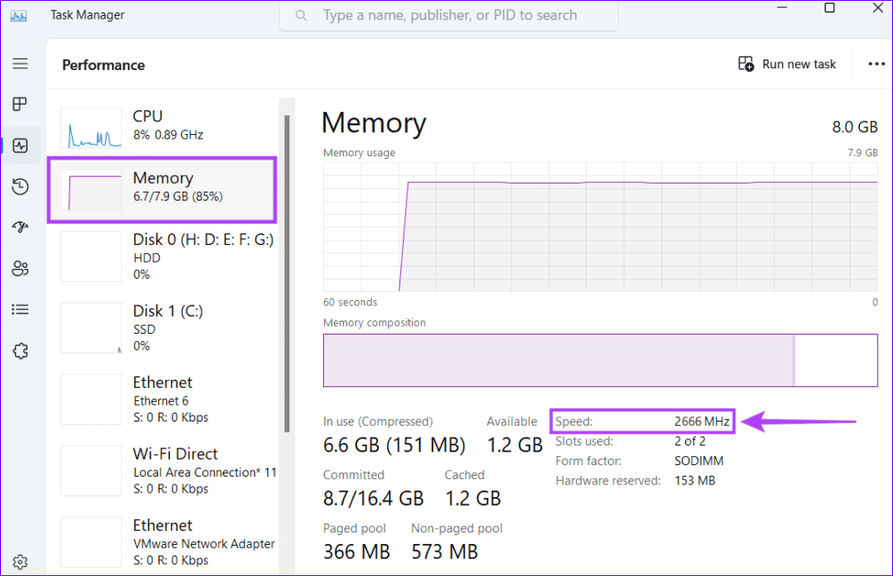
You can also see your total RAM capacity and how many memory slots are being used. If your RAM is advertised at 3200 MT/s but Windows shows a lower speed, the memory profile may not be enabled. You can check your BIOS or UEFI settings for XMP, EXPO, or a similar memory profile option.
Final Words
RAM speed does matter for gaming, but it is only one part of overall system performance. Faster memory can help more when you are CPU-limited, using integrated graphics, playing at very high FPS, or running CPU-heavy games.
For most gamers, getting enough RAM and using a good speed for your platform is more important than chasing the highest available speed. If your current RAM is already fast enough, spending money on a faster kit may provide only a small FPS improvement.
People Also Ask
For DDR4, 3200 to 3600 MT/s is a good range for gaming. For DDR5, around 6000 MT/s is a good target for most modern gaming PCs.
Yes, 3200 MT/s RAM is enough for most gaming PCs using DDR4. Faster RAM can provide some extra performance, but the difference is usually small.
2400 MT/s RAM can still run games, but it is relatively slow by modern standards. Upgrading to faster RAM can improve performance, especially in CPU-limited games.
It can. Faster RAM may improve 1% lows in some CPU-limited games, which can make frame delivery feel more consistent.
If you are running out of RAM, increase capacity first. If you already have enough memory, faster RAM can provide some extra gaming performance, but the gains may be relatively small.
