

Want a budget-focused 360mm AIO CPU cooler? Try the ID-COOLING FX360 INF, as it is the one I am using for my gaming PC. And I can confidently say that it can deliver strong cooling performance without asking you to spend heavily.
The primary highlights of this CPU cooler are its quiet operation and excellent thermal performance. Owing to these, the FX360 INF has positioned itself as a cheaper alternative to more expensive 360mm AIOs.
In this guide, I have provided a complete overview of the ID-COOLING FX360 INF, its specifications, and performance.
What’s My Assessment and Experience With ID-COOLING FX360 INF?
I have been using the ID-COOLING FX360 INF in my gaming PC for around 1 year, and honestly, my gaming experience has been worth telling. I haven’t faced the overheating problem a single time, even while playing high-end games.
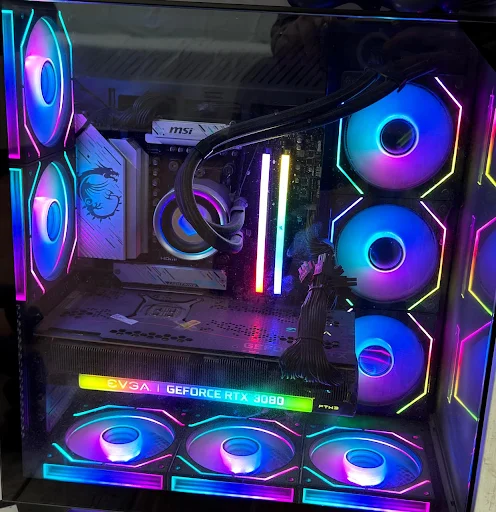
The current configuration of my gaming PC is:
- CPU: AMD Ryzen 7 9800X3D
- GPU: NVIDIA RTX 3080 (12GB GDDR6 VRAM)
- Memory: 64GB DDR5
The FX360 INF has handled the performance of my computer very well, and that’s the reason I recommend it to every gamer around me who wants a good CPU cooler without spending much.
| What I Like | What I Don’t Like |
|---|---|
| Strong cooling for the price | Pump control differs between versions |
| Low noise levels | Thermal paste is not pre-applied |
| 360mm radiator | |
| ARGB infinity-mirror design | |
| 2,900 RPM pump | |
| Full RAM compatibility | |
| Supports AM4, AM5, LGA1200, LGA1700 and LGA1851 | |
| Five-year warranty on the current product listing |
What is ID-COOLING FX360 INF?
The FX360 INF is a 360mm closed-loop liquid CPU cooler aimed primarily at budget-conscious gaming and high-performance PC builds. It uses a 396 × 120 × 27mm aluminum radiator and three 120mm fans capable of reaching up to 2,000 RPM.
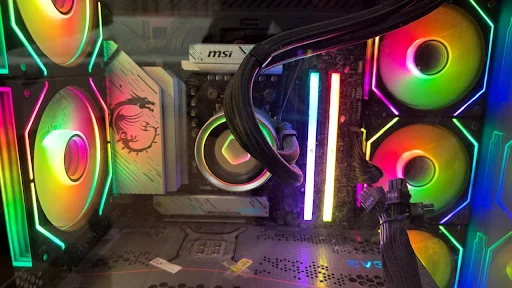
The CPU block combines a copper cold plate with ID-COOLING’s 7th-generation pump, which can operate at up to 2,900 RPM. The top of the block features an ARGB infinity-mirror design that adds lighting without requiring an LCD screen.
One of its biggest advantages is that it does not sacrifice the basic features expected from a modern 360mm AIO simply to achieve its lower price.
Price of the ID-COOLING FX360 INF
The price of the ID-COOLING FX360 INF is $79.99 as per the official store of ID-COOLING on Amazon.
However, you should check and verify the details before purchase, as prices are always subject to change.
ID-COOLING FX360 INF Specifications
| Specification | Details |
|---|---|
| Cooler Type | 360mm AIO liquid cooler |
| Radiator Material | Aluminum |
| Radiator Size | 396 × 120 × 27mm |
| Pump Speed | 2,900 RPM ±10% |
| Pump Bearing | Ceramic |
| Pump Noise | 25 dBA |
| Cold Plate | Copper |
| Fans | 3 × 120mm |
| Fan Speed | 300–2,000 RPM ±10% |
| Airflow | Up to 58 CFM |
| Static Pressure | Up to 1.94 mmH₂O |
| Fan Bearing | Hydraulic |
| Fan Noise | 27.2 dBA maximum |
| Lighting | ARGB |
| Tubing | Premium sleeved tubing |
| Tubing Length | 465mm / 420mm depending on version |
| Intel Compatibility | LGA115X, LGA1200, LGA1700, LGA1851 |
| AMD Compatibility | AM4, AM5 |
| Rated TDP | 350W |
| Warranty | 5 years |
The specifications above are based primarily on ID-COOLING’s current product listing. The manufacturer notes that both older 3-pin and newer 4-pin PWM pump versions exist, so buyers should check the specific version being sold.
1. Pump and Tubing
The FX360 INF uses ID-COOLING’s seventh-generation pump design with a ceramic bearing and a maximum speed of approximately 2,900 RPM. The waterblock uses a copper cold plate designed to transfer heat from the CPU into the liquid loop.
The tubing is sleeved and measures up to 465mm in the current listing, which is enough length for most conventional 360mm radiator installations.
The tubing connections at the pump are rotatable, which provides additional flexibility when positioning the tubes inside the case.
2. Thermal Paste
ID-COOLING includes its Frost X45 thermal compound with the FX360 INF. Tom’s Hardware notes that this paste is rated at 15.2 W/m-K and considers it a strong-performing thermal paste.
Having additional thermal compound is also useful if you later remove and reinstall the cooler.
3. ARGB Infinity-Mirror Pump
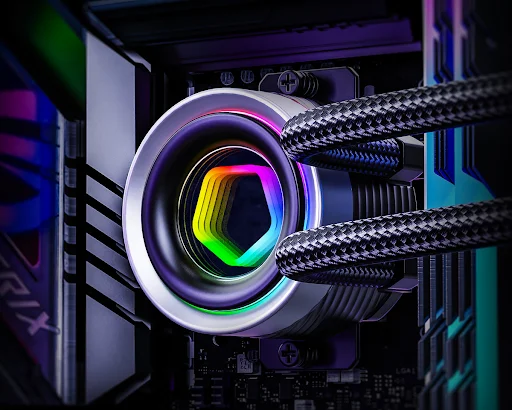
Instead of an LCD screen, ID-COOLING uses an infinity-mirror design on the CPU block.
The pump head features an illuminated geometric design with multiple ARGB lighting loops. The pump top can also be rotated, which allows the lighting design to remain correctly oriented depending on how the cooler is installed.
This is a good approach for users who want attractive gaming PCs without paying extra for a display. If you specifically want CPU temperatures, GIFs, or system information displayed directly on the pump, however, an LCD-equipped AIO would be a better choice.
4. 120mm ARGB Fans
The FX360 INF comes with three 120mm fans rated for speeds between 300 and 2,000 RPM. Each fan can produce up to 58 CFM of airflow and 1.94 mmH₂O of static pressure. The fans use hydraulic bearings and connect through PWM and 5V 3-pin ARGB connections.
The fans also use a quick-connect arrangement that helps simplify cable management compared with having several completely independent cables running through the case.
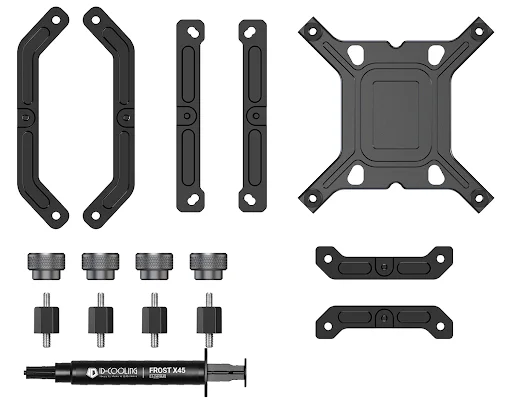
5. Installation
Installation is relatively straightforward for this 360mm AIO CPU cooler. For Intel LGA1700, the process is as follows:
- Install the appropriate backplate and mounting hardware
- Attach the mounting bars
- Apply thermal paste
- Secure the CPU block
- Connect the PWM and ARGB cables.
AMD AM4 and AM5 installation follows a similar process, with the main difference being the mounting hardware used on the motherboard. The included tubing clips can also help keep the tubes organized inside the case.
One thing to note is that the thermal paste is supplied separately rather than being pre-applied. In my experience, it is a minor inconvenience for first-time builders and KitGuru has also highlighted it.
6. Cooling Performance
Cooling performance is where the FX360 INF becomes particularly interesting for its price.
I test the cooling performance by measuring temperature after playing Resident Evil Requiem on my PC, using the Ryzen 7 9800X3D and EVGA 3080 FTW3.
- At 1080p, the temperature was 58°C.
- At 1440p, the temperature was 65°C.
This shows that the FX360 INF cooler has worked quite well to maintain the temperature for optimal performance.
Tom’s Hardware tested the cooler with an Intel Core i7-14700K and measured an average sustained CPU package power of approximately 259W. The cooler was also tested with Intel’s Core Ultra 9 285K and was able to sustain full, unthrottled performance in that testing. That is impressive considering the cooler’s budget positioning.
In a combined CPU and GPU workload using a 110W CPU load and a 275W GPU load, Tom’s Hardware recorded an average CPU temperature of 58°C.
KitGuru’s testing with AMD’s Ryzen 9 9950X also showed respectable performance, with an average load temperature of 64°C in its manual overclocking test. However, KitGuru noted that some similarly priced coolers can deliver better thermal performance when their fans are tuned to comparable noise levels.
Overall, the FX360 INF is capable of handling demanding modern CPUs, although its main advantage is the combination of cooling and low noise rather than class-leading thermal performance.
7. Noise Levels
Noise is arguably one of the FX360 INF’s strongest characteristics. Tom’s Hardware measured 44.4 dBA while the cooler was sustaining its high-power CPU workload.
KitGuru also found the cooler unusually quiet, recording approximately 43 dBA at maximum fan speed while testing with the Ryzen 9 9950X.
Per my experience, I am quite satisfied with the noise level of the FX360, as it never caused me trouble even during FPS games like Call of Duty.
This makes the FX360 INF particularly attractive if you want a 360mm AIO without aggressive fan noise. Hence, you can use the best gaming CPUs without worrying.
8. Radiator and Case Compatibility
The FX360 INF uses a standard 360mm radiator measuring 396 × 120 × 27mm. With its 25mm-thick fans installed, the radiator-and-fan assembly requires roughly 52mm of total thickness.
Before buying, your case should therefore have dedicated 360mm radiator support and enough clearance for the radiator, fans, motherboard components, and RAM.
The radiator itself does not interfere with RAM slots, and the cooler provides full RAM compatibility because the CPU block does not overhang the DIMM slots.
For front mounting, also check GPU clearance because a 360mm radiator and fans occupy significant space inside the chassis.
CPU Compatibility of ID-COOLING FX360 INF
The ID-COOLING FX360 INF supports AMD AM4 and AM5 processors, along with Intel LGA115X, LGA1200, LGA1700, and LGA1851 platforms. The following processors are examples of CPUs that use the supported sockets.
1. AMD AM4
The FX360 INF supports Ryzen processors using the AM4 socket, including Ryzen 3000 and Ryzen 5000 series desktop CPUs.
| Ryzen Series | Compatible Processors |
|---|---|
| Ryzen 3000 | Ryzen 5 3600, Ryzen 5 3600X, Ryzen 7 3700X, Ryzen 7 3800X, Ryzen 9 3900X, Ryzen 9 3900XT, Ryzen 9 3950X |
| Ryzen 5000 | Ryzen 5 5500, Ryzen 5 5600, Ryzen 5 5600X, Ryzen 7 5700X, Ryzen 7 5700X3D, Ryzen 7 5800X, Ryzen 7 5800X3D, Ryzen 9 5900X, Ryzen 9 5900XT, Ryzen 9 5950X |
2. AMD AM5
The FX360 INF supports AMD’s AM5 socket, covering Ryzen 7000, Ryzen 8000G, and Ryzen 9000 desktop processors.
| Ryzen Series | Compatible Processors |
|---|---|
| Ryzen 7000 | Ryzen 5 7500F, Ryzen 5 7600, Ryzen 5 7600X, Ryzen 7 7700, Ryzen 7 7700X, Ryzen 7 7800X3D, Ryzen 9 7900, Ryzen 9 7900X, Ryzen 9 7900X3D, Ryzen 9 7950X, Ryzen 9 7950X3D |
| Ryzen 8000G | Ryzen 5 8500G, Ryzen 5 8600G, Ryzen 7 8700G |
| Ryzen 9000 | Ryzen 5 9600X, Ryzen 7 9700X, Ryzen 7 9800X3D, Ryzen 7 9850X3D, Ryzen 9 9900X, Ryzen 9 9900X3D, Ryzen 9 9950X, Ryzen 9 9950X3D |
These processor examples are based on their use of the supported AM5 socket. They should not be interpreted as individual CPU models that ID-COOLING has specifically tested with the FX360 INF.
3. Intel LGA1700
The FX360 INF supports Intel processors using the LGA1700 socket, including 12th, 13th, and 14th Generation Core desktop CPUs.
| Intel Generation | Compatible Processors |
|---|---|
| 12th Gen | Core i5-12600K, Core i7-12700K, Core i9-12900K |
| 13th Gen | Core i5-13600K, Core i7-13700K, Core i9-13900K |
| 14th Gen | Core i5-14600K, Core i7-14700K, Core i9-14900K |
4. Intel LGA1851
The FX360 INF also supports Intel’s LGA1851 socket, making it compatible with Core Ultra desktop processors that use this platform.
| Intel Core Ultra Series | Compatible Processors |
|---|---|
| Core Ultra 200S | Core Ultra 5 245K, Core Ultra 7 265K, Core Ultra 9 285K |
5. Intel LGA1200 and LGA115X
The FX360 INF also officially supports Intel’s older LGA1200 and LGA115X sockets. This covers compatible Intel Core processors from previous generations that use these platforms.
ID-COOLING lists socket compatibility rather than providing a processor-by-processor compatibility database. Therefore, compatibility with a specific CPU should ultimately be confirmed against the motherboard socket and the mounting hardware included with the particular FX360 INF version.
ID-COOLING FX360 INF vs 240mm AIO
The main reason to choose the FX360 INF over a 240mm AIO is the larger radiator and additional fan.
A 360mm radiator provides substantially more surface area for heat dissipation, which makes it better suited to high-power processors and sustained workloads.
The trade-off is size. A 360mm AIO requires a larger compatible case and takes considerably more installation space than a 240mm model.
For mainstream gaming CPUs, a good 240mm AIO like the Corsair Nautilus 240 RS may already be sufficient. For high-end Ryzen 9, Core i7, or Core Ultra processors, the FX360 INF gives you more thermal headroom.
Who Should Buy the ID-COOLING FX360 INF?
The FX360 INF makes the most sense for:
- Gamers building a high-performance PC
- Users running Ryzen 5, Ryzen 7, Ryzen 9, or comparable Intel processors
- Anyone wanting a 360mm AIO on a limited budget
- Buyers who prioritize low noise
- RGB gaming PC builders
- Users who prefer an infinity-mirror design over an LCD
- Anyone wanting compatibility with modern AM5 and LGA1851 platforms
It is less appealing if you have a small case, do not need 360mm cooling, or want an integrated LCD display.
Final Thoughts
The ID-COOLING FX360 INF is one of the more compelling 360mm AIOs because it focuses on performance instead of expensive extras.
Its 360mm radiator, 2,900 RPM pump, copper cold plate, and three ARGB fans provide enough cooling capacity for demanding modern CPUs. Its biggest strengths are its price, cooling performance, low noise, and simple ARGB infinity-mirror design.
It is not necessarily the absolute best-performing 360mm AIO like the Arctic Liquid Freezer III 360, but that is not really the point. If you want a capable 360mm liquid cooler without spending premium money, the FX360 INF is a very strong option to consider.
