

Going to buy an RTX 5090? On paper, the RTX 5090 is easy to get excited about. The harder part is figuring out what all those numbers actually mean for your games.
- Is 32GB of GDDR7 really useful for 4K gaming?
- And how much does its 575W power draw matter in a real PC?
In this guide, I explained the RTX 5090’s hardware, features, and 4K performance in context, plus what’s actually happening with stock and pricing right now, and whether it is worth buying now or wait.
My Quick Specs Overview
| Spec | RTX 5090 |
|---|---|
| Architecture | Blackwell |
| CUDA Cores | 21,760 |
| Tensor Cores | (5th gen) |
| RT Cores | (4th gen) |
| VRAM | 32GB GDDR7 |
| Memory Bus / Bandwidth | 512-bit / 1,792 GB/s |
| Boost Clock | 2.41 GHz |
| Total Graphics Power | 575W |
What is the Nvidia RTX 5090?
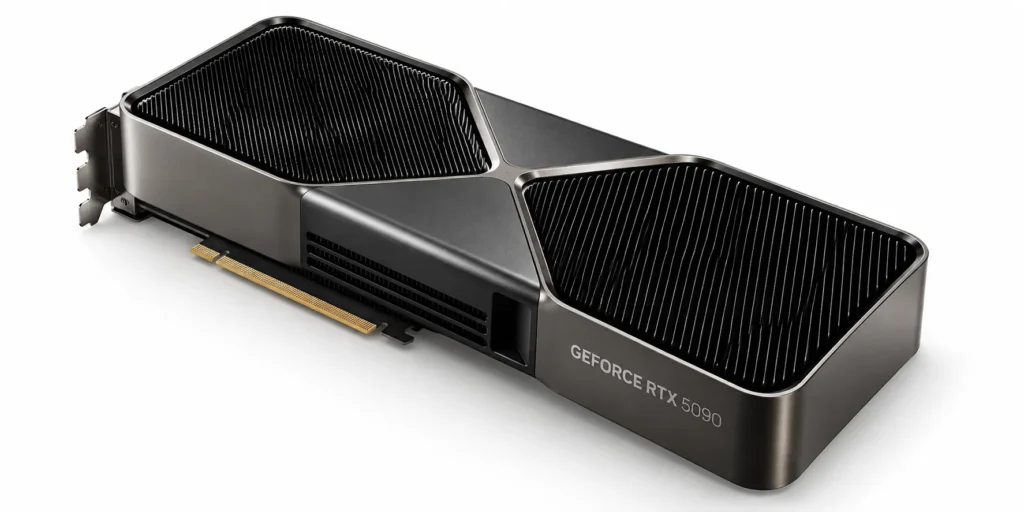
The Nvidia GeForce RTX 5090 is Nvidia’s flagship consumer graphics card, positioned as the most powerful GeForce GPU the company has ever shipped.
It targets 4K gaming, path tracing, and heavy creator or local-AI workloads, backed by 32GB of GDDR7 memory which is the most VRAM ever offered on a mainstream GeForce card.
When Was 5090 Launched?
Nvidia announced the RTX 5090 at CES on January 6, 2025, and it went on sale on January 30, 2025, alongside the RTX 5080. It’s been the top card in Nvidia’s Blackwell gaming lineup ever since, with no RTX 5090 Ti or Super refresh confirmed as of this writing.
Key launch facts:
- Announced: January 6, 2025 (CES)
- Released: January 30, 2025
- Sold alongside: RTX 5080 ($999 MSRP)
- Successor to: RTX 4090
What is the Price of Nvidia RTX 5090?
Nvidia’s official Founders Edition MSRP is $1,999, and that figure hasn’t changed on paper.
In practice, actual pricing is a very different story. A GDDR7 memory shortage tied to the AI boom has pushed real-world street prices well past MSRP throughout 2026, and by September 2026 several tracked retail listings were running from roughly $4,600 up to $9,000–$11,500 on select partner models, when they’re in stock at all.
What are The Specifications of Nvidia RTX 5090
| Category | Spec | Detail |
|---|---|---|
| GPU Architecture | Blackwell | 5th-gen Tensor Cores, 4th-gen RT Cores |
| VRAM | 32GB GDDR7 | Most VRAM on a consumer GeForce card |
| CUDA Cores | 21,760 | Up from 16,384 on the RTX 4090 |
| Clock Speed | 2.01–2.41 GHz | Base to boost |
| Memory Speed & Bandwidth | 512-bit bus | 1,792 GB/s bandwidth |
| TDP & Power | 575W TGP | 1000W PSU recommended |
| Dimensions | 304mm x 137mm | 2-slot Founders Edition design |
These specifications are derived from Nvidia’s official website.
1. GPU Architecture
The RTX 5090 runs on Nvidia’s Blackwell architecture, which brings 5th-generation Tensor Cores built for FP4 and DLSS, alongside 4th-generation RT Cores designed around Mega Geometry for more detailed ray-traced scenes.
This is the same architecture family used across the entire RTX 50 series, from the 5090 down to the 5050.
Best For: Readers comparing generations before upgrading
2. How Much VRAM Does 5090 Have?
32GB of GDDR7 is the headline spec here, and it’s a meaningful jump from the RTX 4090’s 24GB of GDDR6X. That extra headroom matters most at 4K with ray tracing enabled, in texture-heavy creative workloads, and for local AI inference where model size is the limiting factor.
If you’re still deciding how much VRAM your build actually needs, our VRAM buying guide by resolution breaks that down tier by tier.
Ideal For: 4K gaming, creative work, and local LLM inference
3. How many CUDA cores does 5090 Have?
The RTX 5090 has 21,760 CUDA cores. They help in translating directly into more raw shader throughput for traditional rendering, not just AI-assisted frames.
4. What is the Clock Speed of 5090?
Nvidia lists a base clock of 2.01 GHz and a boost clock of 2.41 GHz for the Founders Edition. Factory-overclocked partner cards typically push a little higher out of the box, though the gains are usually small relative to the card’s overall performance.
5. Memory Speed & Bandwidth
The 512-bit memory interface paired with GDDR7 delivers 1,792 GB/s of bandwidth — nearly 78% more than the RTX 4090’s 1,008 GB/s. That bandwidth is what lets the card feed its Tensor and RT cores fast enough to sustain 4K frame rates without the GPU starving for data.
6. How Much TDP and Power Does 5090 Consumes?
Total graphics power (TDP) sits at 575W, and Nvidia recommends a minimum 1000W power supply for the system as a whole. You’ll need either four 8-pin PCIe cables into the included adapter or a single 600W rated PCIe Gen 5 cable.
Note:
- 850W is not enough. Nvidia’s own guidance starts at 1000W
- Temporary power spikes mean headroom above the minimum is safer, especially with a high-end CPU in the same system
7. What are The Weight and Dimensions of 5090?
The Founders Edition is 304 mm long and 137 mm wide in a 2-slot design, using a dual flow-through vapor chamber cooler. Nvidia doesn’t publish an official weight figure for this card, so if you’re worried about PCIe slot sag, a support bracket is a cheap, sensible precaution regardless of the exact number.
Partner cards vary; some AIB models run closer to 3-slot thickness and over 350mm long, so always check clearance against your specific case before ordering.
What Are The Features of RTX 5090?
Below are the features for what the RTX 5090 has been made for.
1. DLSS 4
The RTX 5090 ships with the complete DLSS 4 suite, including Super Resolution, DLAA, Ray Reconstruction, Frame Generation, and Multi Frame Generation.
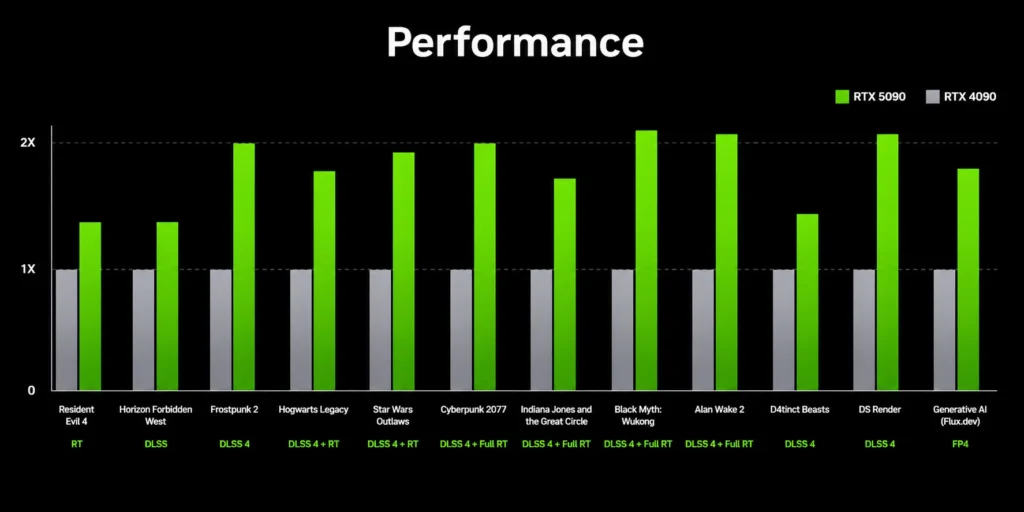
On this card specifically, the Tensor Cores are what run all five of those modes, and DLSS 4 is the main reason the 5090 pulls so far ahead of the RTX 4090 in Nvidia’s own performance charts for supported titles.
2. Frame Generation
On the RTX 5090, Frame Generation uses the Tensor Cores and Optical Flow Accelerator to insert an AI-generated frame between two traditionally rendered ones, boosting perceived smoothness without fully rendering every frame individually.
The feature also exists on RTX 40-series cards, but the 5090’s extra Tensor throughput lets it sustain frame generation at higher base resolutions with less overhead.
3. Multi-Frame Generation
This is where the RTX 5090’s hardware specifically matters: its 5th-generation Tensor Cores let it dynamically generate up to several AI frames per traditionally rendered frame, a mode that’s exclusive to the RTX 50 series.
Best For: Games with native MFG support
4. Ray Tracing Technology
This one comes straight from the card’s hardware spec sheet: the RTX 5090 packs 170 4th-generation RT Cores. Those RT Cores are what let the 5090 run full path tracing and Mega Geometry, making it handle far more triangle detail in ray-traced scenes.
5. AI Performance
The RTX 5090’s Tensor Cores are what produce its AI performance. On this card, that Tensor power is what actually runs DLSS in real time, accelerates AI-based content creation tools in Nvidia Studio, and handles local LLM inference, with the 32GB of VRAM giving it room to hold larger models than the 4090 can.
How Well Does 5090 Perform in 4K Gaming?
| Game | GPU Usage | 1% Lows | Avg. FPS |
|---|---|---|---|
| God of War Ragnarök | 97% | 125 | ~449 |
| Resident Evil Requiem | 98% | 70 | ~289 |
| Forza Horizon 6 | 98% | 73 | ~302 |
| The Last of Us Part 2 | 97% | 109 | ~421 |
| Crimson Desert | 99% | 71 | ~244 |
Test bench components:
- AMD Ryzen 7 9800X3D
- Montech HyperFlow 360mm AIO
- GIGABYTE B650 Aorus Elite V2
- Kingston Fury Renegade 32GB 6000MHz CL32 DDR5
- Fanxiang S770 2TB PCIe 4.0 SSD
- Kootion 2TB PCIe 4.0 SSD
- Lian Li Edge Gold 1200W PSU
- NZXT H6 Flow case.
These gaming benchmarks are verified from Geralt Benchamrks YouTube channel.
What is DLSS 5 on 5090?
Nvidia officially launched DLSS 5 in September 2026, introducing 3D-Guided Neural Rendering, which is an AI model that adds lighting, subsurface scattering, and contact-shadow detail directly into the rendering pipeline, on top of what DLSS 4 already does.
The RTX 5090 is one of the first cards to run it, since Blackwell’s Tensor Cores handle the FP8 format the model needs. It’s worth being clear this isn’t a 50-series-only feature going forward, though: Nvidia has confirmed DLSS 5 is coming to RTX 40-series cards as well, since Ada Lovelace’s Tensor Cores also support FP8.
DLSS 5 Quality vs Normal Gaming Quality

You can clearly see the difference between DLSS on vs DLSS off. The textures, lightning, and clarity, everything improves.
What Type of Components To Pair With 5090?
Pairing the RTX 5090 with the wrong components is the easiest way to bottleneck a $2,000 GPU. If you’re building from scratch, start with our guide to choosing PC parts before locking in anything below.
1. CPU
You want a modern high-end CPU to avoid bottlenecking the 5090 at 1440p and 4K. AMD’s Ryzen 7 9800X3D and Ryzen 7 9850X3D is a strong, widely recommended pairing.
For general guidance on matching a CPU to your GPU tier, check out our how to pick a CPU guide.
2. RAM
32GB of DDR5 at 6000MHz or higher is a sensible baseline for a build around this GPU, giving you headroom for gaming, streaming, and any AI workloads without needing to size up further right away.
3. Storage
A PCIe 4.0 or 5.0 NVMe SSD in the 2TB range keeps modern game install sizes and load times in check. A secondary drive is worth adding if you’re also doing content creation or local AI work alongside gaming.
4. MotherBoard
Match your board to your CPU platform and make sure it supports PCIe 5.0 for the GPU slot, plus enough power delivery for a high-end chip if you’re pairing with something like the 9800X3D.
Choose Something Like:
- X670 (WIFI + gaming)
- X850
5. Case
Confirm clearance for a large, multi-slot card before you buy one. Many RTX 5090 partner models run longer and thicker than the Founders Edition. Airflow-focused cases help keep both the GPU and CPU cool under sustained 4K loads.
6. Power Supply
Budget for at least 1000W, ideally from a unit with native ATX 3.0/PCIe 5.0 connectors rather than relying solely on adapters, especially if you’re also running a power-hungry CPU.
RTX 5090 vs RTX 4090
| Spec | RTX 5090 | RTX 4090 |
|---|---|---|
| NVIDIA Architecture | Blackwell | Ada Lovelace |
| CUDA Cores | 21,760 | 16,384 |
| DLSS | DLSS 4 + DLSS 5 (native) | DLSS 4 (DLSS 5 rolling out) |
| AI TOPS | 3,352 | 1,321 |
| Tensor Cores | 5th Gen | 4th Gen |
| Ray Tracing Cores | 4th Gen | 3rd Gen |
| NVIDIA Encoder (NVENC) | 3x 9th Gen | 2x 8th Gen |
| NVIDIA Decoder (NVDEC) | 2x 6th Gen | 1x 5th Gen |
| Memory Configuration | 32GB GDDR7 | 24GB GDDR6X |
| Memory Bandwidth | 1,792 GB/s | 1,008 GB/s |
| Total Graphics Power | 575W | 450W |
| Launch Price | $1,999 | $1,599 |
Who Should Buy This GPU?
This GPU is an ideal pick for:
- 4K gamers who want max settings without compromise.
- Creators and local-AI users who need the VRAM.
- Enthusiasts building a no-compromise rig.
It’s a poor option for anyone gaming at 1080p or 1440p or on a strict budget. At that budget an RTX 5070-tier card will get you most of the visual experience for a fraction of the cost and hassle right now.
Pros and Cons of RTX 5090
| Pros | Cons |
|---|---|
| Fastest consumer GPU available | Street prices far above the $1,999 MSRP |
| 32GB VRAM, which is the most on any GeForce card | Frequently out of stock at major retailers |
| DLSS 5 support, native at launch | 575W TGP needs a serious PSU |
| Best-in-class ray tracing and AI performance | Large size limits case compatibility |
Would I Recommend the RTX 5090?
The RTX 5090 is, without question, the fastest consumer GPU you can buy, and the specs back that up, and now DLSS 5 support on top of everything DLSS 4 already offered. If money and availability weren’t factors, it’d be an easy recommendation for anyone serious about 4K gaming or local AI work.
But money and availability are factors right now. Between the GDDR7 shortage and AI-driven demand, you’re not really choosing between $1,999 and “worth it” — you’re choosing between paying several times MSRP or waiting it out.
My honest advice: if you can find one anywhere close to a fair price, and your workload genuinely needs the VRAM or the raw performance, buy it. If you’re gaming at 1440p or don’t need 32GB of headroom, save your money and revisit this once the memory market settles down.
