

4K gaming on a laptop sounds like something you’d only dream about a few years ago. Today, thanks to NVIDIA’s RTX 50-series GPUs and DLSS 4 with Multi-Frame Generation, it’s genuinely possible — but that doesn’t automatically make it the right move for every gamer.
Here’s the honest truth: most gaming laptops sold in 2026 don’t even ship with a 4K screen. The vast majority top out at 1080p or 1440p—and for good reason. Higher frame rates matter more than pixel density in fast-paced games.
But if you’re chasing the most visually stunning laptop gaming experience money can buy, especially for immersive single-player titles, 4K resolution gaming is finally within reach — with some important caveats.
In this guide, we break down exactly what you need, what to realistically expect, and which laptops are actually worth buying for 4K gaming in 2026.
What Does 4K Gaming on a Laptop Actually Require?
4K resolution (3840×2160) pushes four times the pixels of 1080p. That means your GPU has to process four times the data per frame — and inside a laptop chassis with strict thermal and power constraints, that’s a serious ask.
Is the RTX 5080 the Minimum?
A couple of years ago, even an RTX 4090 laptop GPU struggled to hold 60 fps at native 4K in demanding AAA titles without upscaling. In 2026, the RTX 5090 mobile GPU averages around 66 fps at 4K across a wide range of games using native rendering — playable, but not exciting on a high-refresh display.
The RTX 5080 laptop GPU handles most 2026 titles at high-to-maximum 4K settings at playable frame rates too, but it starts to show its limits in the most demanding path-traced workloads (think Cyberpunk 2077 with full path tracing and ray reconstruction).
The realistic threshold:
- RTX 5080: Smooth 4K gaming with DLSS 4 Quality mode. Struggles at native 4K in the heaviest titles.
- RTX 5090: Handles native 4K Ultra at 60+ fps in most 2026 games. Still benefits from DLSS 4 for high-refresh play.
- RTX 5070 Ti and below: Best at 1080p–1440p gaming. Can push 4K in less demanding titles or older games, but don’t expect AAA performance.
TGP Matters More Than the Label?
This is the most underrated buying consideration in the 4K laptop space. Two laptops can both carry an “RTX 5090” badge, but if one runs at 115W TGP and another at 175W, you’re looking at a very different machine. Always look for 150W TGP minimum on any flagship GPU — and check independent review sites (Notebookcheck, UltrabookReview) for sustained-load benchmarks, not just burst figures.
Don’t Forget External 4K Monitors
You don’t need a laptop with a built-in 4K panel to game at 4K. Any high-end gaming laptop with an RTX 5080 or 5090 and a USB-C or DisplayPort output can drive an external 4K monitor at your desk.
This hybrid setup — 4K on a monitor, fast 1440p or 1080p on the lid — is actually what most power users choose. It’s flexible, practical, and gets you into 4K gaming without paying the premium for a built-in 4K screen.
What is The Real Reason That 4K Gaming on Laptops Is Viable Now?
DLSS 4 with Multi-Frame Generation is arguably the most important technology for 4K laptop gaming in 2026. It’s exclusive to RTX 50-series Blackwell GPUs, and what it does is genuinely impressive: it synthesizes AI-generated frames between rendered frames, multiplying your output frame rate by 2x, 3x, or even 6x in supported modes.
In a real-world test, a Razer Blade 16 with an RTX 5090 running Cyberpunk 2077 at max settings delivered 186 fps with DLSS 4 enabled — more than double the 88 fps recorded on a Blade 16 with last year’s RTX 4090. In another benchmark, a Cyberpunk 2077 run at 4K with DLSS 4 jumped from 47 fps to 144 fps — a 101% performance uplift.
DLSS 4 Considerations for 4K Gaming:
- Higher input latency: DLSS 4 adds a small delay compared to native rendering.
- Avoid for competitive games: CS2, Valorant, and Apex Legends players may notice the difference.
- Great for single-player games: Ideal for RPGs, open-world, and cinematic titles.
- Better 4K experience: Delivers excellent visuals with minimal noticeable latency.
Our take: If you own an RTX 50-series laptop, there’s almost no reason not to run DLSS 4 for single-player 4K gaming. It transforms what’s possible.
Is 4K Gaming on a Laptop Worth It in 2026?
For a surprisingly large number of gamers, the answer is still no — and that’s not a criticism of 4K. It’s simply a reflection of how modern gaming hardware works. Even with RTX 50-series GPUs pushing laptop performance further than ever, 4K remains the most demanding gaming resolution available. If your priority is maximum frame rate, lower latency, and the best performance-per-dollar, a high-refresh 1440p laptop is still the smarter buy.
Where 4K starts to make sense is for players who care deeply about image quality. Story-driven RPGs, open-world adventures, racing games, and cinematic single-player experiences all benefit from the added sharpness and detail.
Pair an RTX 5080 or RTX 5090 with DLSS 4 and a quality 4K display, and the visual experience is genuinely stunning in a way that even excellent 1440p panels struggle to match.
The other factor is longevity. Buying a laptop capable of 4K gaming today effectively means buying flagship-class hardware. While that comes with a steep upfront cost, it also gives you more performance headroom for future titles, higher-quality textures, and increasingly demanding ray-tracing workloads.
Our verdict: 4K gaming on a laptop is absolutely worth it in 2026 — but only if you’re already shopping in the premium tier. For most gamers, 1440p remains the best balance of performance, visuals, and value. For enthusiasts chasing the best image quality available, 4K finally delivers an experience that justifies the investment.
How Much Does a 4K Gaming Laptop Cost in 2026?
A true 4K gaming laptop in 2026 usually costs $2,500–$5,000+ because the expensive part is the hardware needed to power 4K gaming, not just the display. RTX 5080 and RTX 5090 laptops are the main options for this resolution. A more affordable approach is using a powerful QHD laptop with an external 4K monitor.
4K Gaming Laptop Cost Breakdown:
- Avoid paying only for a 4K panel: Performance hardware matters more than the screen resolution alone.
- Expect premium pricing: Most capable 4K gaming laptops start around $2,500.
- RTX 5080 models: Usually cost $2,500–$3,500 depending on configuration.
- RTX 5090 models: Often start around $3,500 and can exceed $5,000.
- Main cost factors: Flagship GPUs, advanced cooling, high-power components, and premium builds.
- Better value option: Buy a powerful QHD laptop and connect it to a 4K external monitor.
Best 4K Gaming Laptops in 2026
These are three of the best gaming laptops for 4K gaming.
1. MSI Titan 18 HX AI (2026)
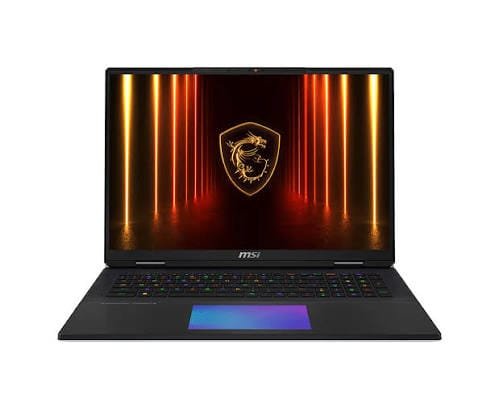
The MSI Titan 18 HX AI is the ultimate 4K gaming laptop, featuring an 18-inch 4K Mini LED 240Hz display, RTX 5090, and Core Ultra 9 290HX Plus. It delivers unmatched performance with premium hardware for gamers who want the highest possible laptop experience.
Key Specs: Intel Core Ultra 9 290HX Plus | RTX 5090 (175W TGP) | Up to 64GB DDR5 | Up to 4TB SSD | 18″ 4K 240Hz Mini LED | ~$4,999
Pros:
- The only gaming laptop shipping with a built-in 4K 240Hz gaming display in 2026
- Mini LED panel delivers excellent HDR with 1000 nits peak brightness and no OLED burn-in risk
- RTX 5090 handles native 4K Ultra in most 2026 titles at 60+ fps
- Mechanical keyboard option available; excellent build quality
- Wi-Fi 7 with multi-gigabit wireless performance
Cons:
- $5,000 starting price puts it out of reach for the vast majority of buyers
- Extremely heavy — not a laptop you’ll take to a coffee shop
- Comes with a 400W power brick that’s nearly as heavy as many other laptops
- Battery life under gaming loads is measured in minutes, not hours
Best for: Dedicated desktop-replacement buyers, content creators, and gamers who want the most visually capable laptop display ever built.
2. ASUS ROG Scar 18 (2026)
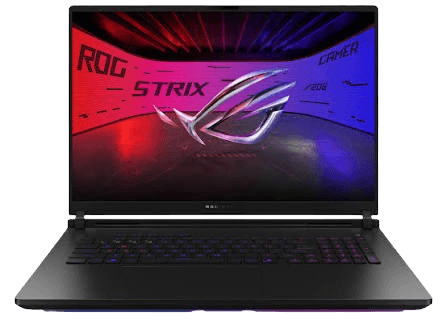
The ASUS ROG Strix Scar 18 is one of the best 4K gaming platforms with its RTX 5090, advanced cooling, and MUX switch technology. It delivers higher FPS on external 4K monitors by maximizing GPU performance and reducing iGPU overhead.
Key Specs: AMD Ryzen AI 9 HX | RTX 5090 (175W TGP) | Up to 64GB DDR5 | 18″ QHD+ 240Hz | ~$3,499–$4,499
Pros:
- Excellent sustained GPU performance thanks to vapor chamber cooling
- MUX switch eliminates iGPU bottleneck — real-world fps gains at 4K
- Supports DLSS 4 Multi-Frame Generation (RTX 5090)
- More portable than the Titan despite the 18-inch chassis
- OLED display option for stunning lid visuals
Cons:
- No built-in 4K panel — requires external monitor for 4K gaming
- Runs hot under sustained 4K loads (85–90°C CPU temps on Turbo)
- Fan noise at maximum Turbo mode is intrusive
- RAM shortage in 2026 has pushed memory upgrade costs higher than usual
Best for: Performance-first gamers who want top-tier 4K desktop gaming power in a slightly more mobile package than the Titan.
3. Razer Blade 16 (2026)
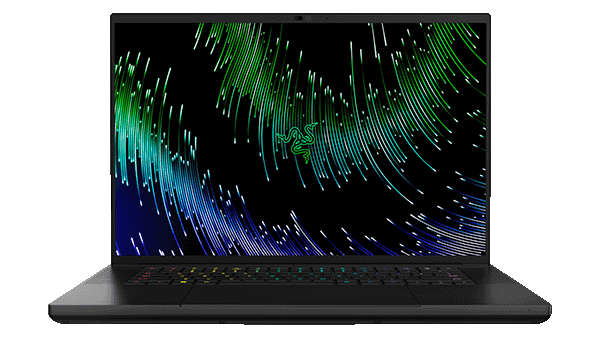
The Razer Blade 16 combines a premium QHD+ OLED 240Hz display with powerful RTX 5080/5090 options for smooth 4K external monitor gaming. While it lacks a built-in 4K panel, its OLED screen offers exceptional visuals for laptop gaming.
Key Specs: AMD Ryzen AI 9 HX 370 | RTX 5080 or 5090 | Up to 32GB DDR5 | 16″ 2560×1600 240Hz OLED | Starting ~$2,999
Pros:
- Best chassis design in the gaming laptop market — genuinely portable
- QHD+ 240Hz OLED is stunning for gaming: infinite contrast, perfect blacks
- DLSS 4 support makes it a serious 4K performer on external monitors
- Thinner and lighter than most 4K-capable competitors
- Subtle design works in office environments too
Cons:
- No native 4K display option — you’ll need an external monitor for 4K gaming
- Battery life disappoints under sustained gaming load
- Gets hot and loud under heavy 4K workloads
- Premium price reflects brand prestige as much as pure hardware value
Best for: Gamers who prioritize portable design and build quality, happy to run 4K gaming via a desktop monitor while using the OLED panel on the move.
4K vs 1080p vs 1440p: Which Is Best for Gaming Laptops?
This is the question most buyers actually need answered, and the honest answer is a little strange.
| Resolution | GPU Demand | Typical FPS (RTX 5080) | Best For |
|---|---|---|---|
| 1080p FHD | Low | 200–400+ fps | Competitive gaming, esports, budget builds |
| 1440p QHD | Medium | 100–180 fps | Best all-round balance of visuals + performance |
| 4K UHD | Very High | 50–90 fps native / 120–180 fps with DLSS 4 | Cinematic single-player, desktop 4K setups |
QHD (2560×1440 or 2560×1600) has become the definitive sweet spot for gaming laptops in 2026—sharp enough to be a visible improvement over 1080p, demanding significantly less GPU power than 4K, and compatible with high-refresh panels that let mid-range hardware shine. Most gamers are better served by a 1440p 240Hz setup than by a 4K 120Hz one.
Go with 4K gaming on a laptop if:
- You have an RTX 5080 or 5090 and plan to leverage DLSS 4
- You primarily play single-player, cinematic, and open-world games
- You want to game at 4K on a desk via an external monitor and use the laptop lid for travel
- You’re a content creator who needs pixel-accurate display fidelity
Stick with 1080p or 1440p if:
- You mainly play competitive titles — CS2, Valorant, Apex Legends
- You’re on a budget under $2,000
- Frame rate and input latency matter more than visual fidelity to you
- You want longer gaming sessions away from a power outlet
Would I Recommend a Laptop For 4K Gaming?
Honestly, I would only recommend a 4K gaming laptop if you specifically need the portability. If I’m spending the kind of money these high-end laptops cost and the machine is going to stay on my desk most of the time, I’d put that budget into a gaming PC instead.
- Choose a 4K laptop if you travel often and want a powerful gaming machine you can take anywhere.
- Choose a gaming PC if portability isn’t important to you.
- A PC gives you more performance for the same budget and better cooling potential.
- You also get much more flexibility to upgrade the GPU, CPU, RAM, and storage later.
- With a laptop, you’re paying extra for the screen, battery, compact hardware, and portability.
- If you already have a good laptop and want 4K gaming at home, I’d rather build or upgrade a desktop and pair it with a 4K monitor.
My recommendation: For most gamers spending $2,500 or more, I’d choose a gaming PC over a 4K gaming laptop. I’d only take the laptop if portability is genuinely important to me.
Common Question Gamers Ask About 4K Gaming
Any gaming laptop can connect to a 4K monitor, but smooth 4K gaming requires high-end GPUs like RTX 5080 or RTX 5090. Mid-range GPUs are better suited for 1080p or 1440p gaming.
Native 4K gaming is difficult even for powerful GPUs. DLSS 4 significantly improves performance and makes 4K gaming more practical on RTX 50-series laptops.
Most 4K-capable gaming laptops use 1080p or 1440p displays and output 4K to external monitors. Only a few models, like the MSI Titan 18 HX AI, include true 4K panels.
Gaming at 4K drains the battery quickly, often lasting only 30–60 minutes under heavy load. For longer battery life, lower the resolution and use balanced performance modes.
Final Words on 4K Gaming on Laptop
After looking at the performance, price, thermals, portability, and limitations of 4K gaming laptops, my take is pretty simple: 4K gaming on a laptop is impressive, but it isn’t the best use of money for most gamers.
If you genuinely need a portable machine and want to play demanding games at 4K, a high-end laptop with an RTX 5080 or RTX 5090 can make sense. But if your laptop will mostly sit on a desk, I’d put that same budget into a gaming PC instead. You get more room for powerful hardware, better cooling, easier upgrades, and more performance for your money.
For most gamers, I’d also consider 1440p the better balance between image quality and performance. You don’t need to spend thousands on a 4K laptop just to get a great gaming experience.
Sources
- UltrabookReview — 4K gaming benchmarks on RTX 5090 and 5080 laptops
- BudgetLoadout — RTX 5090 laptop real-world 4K performance analysis
- FRAMELIMIT — RTX 5090 vs RTX 5080 laptop gaming comparison and rankings
- VRLA Tech — RTX 5080 4K gaming performance with DLSS 4
- Tom’s Guide — DLSS 4 demo (Razer Blade 16, RTX 5090 vs RTX 4090)
- NVIDIA GeForce — RTX 50 Series Laptop GPU and DLSS 4 Multi-Frame Generation
- MSI — Titan 18 HX AI official specs and 4K Mini LED display details
- VideoCardz — MSI 2026 laptop lineup (Titan 18, Raider 18 Max, Stealth 18)
- PC Guide — RTX 5090 laptop review (Pinnacle X580WNT-G, 4K benchmark)
- CyberPowerPC — 1080p vs 1440p vs 4K gaming guide, 2026
- Newegg Insider — Gaming laptop buying guide 2026
