

Playing games on gaming PCs is fun unless you get into the situation where your computer starts glitching due to excessive heat. The only way to avoid this issue is to install a 360mm AIO CPU cooler, as far as my experience is concerned.
While numerous options are available on the web, their pricing and value are not optimal. After searching the web, I found the Thermalright Grand Vision 360 ARGB to be one of the best AIO CPU coolers.
It is designed specifically for high-end processors, and the best part is that its performance is top-notch without breaking the budget. In this guide, I have provided a complete review of its specifications, performance, and pricing.
What Is Thermalright Grand Vision 360 ARGB?
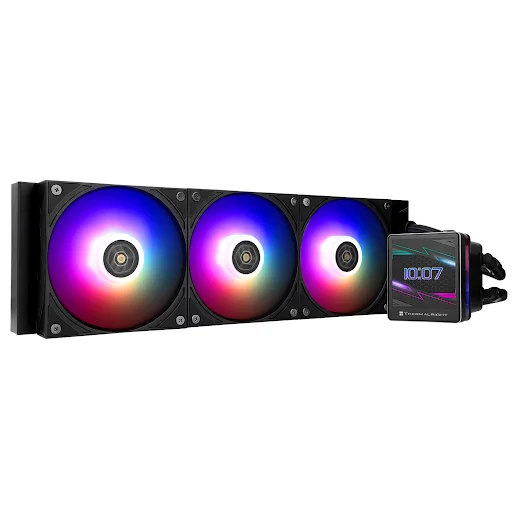
The Thermalright Grand Vision 360 ARGB is a 360mm AIO liquid CPU cooler that combines high-end cooling with a built-in 3.4-inch IPS LCD display and ARGB lighting.
It includes:
- A 360mm aluminum radiator
- A 6,400 RPM pump
- Three 120mm TL-H12-X28-S PWM ARGB fans
- A CPU block featuring a 3.4-inch 480 × 480 IPS LCD display
The LCD can display system information, images, and other customizable content, which gives the cooler a more premium appearance than conventional AIOs.
The cooler also supports a wide range of AMD and Intel CPU sockets, including AM4, AM5, LGA1700, and LGA1851.
What Is the Price of Thermalright Grand Vision 360 ARGB?
On Amazon, the listed price of the Thermalright Grand Vision 360 ARGB CPU cooler is $124.59 for the black variant.
However, the prices are subject to change, and you should confirm with the retailers before making any purchase decision.
My Assessment
| What I Like | What I Don’t Like |
|---|---|
| Excellent cooling performance | It can get relatively loud at maximum fan speed |
| Strong performance with high-power CPUs | 28mm-thick fans require more clearance |
| 3.4-inch 480 × 480 LCD display | Cable management could be better |
| Highly customizable LCD screen | LCD functionality requires additional connections |
| Strong airflow from the included fans | Requires a case that supports a 360mm radiator |
| 6,400 RPM pump | Some of the LCD features require software |
| Supports modern AMD and Intel CPUs | Not worth the extra cost if you don’t care about an LCD |
| ARGB lighting | |
| Good value for an LCD-equipped 360mm AIO | |
| 27mm-thick radiator |
How Does Thermalright Grand Vision 360 ARGB Work?
The Grand Vision 360 uses a closed liquid-cooling loop to transfer heat away from the CPU.
- The copper cold plate absorbs heat from the processor.
- The pump circulates coolant through the system.
- And the heated coolant travels to the 360mm radiator, where the three fans push air through the radiator fins to dissipate the heat.
- The pump can operate at up to 6,400 RPM, while the included TL-H12-X28-S fans reach up to 2,150 RPM.
The LCD screen is separate from the core cooling function. You can operate the AIO normally without customizing the display, although additional software is required for display customization.
Which CPUs Are Compatible With Thermalright Grand Vision 360 ARGB?
Thermalright officially lists compatibility with AMD AM4 and AM5 and several Intel platforms, including LGA1700 and LGA1851.
1. AMD AM4
The Grand Vision 360 ARGB supports AMD processors using the AM4 socket, including Ryzen 3000, Ryzen 4000, and Ryzen 5000 desktop processors.
Examples include:
- Ryzen 5 3600
- Ryzen 5 3600X
- Ryzen 5 5600
- Ryzen 5 5600X
- Ryzen 7 3700X
- Ryzen 7 5700X
- Ryzen 7 5700X3D
- Ryzen 7 5800X
- Ryzen 7 5800X3D
- Ryzen 9 3900X
- Ryzen 9 5900X
- Ryzen 9 5950X
2. AMD AM5
The cooler also supports AMD’s AM5 platform, including Ryzen 7000, Ryzen 8000G, and Ryzen 9000 desktop processors.
Examples include:
- Ryzen 5 7500F
- Ryzen 5 7600
- Ryzen 5 7600X
- Ryzen 7 7700
- Ryzen 7 7700X
- Ryzen 7 7800X3D
- Ryzen 9 7900
- Ryzen 9 7900X
- Ryzen 9 7900X3D
- Ryzen 9 7950X
- Ryzen 9 7950X3D
- Ryzen 5 8500G
- Ryzen 5 8600G
- Ryzen 7 8700G
- Ryzen 5 9600X
- Ryzen 7 9700X
- Ryzen 7 9800X3D
- Ryzen 9 9900X
- Ryzen 9 9900X3D
- Ryzen 9 9950X
- Ryzen 9 9950X3D
3. Intel LGA1700
The Grand Vision 360 supports Intel’s LGA1700 platform used by 12th, 13th, and 14th Gen Core processors.
Examples include:
- Core i5-12600K
- Core i5-13600K
- Core i5-14600K
- Core i7-12700K
- Core i7-13700K
- Core i7-14700K
- Core i9-12900K
- Core i9-13900K
- Core i9-14900K
4. Intel LGA1851
The cooler also supports Intel’s LGA1851 platform used by Core Ultra 200S desktop processors.
Examples include:
- Core Ultra 5 245K
- Core Ultra 7 265K
- Core Ultra 9 285K
Tom’s Hardware specifically tested the Grand Vision 360 with both the Core i7-14700K and Core Ultra 9 285K, demonstrating its suitability for high-power modern Intel processors.
Note:
Socket compatibility does not automatically guarantee physical compatibility with every motherboard and case. Always check your specific motherboard and case clearance before installation.
Thermalright Grand Vision 360 ARGB Specifications
Here are the key specifications of the Thermalright Grand Vision 360 ARGB:
| Feature | Thermalright Grand Vision 360 ARGB |
|---|---|
| Cooler type | 360mm AIO liquid cooler |
| Radiator | Aluminum |
| Radiator dimensions | 403 × 120 × 27mm |
| Pump speed | Up to 6,400 RPM |
| Fans | 3 × TL-H12-X28-S |
| Fan dimensions | 120 × 120 × 28mm |
| Fan speed | Up to 2,150 RPM |
| Fan airflow | Up to 80.45 CFM |
| Static pressure | Up to 2.65 mmH₂O |
| Fan noise | Up to 29.4 dBA |
| Fan bearing | S-FDB V2 |
| Cold plate | Copper |
| Display | 3.4-inch IPS LCD |
| Display resolution | 480 × 480 |
| Lighting | ARGB |
| ARGB connector | 3-pin 5V |
| Fan connector | 4-pin PWM |
| Intel compatibility | LGA115X, LGA1200, LGA1700, LGA1851 |
| AMD compatibility | AM4, AM5 |
| Warranty | 5 years |
The specifications above are based primarily on Thermalright’s official product information.
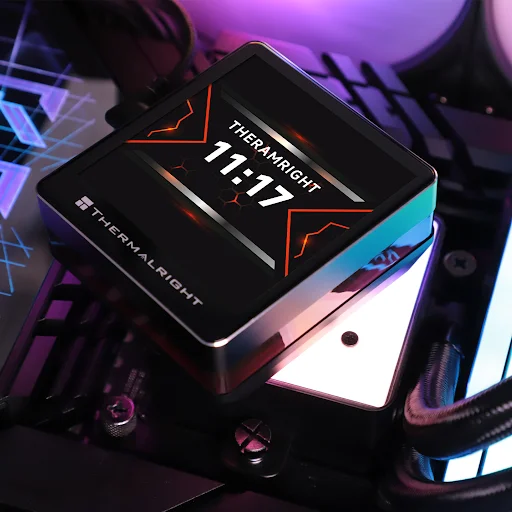
1. A 3.4-Inch LCD Display
The integrated LCD is one of the Grand Vision 360’s biggest differences from conventional 360 AIO CPU coolers. It features a 3.4-inch 480 × 480 display mounted on the CPU block.
You can use the display for:
- System information
- Custom images
- Visual effects
Thermalright’s software provides numerous customization presets, which give users considerable control over the appearance of the screen. This is particularly useful if you are building a showcase gaming PC for your gaming zone and want the CPU cooler to act as a visual centerpiece.
The display is also not required for basic cooling operation, so users who are primarily interested in thermal performance can simply use the cooler without extensively customizing the screen.
2. Cooling Performance
Cooling performance is arguably the strongest reason to buy the Grand Vision 360. Tom’s Hardware described its thermal results as exceptional after testing the cooler with high-power Intel processors.
- With the Core Ultra 9 285K, the Grand Vision 360 averaged around 89°C in its unrestricted CPU stress testing, outperforming the competing coolers in that test.
- The cooler also performed extremely well with Intel’s Core i7-14700K and maintained the top position in Tom’s Hardware’s testing.
This makes the Grand Vision 360 particularly attractive for users running high-performance CPUs, demanding workloads, or heavily threaded applications. If you also want to run high-end games, you should prefer this CPU cooler over the traditional 240mm options like the Corsair Nautilus 240.
Of course, CPU temperatures vary depending on the processor, motherboard, case airflow, ambient temperature, and power limits. Benchmark results should therefore be treated as a comparison rather than a guarantee of a specific temperature on your system.
3. Noise Levels
Despite its excellent thermal performance, the Grand Vision 360 is not completely silent under maximum load. Tom’s Hardware measured approximately 39.3 dBA in its noise testing.
Although it is lower than that of the Arctic Liquid Freezer III 360, it is still noisy. Thermalright rates the included TL-H12-X28-S fans at up to 29.4 dBA individually.
The slightly thicker 28mm fans are designed to provide strong airflow through the radiator while maintaining competitive noise levels.
4. Installation Experience
The Grand Vision 360 has a relatively straightforward installation process. For Intel systems, the installation process is as follows:
- Mount the backplate
- Secure the standoffs and mounting bars
- Apply thermal paste
- Attach the CPU block
The radiator can then be installed in the case before connecting the necessary cables. The cooler comes with the fans pre-installed, which saves some assembly time.
The main connections include:
- 4-pin PWM connection
- 3-pin 5V ARGB connection
- USB connection for the LCD
- SATA power connection for the display system
The LCD functionality requires additional connections, so cable management is slightly more complicated than with a basic AIO.
5. Radiator and Case Compatibility
The Grand Vision 360 uses a 403 × 120 × 27mm radiator. Its included fans are 28mm thick rather than the more common 25mm design.
That means the radiator and fans together require approximately 55mm of thickness before accounting for additional clearance around the installation area.
Before buying, check that your case supports:
- 360mm radiators
- Approximately 403mm radiator length
- 120mm radiator width
- Around 55mm radiator-and-fan thickness
- Top or front radiator mounting
- Adequate motherboard clearance
- Adequate RAM clearance
- Sufficient GPU clearance if front-mounted
The 28mm fans are slightly thicker than standard 25mm fans, so this is particularly important in compact cases.
6. ARGB Lighting
The Grand Vision 360 ARGB combines the LCD screen with traditional ARGB lighting.
The three TL-H12-X28-S fans feature ARGB lighting, while the cooler uses a standard 3-pin 5V ARGB connection.
This allows the lighting to be connected to a compatible motherboard or ARGB controller. Because the display and ARGB lighting are separate features, you can customize the visual appearance of the cooler beyond simply changing the fan colors.
Is Thermalright Grand Vision 360 ARGB Worth Buying?
Yes. The Thermalright Grand Vision 360 ARGB is one of the more compelling 360mm AIO coolers if you want both high cooling performance and an LCD display.
Its thermal performance is the main reason to consider it. The main compromises are noise at maximum speed and somewhat complicated cable management.
For high-performance gaming PCs, workstations, or enthusiast builds with enough space for a 360mm radiator, those compromises are relatively minor.
Who Should Buy Thermalright Grand Vision 360 ARGB?
The Grand Vision 360 ARGB is a good choice for:
- High-end gaming PCs
- Enthusiast PC builds
- Users running high-power Ryzen or Intel CPUs
- Overclocking-focused systems
- Workstations with sustained CPU workloads
- Users who want an LCD CPU cooler
- ARGB gaming builds
- Showcase PC builds
- Users who want strong cooling without paying flagship LCD-AIO prices
Who Shouldn’t Buy?
You should consider another cooler if:
- You do not care about LCD displays
- You prioritize extremely simple cable management
- Your case cannot fit a 360mm radiator
- You want the quietest possible AIO at maximum load
Final Thoughts
The Thermalright Grand Vision 360 ARGB is much more than an AIO with flashy lighting. Its cooling performance is its biggest strength, while the 3.4-inch 480 × 480 LCD adds a premium feature that makes it stand out from conventional 360mm coolers.
Independent testing showed excellent thermal performance with both the Core i7-14700K and Core Ultra 9 285K. So, if your case can accommodate its 403mm radiator and slightly thicker 28mm fans, the Grand Vision 360 ARGB is a strong choice for a high-performance PC.
