

The Arctic Liquid Freezer III 360 is a 360mm AIO CPU cooler designed for users who need strong cooling for modern high-performance processors. It combines a thick 38mm radiator, three P12 PWM fans, a 2,800 RPM pump, and a dedicated VRM fan.
Its cooling performance is excellent, but the cooler is also thicker and slightly more complicated to install than many competing 360mm AIOs. So before buying it, you need to check both your case and motherboard compatibility.
In this guide, I have provided a complete review of the Arctic Liquid Freezer III 360 specs, features, and performance.
What is Arctic Liquid Freezer III 360?
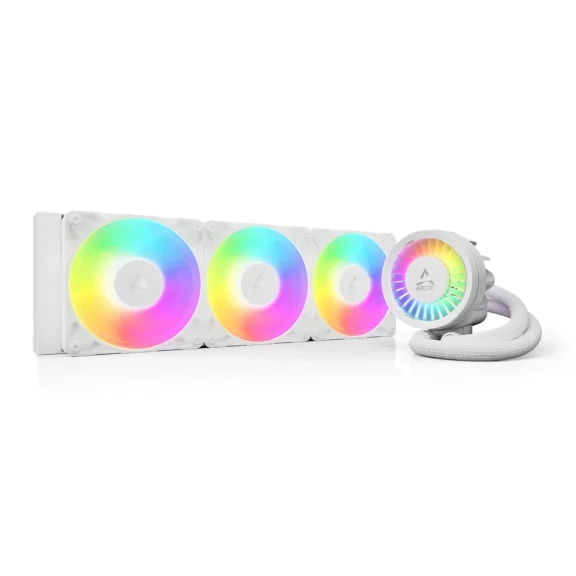
The Arctic Liquid Freezer III 360 is a 360mm all-in-one liquid CPU cooler designed for high-performance processors. It features a 38mm-thick radiator, three 120mm P12 PWM fans, a 2,800 RPM pump, and an integrated VRM cooling fan for improved motherboard airflow.
What is the Price of the Arctic Liquid Freezer III 360?
On the official Arctic store on Amazon, the price of the Arctic Liquid Freezer III 360 is $80.19.
Keep in mind that the pricing may vary based on your location or the retailer.
How Does Arctic Liquid Freezer III 360 Work?
The Liquid Freezer III 360 uses a 398 × 120 × 38mm aluminum radiator with three 120mm Arctic P12 PWM fans. The pump can operate between 800 and 2,800 RPM, while the fans operate from 200 to 1,800 RPM. Arctic also includes MX-6 thermal paste and provides a six-year warranty.
One of its main differences is the VRM fan built into the pump housing. It directs airflow toward the motherboard’s VRM area, which can be useful when using a high-power CPU.
The other major difference is the radiator thickness. At 38mm, it is thicker than many standard AIO radiators.
Specifications of Arctic Liquid Freezer III 360
| Feature | Arctic Liquid Freezer III 360 |
|---|---|
| Cooler type | 360mm AIO |
| Radiator | Aluminum |
| Radiator size | 398 × 120 × 38mm |
| Pump speed | 800–2,800 RPM |
| Fans | 3 × 120mm P12 PWM |
| Fan speed | 200–1,800 RPM |
| Fan airflow | Up to 56.3 CFM |
| Static pressure | Up to 2.2 mmH₂O |
| VRM fan | 400–2,500 RPM |
| Cold plate | Copper |
| Tubing | 450mm |
| Intel sockets | LGA1700, LGA1851 |
| AMD sockets | AM4, AM5 |
| Thermal paste | MX-6 |
| Warranty | 6 years |
These specifications apply to the standard Liquid Freezer III 360.
1. Cooling Performance
Cooling performance is the main reason to consider this AIO.
The 360mm radiator provides substantial cooling capacity, while the thicker 38mm radiator gives it more surface area than many conventional AIO designs.
Independent testing has shown strong results.
- Tom’s Hardware found the Liquid Freezer III performing significantly better than high-end air coolers in demanding workloads.
- PC Gamer also recorded strong temperatures with CPUs such as the Core i7-14700K.
The important point is that the cooler doesn’t need to run its fans at maximum speed to provide good cooling. That gives you useful thermal headroom while keeping noise under control.
For a high-end gaming PC, workstation, or other systems running powerful CPUs under sustained loads, the Liquid Freezer III 360 has more than enough cooling capacity.
2. Noise Levels
The three P12 PWM fans can run as low as 200 RPM, so the cooler can remain quiet during lighter workloads. Under heavier loads, the fans increase their speed to remove additional heat.
PC Gamer found that reducing the fan speed produced only a small temperature increase while substantially reducing noise. At maximum performance, however, you will obviously hear the fans and pump.
So the better way to describe its acoustic performance is strong cooling without requiring aggressive fan speeds during normal use.
3. Installation Experience
Installation is slightly more involved than with some competing AIOs. The Liquid Freezer III uses a dedicated mounting system, and Intel users need to pay particular attention to the included contact frame and mounting instructions.
You also have two control options.
- The single-cable configuration lets you control the pump, radiator fans, and VRM fan together.
- Alternatively, you can use individual connections to control them separately. The individual setup requires three 4-pin motherboard headers.
Overall, installation isn’t difficult for an experienced PC builder when building gaming PCs, but it isn’t the simplest 360mm AIO either.
Personal Tip: Connect the required PWM cable before mounting the pump because accessing it afterward can be difficult.
4. Radiator and Case Compatibility
This is the most important compatibility issue. The radiator is 38mm thick. With the 25mm-thick fans installed, the radiator and fan assembly is roughly 63mm deep.
That means a case advertised as supporting a 360mm radiator isn’t necessarily guaranteed to support the Liquid Freezer III 360 comfortably.
Before buying, check:
- 360mm radiator support
- Radiator thickness clearance
- Top radiator clearance around the motherboard
- RAM clearance
- Front radiator and GPU clearance
- Pump/block clearance around the motherboard
The radiator itself measures 398mm long, so you should also check the actual mounting space inside your case.
5. VRM Cooling Fan
The integrated VRM fan is one of the cooler’s most distinctive features. It sits inside the pump housing and directs airflow toward the motherboard’s VRM area.
This can be useful because conventional AIO coolers move most of their airflow through the radiator rather than directly around the CPU socket.
In testing by PC Gamer, enabling the VRM fan reduced peak VRM temperatures by around 5°C. You shouldn’t buy the cooler expecting this fan to dramatically reduce CPU temperatures. Its main purpose is motherboard component cooling.
CPU Compatibility of Arctic Liquid Freezer III 360
The Arctic Liquid Freezer III 360 supports modern AMD and Intel desktop processors, but compatibility depends on the CPU socket and, in some cases, the motherboard layout.
AMD CPUs
On the AMD side, the cooler supports AM4 and AM5 processors.
That includes:
- Ryzen 1000, 2000, 3000, 4000, and 5000 series CPUs using AM4
- Ryzen 7000, 8000, and 9000 series desktop CPUs using AM5
- Ryzen 7000 X3D and 9000 X3D processors using AM5
This means the cooler can be used with processors such as the Ryzen 5 5600X, Ryzen 7 5800X3D, Ryzen 5 7600X, Ryzen 7 7800X3D, Ryzen 9 7950X, Ryzen 7 9800X3D, and Ryzen 9 9950X, provided the motherboard uses the supported socket.
Intel CPUs
For Intel, the Liquid Freezer III 360 supports LGA1700 and LGA1851.
LGA1700 covers:
- 12th Gen Core processors
- 13th Gen Core processors
- 14th Gen Core processors
This includes CPUs such as the Core i5-12600K, Core i5-13600K, Core i7-13700K, Core i7-14700K, Core i9-13900K, and Core i9-14900K.
LGA1851 covers Intel’s newer desktop platform, including Core Ultra 200S-series desktop processors, such as the Core Ultra 5 245K, Core Ultra 7 265K, and Core Ultra 9 285HX.
Which Motherboards Are Compatible?
For AMD, look for motherboards using AM4 or AM5 sockets. Examples include:
- B450, X470, B550, and X570 for AM4
- A620, B650, B650E, X670, X670E, B850, and X870/X870E for AM5
For Intel, compatible motherboard platforms include:
- H610, B660, H670, Z690
- B760, H770, Z790
- H810, B860, and Z890 for LGA1851
The exact motherboard model still matters because the cooler’s pump housing can interfere with some large motherboard heatsinks or M.2 heatsinks.
So, for example, having an AM5 B650 motherboard does not automatically guarantee that every B650 board will have perfect clearance.
Before buying, check your exact motherboard model against Arctic’s compatibility information, particularly if it has unusually large heatsinks around the CPU socket or M.2 slots.
Important Compatibility Note
The Liquid Freezer III 360 supports the CPU socket, but that doesn’t guarantee physical compatibility with every motherboard using that socket.
In other words:
- CPU socket compatibility = supported
- Motherboard physical clearance = must be checked separately
If your CPU is on the supported AM4, AM5, LGA1700, or LGA1851 platforms and your motherboard has sufficient clearance around the CPU socket, the Liquid Freezer III 360 can be used without an issue.
Is the Arctic Liquid Freezer III 360 Worth Buying?
Yes, if your case and motherboard support it. The Liquid Freezer III 360 offers excellent cooling performance, good noise characteristics, useful additional VRM cooling, and a six-year warranty.
Its biggest disadvantage isn’t cooling performance. It’s compatibility. The 38mm radiator makes the cooler physically larger than many competing AIOs, while the pump design can create motherboard clearance issues.
So if you have a large case like the Lian Li Lancool 217 and a compatible motherboard, there are very few reasons to avoid it. If your case has limited radiator clearance, a thinner 360mm AIO may be a better choice.
Who Should Buy It?
The Arctic Liquid Freezer III 360 is a good choice for:
- High-End Gaming PCs: It provides plenty of cooling capacity for powerful gaming CPUs.
- Workstations: Its 360mm radiator is well suited to sustained CPU-heavy workloads.
- PC Enthusiasts: The separate control options and VRM fan provide additional control over the cooling system.
- Quiet-PC Builders: The P12 fans can operate at low speeds when maximum cooling isn’t required.
You should consider another cooler if you have a compact case, limited motherboard clearance, or simply want the easiest possible installation.
Final Thoughts
The Arctic Liquid Freezer III 360 is a high-performance 360mm AIO with excellent cooling, useful features, and strong long-term value.
Its 38mm radiator and integrated VRM fan set it apart from many competing coolers, while the P12 fans provide a good balance between cooling and noise.
The main thing to check before buying is compatibility. If your motherboard and PC case can accommodate the cooler’s larger dimensions, the Liquid Freezer III 360 is an excellent option for a high-performance gaming or workstation PC.
