

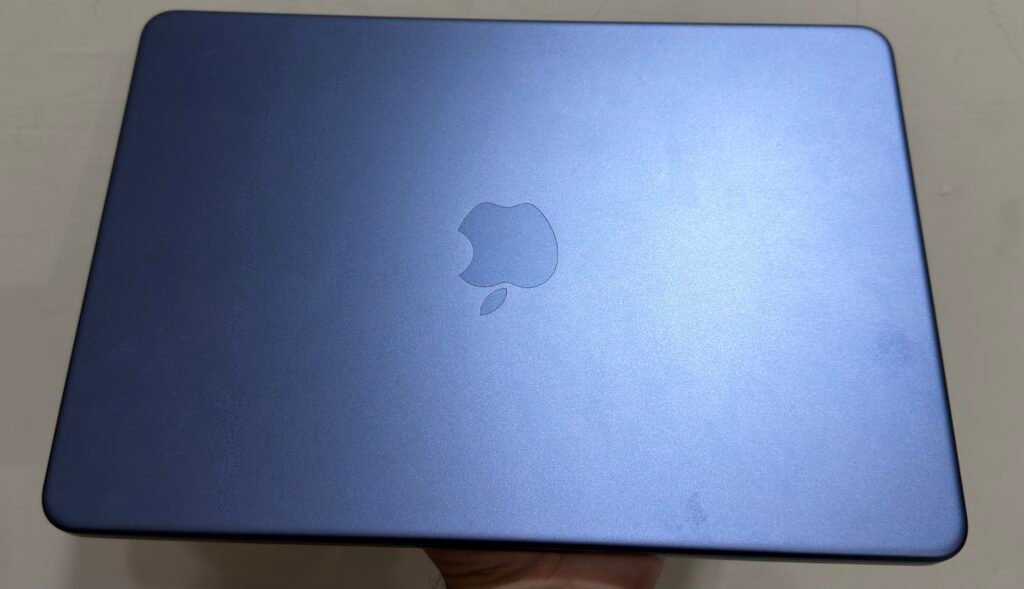
I’m writing this on a MacBook Neo in Indigo color. After using it every day for work, writing, web browsing, and light gaming, I’ve learned where it excels and where Apple made compromises.
When Apple’s cheapest Mac ever launched, I wasn’t sure whether it would feel like a real MacBook or a budget compromise. After daily use, I can confidently say it delivers an excellent experience for students and everyday users, though a few limitations are worth knowing before you buy.
This review covers its real-world performance, battery life, price, specifications, colors, and whether it’s worth buying in 2026.
Hands-On Experience
This review is based on my personal experience using the MacBook Neo for everyday work, web browsing, content creation, and light gaming. To provide a complete and accurate assessment, I also verified technical specifications and compared my observations with trusted industry sources where appropriate.
MacBook Neo at a Glance
| Feature | Details |
|---|---|
| Price | Starts at $699 ($599 with Apple Education Pricing) |
| Chip | Apple A18 Pro |
| Display | 13-inch Liquid Retina IPS (2408 × 1506) |
| Memory | 8GB Unified Memory |
| Storage | 256GB or 512GB SSD |
| Battery Life | Up to 16 hours (Apple) • 8–10 hours in my daily use |
| Weight | 2.7 lb (1.23 kg) |
| Operating System | macOS Tahoe |
| Best For | Students, everyday users, first-time Mac buyers |
| Not Ideal For | Professional video editing, 3D rendering, heavy multitasking, AAA gaming |
| My Verdict | Excellent value for everyday computing with premium build quality, but the fixed 8GB RAM and missing keyboard backlight are worth considering. |
What Is the MacBook Neo?
The MacBook Neo is Apple’s most affordable MacBook, designed for students and everyday users. It uses the A18 Pro chip instead of an M-series processor, making it less powerful than the MacBook Air but significantly more affordable while still delivering the full macOS experience.
Why Is the MacBook Neo Trending?
The MacBook Neo trended for two reasons: an unprecedented price and a colorful design no other Mac offered, and then it trended again in June when that price went up.
Who Is the MacBook Neo Best For?
- Students and first-time Mac buyers: the core target market, especially with education pricing that still preserves close to the original launch price.
- Light-to-moderate everyday users: web browsing, streaming, email, word processing, and casual creative work all run comfortably.
- Budget-conscious switchers from Windows or Chromebooks: the Neo undercuts most premium Chromebooks and mid-range Windows ultraportables while running full macOS.
- Users upgrading from an aging Intel MacBook: even the Neo’s entry-level Apple Silicon chip is a significant jump over anything Intel-based.
Who should look elsewhere: creative professionals doing sustained video or 3D work, anyone who juggles dozens of memory-heavy apps at once, and gamers expecting to run modern AAA titles at native settings.
When did the MacBook Neo come out?
Apple announced the MacBook Neo on March 4, 2026. It is currently available through Apple and authorized retailers, with no successor officially announced yet.
Availability:
The MacBook Neo became available in stores and online starting March 11, 2026, and it remains Apple’s current entry-level laptop today.
There’s no indication of a MacBook Neo 2 on the horizon yet. Apple typically leaves its lower-cost hardware in place for at least a year or two before refreshing it.
MacBook Neo Price
The MacBook Neo starts at $699, making it Apple’s most affordable MacBook. Although it originally launched at $599, a global memory chip shortage increased the price. Students can still save through Apple’s Education Store.
| MacBook NEO | Launch price (March 2026) | Current price (since June 25, 2026) |
|---|---|---|
| 256GB, no Touch ID | $599 | $699 |
| 512GB, with Touch ID | $699 | $799 |
| Education pricing (256GB) | $499 | $599 |
| Education pricing (512GB, Touch ID) | N/A at launch | $699 |
A global memory chip shortage caused the jump. Apple, like other manufacturers, is paying sharply higher prices for the DRAM and NAND flash chips used in RAM and SSD storage — largely because AI companies have been buying up memory chip supply for data center servers, squeezing consumer availability.
Apple raised prices across nearly its entire Mac and iPad lineup the same day, including the MacBook Air (up from $1,099 to $1,299) and the 14-inch MacBook Pro (up from $1,699 to $1,999).
Why Is the MacBook Neo So Affordable?
Even at $699, the Neo is still Apple’s cheapest Mac by a wide margin, and that comes down to a handful of deliberate hardware trade-offs rather than any single trick:
- Reused iPhone silicon: The A18 Pro was already in mass production for the iPhone 16 Pro line, so Apple isn’t paying to develop and fabricate a new Mac-specific chip.
- 8GB of soldered, non-upgradeable RAM: No configuration options, no user upgrades — just one fixed spec that keeps costs predictable.
- No fan. A fanless design removes a mechanical component and simplifies the internal layout.
- No haptic trackpad, no backlit keyboard, no MagSafe: Each of these is a small cost saving individually, but they add up across the whole device.
- Simplified port selection: Two USB-C ports, one of them limited to USB 2 speeds, instead of the Thunderbolt ports found on the Air and Pro.
None of this makes the Neo feel cheap in hand—reviewers consistently note the aluminum chassis feels every bit as solid as the Air’s. The savings come from what’s missing, not from lower build quality.
Is It Worth the Money?
Yes, it’s worth the money for everyday computing, but the 8GB RAM ceiling is the one trade-off that could change your answer.
What You’re Weighing
- The win: At $699, the Neo undercuts nearly every premium Chromebook and mid-range Windows ultraportable while running full macOS and Apple’s software ecosystem.
- The catch: 8GB of RAM is below the 16GB floor Apple set for the rest of its Mac lineup back in late 2024—it’s the single biggest limitation to weigh before buying.
- The alternative: Stretching to the MacBook Air costs roughly $600 more but buys double the RAM, a faster chip, Thunderbolt, MagSafe, and a better display.
MacBook Neo Specifications
The MacBook Neo features Apple’s A18 Pro chip, 8GB of unified memory, up to 512GB of SSD storage, a 13-inch Liquid Retina display, and all-day battery life. It prioritizes everyday performance over professional workloads.

| Component | Specification |
| Chip | Apple A18 Pro (6-core CPU: 2 performance + 4 efficiency, 5-core GPU, 16-core Neural Engine) |
| Fabrication | TSMC 3nm (N3E, second-generation) |
| Memory | 8GB unified LPDDR5X, soldered, not upgradeable |
| Storage | 256GB or 512GB SSD, fixed at purchase |
| Display | 13.0-inch Liquid Retina IPS, 2408 × 1506, 219 ppi, 500 nits, sRGB (no P3, no True Tone) |
| Battery | 36.5Wh, up to 16 hours claimed by Apple |
| Ports | 1× USB-C (USB 3, 10Gbps, DisplayPort support) + 1× USB-C (USB 2, 480Mbps) + 3.5mm headphone jack |
| Wireless | Wi-Fi 6E, Bluetooth (via Apple’s N1 wireless chip) |
| Camera | 1080p FaceTime HD |
| Audio | Dual side-firing speakers with Spatial Audio, dual mics with directional beamforming |
| Keyboard | Magic Keyboard, no backlight |
| Trackpad | Large Multi-Touch, mechanical (hinged, non-haptic) |
| Touch ID | 512GB configuration only |
| Weight / Size | 2.7 lb (1.23 kg); 11.71 × 8.13 × 0.5 in |
| Build material | Aluminum, 60% recycled content |
| OS | macOS Tahoe with Apple Intelligence |
Display and Size
The 13-inch display is sharp for the price but cuts corners elsewhere. It hits 219 ppi for crisp text, while skipping the display tech and color accuracy the Air offers.
- Sharp resolution: 219 pixels per inch — genuinely crisp for everyday reading and browsing
- Missing features: No P3 wide color gamut, no True Tone, no ProMotion adaptive refresh rate
- The catch: A reflective, glossy coating and temporal dithering (simulating color depth it doesn’t natively support) — not noticeable day to day, but why reviewers rate it slightly below the Air’s panel

Apple Silicon Chip
The A18 Pro is genuinely capable silicon, with single-core performance close to the M4. It falls behind on multi-core and GPU work since it has fewer cores than a full M-series chip.
- Proven pedigree: Same chip that ran PS5-caliber console ports like Resident Evil Village on the iPhone 16 Pro
- Single-core: 3,400–3,600 on Geekbench 6 — close to the M4, since both use the same 3nm process
- Multi-core: 8,700–8,900 — trails Apple’s M-series chips due to fewer total cores
- GPU: A 5-core GPU (down from 6 on the iPhone, due to binning), weaker than a full M-series GPU
RAM and Storage
8GB of unified memory is the Neo’s most debated spec, and for good reason, it’s below the 16GB floor Apple set for the rest of its current Mac lineup.
In practice, that’s fine for a handful of apps and browser tabs at once and starts to show strain once you’re running memory-hungry creative software or juggling dozens of tabs and background utilities simultaneously.
Storage tops out at 512GB, and like the RAM, it’s fixed at the point of purchase with no aftermarket upgrade path. Buy based on what you need long-term, not just what fits your current files.
Battery Life
Apple rates the Neo for up to 16 hours, and third-party testing generally supports strong runtime at moderate brightness. Notebookcheck specifically measured long battery life at 150 nits of screen brightness.
That same testing found runtime drops noticeably at higher brightness levels, and charging speeds are on the slower side compared to the Air.
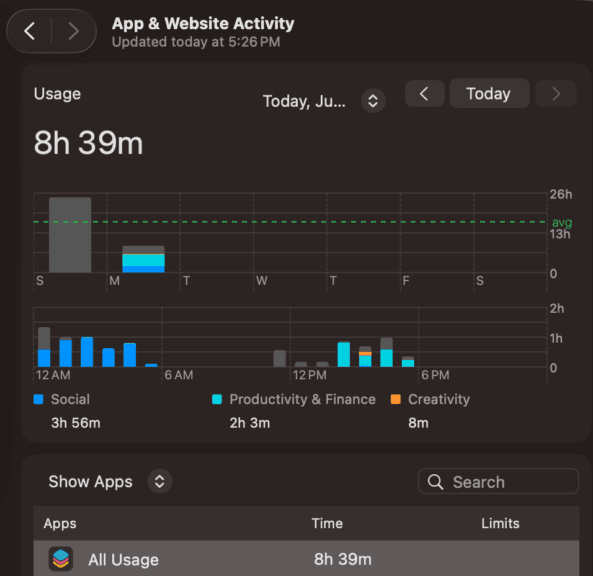
My personal experience: Apple advertises longer battery life, but in my daily routine—which includes Chrome, WordPress, YouTube, Spotify, and messaging apps—I consistently get around 8–10 hours, which comfortably lasts an entire workday.
Ports and Connectivity
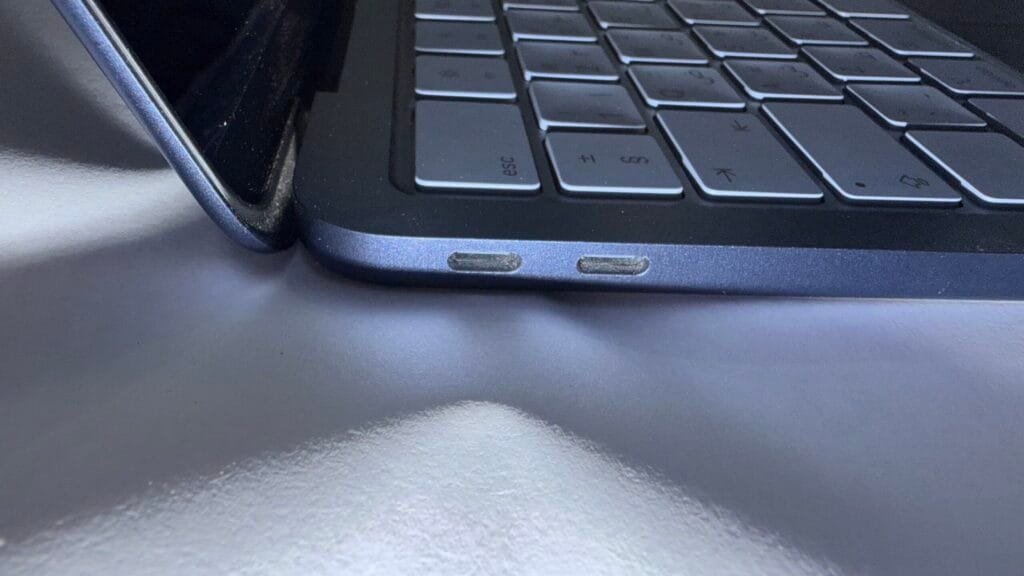
- 2× USB-C ports total: the most obvious budget cut
- Port 1: USB 3, 10Gbps, supports DisplayPort output to one external display
- Port 2: USB 2 only, capped at 480Mbps
- No Thunderbolt
- No MagSafe: charging happens through either USB-C port
- No card reader
- Wi-Fi 6E + Bluetooth: solid, but a step behind the Air’s Wi-Fi 7
Camera, Speakers, and Other Features
The 1080p FaceTime camera and dual side-firing speakers with Spatial Audio both punch above the Neo’s price point—multiple reviewers single out the speakers specifically as surprisingly good for a budget machine.
Touch ID, however, is reserved exclusively for the $799 512GB configuration, which is a meaningful omission if biometric login matters to you and you’re eyeing the cheaper tier.

MacBook Neo Colors
The Neo comes in four finishes, and Indigo is the standout pick for anyone who wants personality without going too loud — it’s what I’m using myself.
- Silver — safest, most professional-looking; best if you want the color to stay invisible in a work or classroom setting
- Blush — soft pink, proven popular in early sales and reviewer coverage
- Citrus — bright yellow, the boldest option in the lineup
- Indigo — deep blue-purple, splits the difference between playful and professional
- Keyboard matches the chassis on all four colors — the color-matching goes deeper than just the lid
- Build quality is identical across every finish — no color gets a nicer coating than another
My experience: I chose the Indigo finish because it stands out without being overly flashy. After weeks of use, it still looks clean and doesn’t show fingerprints as much as I expected.
MacBook Neo Student Discount
Eligible students, educators, and parents can purchase the MacBook Neo at a discounted price through Apple’s Education Store. Depending on the configuration, the savings can reach around $100 compared with standard retail pricing.
Who Qualifies?
- Who qualifies: College and university students, their parents, faculty, and staff at eligible institutions
- Also included: Homeschool teachers and parents, in some regions
- How it’s applied: Through Apple’s dedicated Education Store, not a discount code at checkout
How to Claim Apple’s Education Pricing
- Where to buy: Apple’s online Education Store
- Eligibility verification: Done at time of purchase or afterward through a service like UNiDAYS. Varies by region
- Base 256GB Neo: $599 with education pricing
- 512GB Touch ID configuration: $699 with education pricing
- Net effect: Shields students from most of the June 2026 price increase
Practical advice: if you or a family member has any active student, parent-of-a-student, or educator status, it’s worth checking eligibility before buying — the savings are equivalent to a $100 discount off current retail pricing on every configuration.
My Experience Using the MacBook Neo
- Battery Life: I consistently get 8–10 hours on a full charge. That’s enough for a full workday of writing, browsing, streaming, and light gaming.
- Performance: The 8GB unified memory performs far better than I expected. Compared to Windows laptops with 8GB RAM, macOS feels noticeably smoother and handles multitasking with ease.
- Thermals: For me, heat was not an issue because I mostly use it to write articles, but for someone reading to use this machine for heavy tasks, it is worth knowing before buying.
- Build Quality: The aluminum chassis feels premium and solid. It doesn’t feel like a budget laptop despite being Apple’s most affordable MacBook.
- Display: The display is sharp and enjoyable for everyday use. Screen reflections haven’t bothered me during regular indoor use.
- Keyboard: Typing feels excellent, especially during long writing sessions. My only complaint is the missing keyboard backlight, which makes typing in dark rooms less convenient.
- Trackpad: The trackpad is the best I’ve used on any laptop. The only small adjustment was getting used to physically clicking instead of relying on Apple’s haptic feedback.
💻 Overall Experience: After using the MacBook Neo daily, I can confidently say it delivers one of the best everyday laptop experiences in its price range. For students and everyday users, it offers excellent value without feeling like a compromise.
Who Should Buy the MacBook Neo?
Buy it if you:
- Are a student
- Want the cheapest MacBook
- Mainly browse the web, stream, study, or work with Office apps
- Already use an iPhone or iPad
Skip it if you:
- Edit 4K video professionally
- Need more than 8GB of RAM
- Rely on Thunderbolt accessories
- Want to play demanding AAA games natively
People Also Ask About The MacBook Neo
Apple’s entry-level laptop, running the iPhone 16 Pro’s A18 Pro chip instead of M-series silicon.
It launched at $599 in four bold colors, then trended again in June 2026 when Apple raised it to $699.
Announced March 4, 2026; released March 11, 2026. No successor has been announced yet.
$699 (256GB) or $799 (512GB, Touch ID); education pricing is $599 and $699 respectively.
8GB, fixed and non-upgradeable — below the 16GB floor Apple sets elsewhere in its Mac lineup.
Final Verdict on MacBook Neo
The MacBook Neo delivers on its core promise: a real Mac under $700, built for students and everyday users, not power users. The trade-offs — fixed 8GB RAM, no Thunderbolt or MagSafe, Touch ID locked to the pricier tier — are deliberate cuts for the price, not corner-cutting.
Using it daily, in Indigo, the experience holds up for what it’s built for: everyday tasks, light gaming, and casual use, with genuinely strong battery life. It’s not for creative professionals or anyone needing Thunderbolt accessories. But for students and first-time Mac buyers, it’s a legitimately good laptop at this price — not just a cheap one.
