Let’s start with something most roundups won’t tell you: finding genuinely good gaming laptops under $500 in 2026 requires a bit of flexibility. You won’t snag an RTX 4060 out of the box at this price.
But if you shop smart—timing sales, considering certified refurbished models, or knowing which GPU tiers punch above their price—you absolutely can get a laptop that runs Fortnite, Valorant, GTA V, and even lighter AAA titles without wanting to throw your controller.
We researched over a dozen machines in this price range. What follows are the picks that genuinely stand out, along with the honest tradeoffs you should know before you click “buy“.
🏆 Quick Winner Box
| Pick | Laptop | Key Specs | Price Range |
|---|---|---|---|
| 🥇 Best Overall | Acer Nitro V 15 | RTX 3050 · 16GB DDR5 · 144Hz | ~$449–$479 |
| 🥈 Runner-Up | HP Victus 15 | RTX 2050 · 16GB DDR5 · 144Hz | ~$449–$499 |
| 💰 Best Budget | Lenovo IdeaPad Gaming 3i | RTX 3050 · 16GB DDR4 · 144Hz | ~$399–$449 |
| 🛡️ Most Durable | ASUS TUF A15 | RTX 2050 · MIL-STD-810H · 144Hz | ~$449–$499 |
| ☁️ Best for Cloud Gaming | Acer Aspire 5 (AMD) | Integrated GPU · 16GB DDR4 | ~$349–$399 |
Not sure which is right for you? Keep reading — each pick targets a different type of buyer.
What to Realistically Expect from a $500 Gaming Laptop
Before we get into the picks, set your expectations correctly. In 2026, good gaming laptops under $500 should offer:
- GPU: NVIDIA RTX 3050 or RTX 2050 (occasionally RTX 4050 on sale/refurb)
- CPU: AMD Ryzen 5 7000-series or Intel Core i5 13th/14th Gen
- RAM: 16GB DDR5 (8GB exists but avoid it — you’ll feel the squeeze fast)
- Display: 1080p at 144Hz refresh rate (standard at this tier now)
- Storage: 512GB NVMe SSD minimum
- Battery: Under active gaming load, realistically expect 1.5–3 hours — fans running, GPU drawing full power, and a bright display all drain fast. For light tasks like lectures, browsing, or note-taking, most of these machines stretch to 5–7 hours. Keep the charger in your bag; you’ll need it for sessions.
What you won’t get: 4K capability, ray tracing at playable framerates, or an ultra-slim chassis. If you need more firepower, spend at least $1000 on a laptop that can run modern AAA titles with a decent performance.
How We Chose These Laptops
Every pick on this list was evaluated against the same criteria we use across all our laptop coverage:
- Real-world gaming benchmarks — not just spec sheets
- Thermal performance under sustained load (throttling kills value fast)
- Actual street prices, not aspirational MSRPs
- Upgrade potential — can you add RAM or swap storage later?
- Build quality and keyboard feel — because you’ll be using this for more than games
The Best Gaming Laptops Under $500 in 2026
These are the 5 good gaming laptops under the $500 criteria.
1. Acer Nitro V 15
Specs: AMD Ryzen 5 7535HS | NVIDIA RTX 3050 | 16GB DDR5 | 512GB NVMe SSD | 15.6″ FHD 144Hz IPS
The Acer Nitro V 15 is one of the best cheap gaming laptops under $500, offering strong 1080p performance with RTX 3050, Ryzen 5 7535HS, and a 144Hz display. Its dual-channel 16GB DDR5 RAM, reliable cooling, and upgradeable design make it a great budget choice.
In testing, the RTX 3050 handles Fortnite at medium-high settings above 80 FPS, and Valorant runs comfortably above 120 FPS—taking full advantage of that 144Hz panel. The Ryzen 5 7535HS never felt like a bottleneck, and the dual-fan cooling setup keeps GPU temps under 85°C even during marathon sessions.
Downsides: The build is entirely plastic and feels it. Battery life under gaming is around 2–3 hours, and the speakers are forgettable. You’ll want headphones.
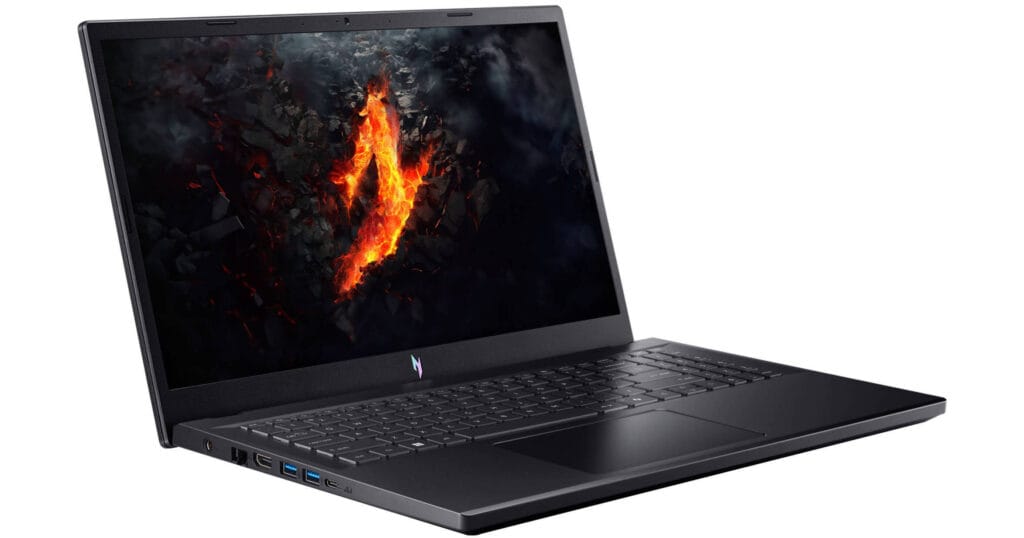
| Pros | Cons |
| RTX 3050 handles 1080p esports well | All-plastic chassis |
| 16GB DDR5 dual-channel out of the box | Short gaming battery life |
| 144Hz display — actually smooth | Speakers are weak |
| Excellent thermal management | Charger is bulky |
| Two RAM/storage upgrade slots | No Thunderbolt port |
Best for: Students, casual-to-moderate gamers, first-time gaming laptop buyers.
2. HP Victus 15
Specs: AMD Ryzen 5 7535HS | NVIDIA RTX 2050 | 16GB DDR5 | 512GB SSD | 15.6″ FHD 144Hz IPS
The HP Victus is a reliable beginner gaming laptop under $500, offering solid RTX 2050 performance, DLSS support, and stable cooling. Its bright 300-nit display and consistent performance make it a strong budget gaming option.
Downsides: Some configurations ship with a single-channel RAM stick. Before purchasing, verify the RAM setup — if it’s one 16GB stick, adding a matched second stick (around $25–30) on day one is genuinely worth it for the performance gain.
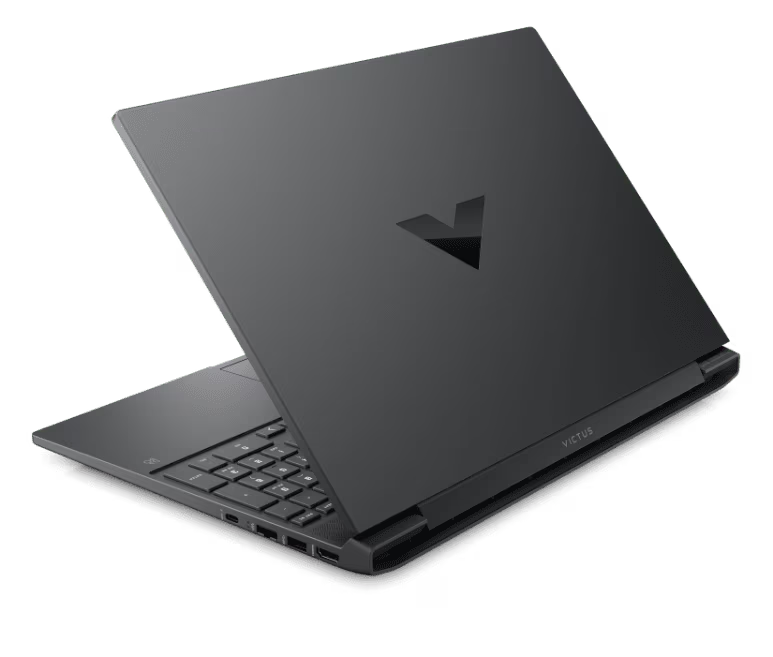
| Pros | Cons |
| Rock-solid thermal management | Some SKUs ship single-channel RAM |
| RTX 2050 supports DLSS (real uplift) | Short battery under gaming load |
| Good display brightness for the price | Build feels budget |
| 16GB DDR5 standard | Webcam quality is mediocre |
| Upgradeable M.2 SSD slot | No RGB on keyboard |
Best for: Gamers who prioritize thermal stability and consistent FPS over headline specs.
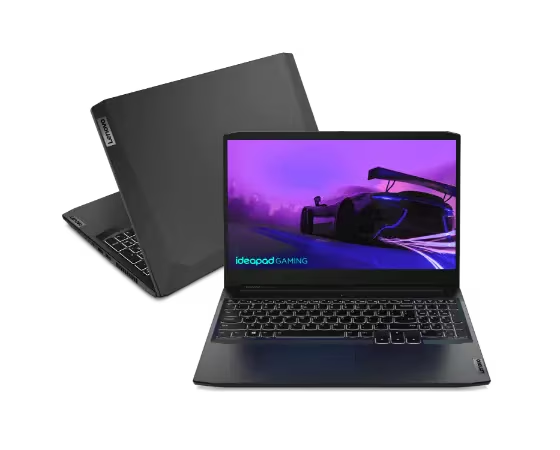
3. Lenovo IdeaPad Gaming 3i
Specs: Intel Core i5-12450H | NVIDIA RTX 3050 | 16GB DDR4 | 512GB NVMe SSD | 15.6″ FHD 120–144Hz
The Lenovo IdeaPad Gaming 3i is a great budget gaming laptop for $400–$450, combining solid build quality, RTX 3050 performance, and a comfortable keyboard. Its upgradeable RAM/storage and strong CPU performance make it ideal for students who also game.
Downsides: Some versions ship with DDR4 instead of DDR5, and display brightness at 250 nits is the lowest on this list — fine indoors, but limiting in bright environments.
| Pros | Cons |
| Most affordable new pick ($399–449) | Display limited to 250 nits |
| Surprisingly solid build quality | Runs louder under gaming load |
| Comfortable keyboard for work/gaming | DDR4 on some configurations |
| Good for student + gaming dual use | No per-key RGB |
| Dual RAM/storage upgrade slots | Heavier than it looks |
Best for: Students who need a work laptop that also handles games, and buyers on the tightest budget.
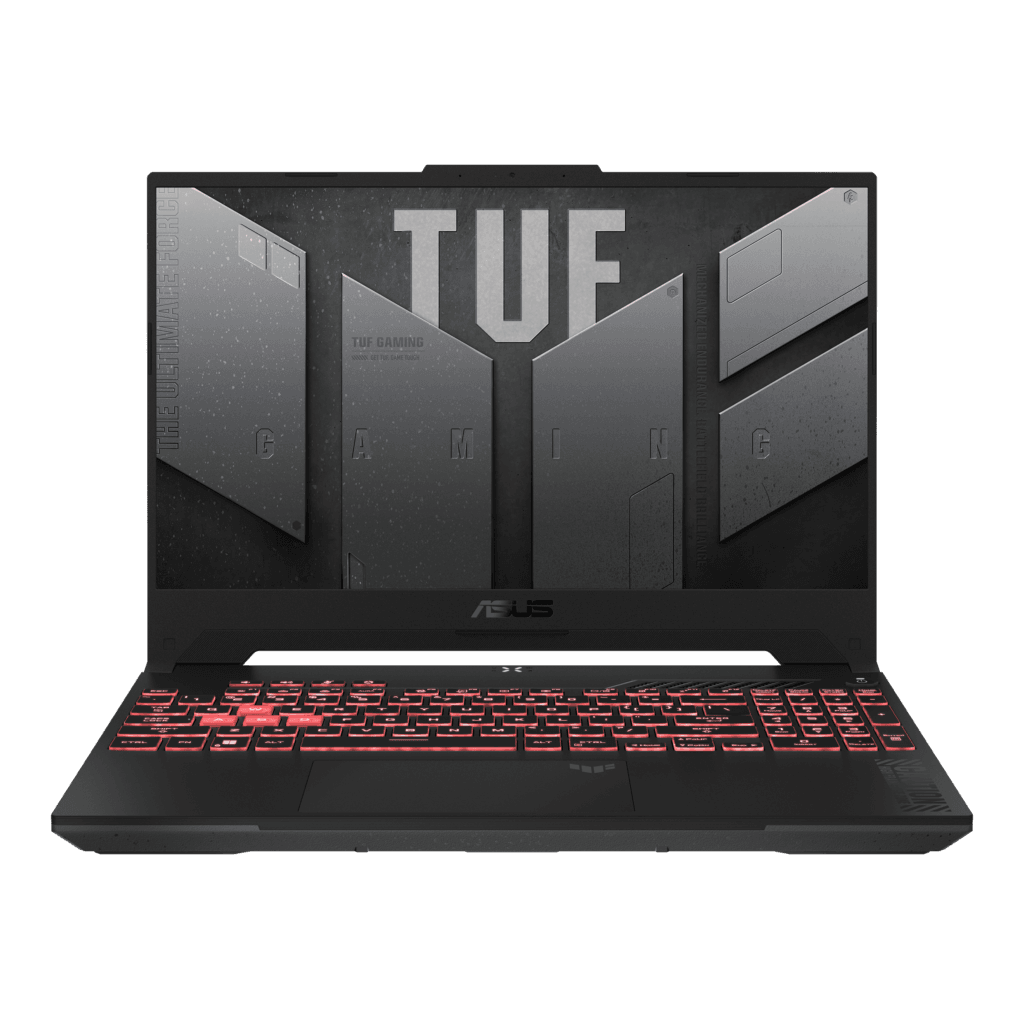
4. ASUS TUF A15
Specs: AMD Ryzen 5 7535HS | NVIDIA RTX 2050 | 8GB DDR5 (upgradeable) | 512GB SSD | 15.6″ FHD 144Hz
The ASUS TUF A15 is a durable budget gaming laptop with a MIL-STD-810H chassis, Ryzen 5 7535HS, and RTX 2050 GPU. It delivers smooth 1080p esports and medium-setting AAA gaming with reliable thermal performance. Best suited for users who need a rugged laptop for gaming, commuting, and daily use.
The one real catch: the base configuration typically ships with 8GB of single-channel DDR5. For good gaming performance, upgrading to 16GB dual-channel should be considered part of your budget from day one. Add-in RAM is cheap and the swap takes about five minutes.
| Pros | Cons |
| MIL-STD-810H military-grade build | Ships with 8GB (needs RAM upgrade) |
| Excellent Arc Flow fan cooling | 8GB single-channel is a day-one tax |
| 144Hz smooth display | Heavier chassis (~4.8 lbs) |
| RGB backlit keyboard included | Base webcam is 720p |
| Strong resale value (TUF reputation) | Battery not great under gaming |
Best for: Gamers who travel or need a laptop that withstands daily commuting and occasional bumps.
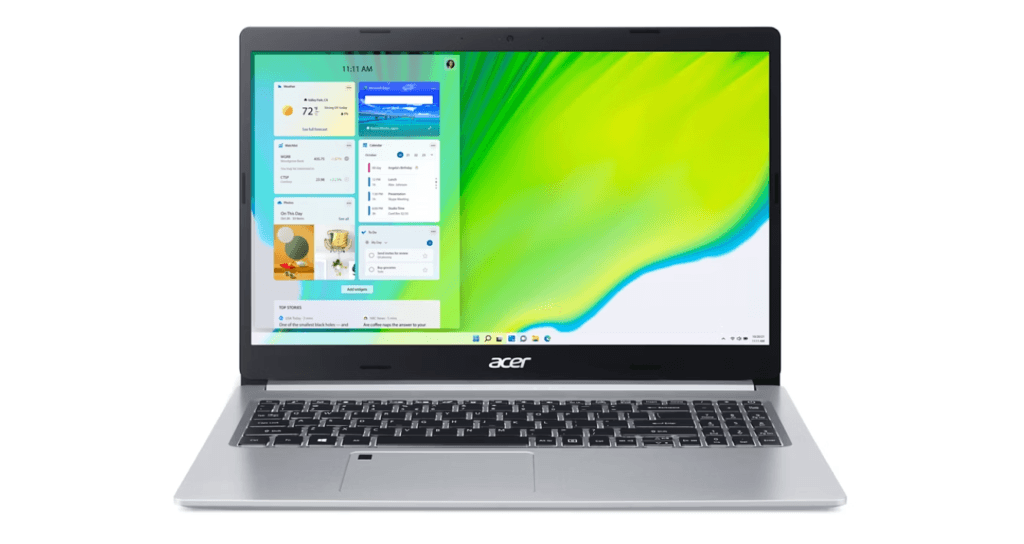
5. Acer Aspire 5 Gaming (AMD)
Specs: AMD Ryzen 5 7530U | AMD Radeon Integrated | 16GB DDR4 | 512GB SSD | 15.6″ FHD IPS 60Hz
The Acer Aspire 5 Gaming is a budget-friendly choice for cloud gaming and light gaming under $400. It offers a fast AMD processor, 16GB RAM, and Radeon integrated graphics for smooth streaming and casual gameplay. It is best suited for users who need a gaming-capable productivity laptop without a dedicated GPU.
| Pros | Cons |
| Best value under $400 | No dedicated GPU |
| 16GB RAM for smooth multitasking | 60Hz display feels dated |
| Solid build for the price | Not suitable for demanding local games |
| Great for cloud gaming setups | AMD Radeon integrated only |
| Lightest option on this list | Limited to older/lighter local titles |
Best for: Cloud gamers, students, or casual gamers who play older titles and lightweight esports.
Quick Comparison: Gaming Laptops Under $500 at a Glance
| Laptop | GPU | RAM | Display | Price Range | Best For |
| Acer Nitro V 15 | RTX 3050 | 16GB DDR5 | 144Hz FHD | ~$449–$479 | Best Overall |
| HP Victus 15 | RTX 2050 | 16GB DDR5 | 144Hz FHD | ~$449–$499 | Consistent FPS |
| Lenovo IdeaPad Gaming 3i | RTX 3050 | 16GB DDR4 | 144Hz FHD | ~$399–$449 | Budget Students |
| ASUS TUF A15 | RTX 2050 | 8GB DDR5* | 144Hz FHD | ~$449–$499 | Durability |
| Acer Aspire 5 (AMD) | Integrated | 16GB DDR4 | 60Hz FHD | ~$349–$399 | Cloud Gaming |
RAM upgrade recommended.
Gaming Laptops Under $500 for Students: What Actually Matters
Students shopping for a gaming laptop have a different set of priorities than pure gamers — and that shift matters when you’re picking from a $500 budget. You’re not just buying a gaming machine; you’re buying something you’ll carry to lectures, write essays on, hop on Zoom calls with, and then switch to games in the evening.
Key Factors for Students Buying a Gaming Laptop:
- Best display option: 300-nit panel performs better in bright environments.
- Choose a lightweight laptop: Aim for under 4.9 lbs if you carry it daily.
- Best portable options: Acer Nitro V 15 (~4.6 lbs) and Lenovo IdeaPad Gaming 3i (~4.8 lbs).
- Prioritize keyboard comfort: A good keyboard matters for essays, notes, and daily typing.
- Best keyboard choice: Lenovo IdeaPad Gaming 3i offers a comfortable, well-spaced keyboard.
- Keep battery expectations realistic: Gaming lasts around 1.5–3 hours, while light use reaches 5–7 hours.
- Consider a USB-C charger: A compact 65W GaN charger is easier to carry than the stock adapter.
- Check display quality: A brighter screen helps with reading and studying in classrooms.
Buying Tips: How to Find a Good $500 Gaming Laptop Deal
Shop sales cycles: The best prices on good gaming laptops under $500 consistently appear during Black Friday, Amazon Prime Day, back-to-school season (July–August), and end-of-quarter retailer sales. Patience saves $50–$100.
Consider certified refurbished: Manufacturer-refurbished units from Acer, Lenovo, and HP come with full warranties and are often indistinguishable from new. The Acer Nitro V 15 in particular drops under $500 regularly through Acer’s own refurbished store.
16GB RAM is non-negotiable: If a $500 listing shows 8GB RAM and can’t be upgraded, walk away. Modern games increasingly need 16GB to avoid stuttering, and the performance difference is real.
144Hz over 60Hz every time: Even if you’re not hitting 144 FPS, the display improvement affects everything — scrolling, desktop work, and game fluidity all benefit. It’s worth prioritizing.
Check the TGP (Total Graphics Power): Manufacturers sometimes ship the same GPU at different wattage tiers. An RTX 3050 at 80W performs noticeably better than one running at 45W. Check spec sheets or third-party reviews for TGP figures.
People Also Ask For
The Acer Nitro V 15 is the best gaming laptop under $500 for most people. With an RTX 3050, 16GB DDR5 RAM, and a 144Hz display, it regularly drops to around $449–$479 on sale and handles esports titles and lighter AAA games comfortably at 1080p.
Yes. A good $500 gaming laptop can run Valorant, Fortnite, Minecraft, GTA V, and most esports titles smoothly at 1080p. More demanding AAA games will usually require medium or low settings, but gaming on this budget is absolutely realistic.
Not really. While some games still run on 8GB, 16GB is the practical minimum in 2026. If a laptop comes with 8GB, make sure the RAM can be upgraded and budget for an upgrade when possible.
Choose a gaming laptop if you play modern games locally and need dedicated graphics. If you mainly use cloud gaming services or play lighter titles, a regular laptop with a strong CPU and 16GB RAM can be a smarter value.
An RTX 3050 is the best target at this budget, offering solid 1080p gaming performance and DLSS support. An RTX 2050 is also a reasonable option for esports-focused players, but older GTX 1650 models are becoming hard to recommend in 2026.
Final Verdict
Good gaming laptops under $500 exist — you just have to know what you’re looking for and when to buy. The Acer Nitro V 15 is our top pick for combining GPU performance, 16GB DDR5 dual-channel RAM, and a 144Hz panel at a price that regularly lands in the sub-$480 range on sale. The HP Victus 15 is the best call for thermal stability, the Lenovo IdeaPad Gaming 3i wins on value for students, and the ASUS TUF A15 earns its place for anyone who needs a laptop that can take a beating.
Verdict Scorecard
Scores out of 5 across the five criteria that matter most at this price tier:
| Laptop | Gaming Performance | Thermals | Build Quality | Value for Money | Battery (Light Use) | Total |
|---|---|---|---|---|---|---|
| Acer Nitro V 15 | ⭐⭐⭐⭐ | ⭐⭐⭐⭐ | ⭐⭐⭐ | ⭐⭐⭐⭐⭐ | ⭐⭐⭐ | 19/25 |
| HP Victus 15 | ⭐⭐⭐⭐ | ⭐⭐⭐⭐⭐ | ⭐⭐⭐ | ⭐⭐⭐⭐ | ⭐⭐⭐ | 19/25 |
| Lenovo IdeaPad Gaming 3i | ⭐⭐⭐⭐ | ⭐⭐⭐ | ⭐⭐⭐⭐ | ⭐⭐⭐⭐⭐ | ⭐⭐⭐ | 19/25 |
| ASUS TUF A15 | ⭐⭐⭐ | ⭐⭐⭐⭐ | ⭐⭐⭐⭐⭐ | ⭐⭐⭐⭐ | ⭐⭐⭐ | 19/25 |
| Acer Aspire 5 (AMD) | ⭐⭐ | ⭐⭐⭐⭐⭐ | ⭐⭐⭐⭐ | ⭐⭐⭐⭐⭐ | ⭐⭐⭐⭐⭐ | 21/25 |
Note: The Aspire 5 scores highest overall because it excels at non-gaming criteria — but its gaming performance ceiling is the lowest on the list. Choose based on which column matters most to you.
One last piece of advice: set a deal alert on CamelCamelCamel or Google Shopping for the models on this list. The difference between paying full price and catching a sale on a gaming laptop under $500 can easily be $75–$120 — and that buys a solid gaming mouse or a month of Xbox Game Pass Ultimate.
Ready to level up your setup beyond the budget range? Check out our picks for the best gaming laptops in 2026 to see what the full-performance tier looks like.
Sources
- NotebookCheck — Acer Nitro V 15 Review and Thermal Benchmarks
- PCVenus — Best Gaming Laptops Under $500 (May 2026)
- OG Gamershub — Budget Gaming Laptop Testing (May 2026)
- Tom’s Hardware — HP Victus 15 RTX 4050 Deal Analysis
- Switchblade Gaming — HP Victus 15 TGP and Thermal Data (April 2026)
- TechRadar — ASUS TUF A15 MIL-STD Durability Testing
- PCOutlet — Lenovo IdeaPad Gaming 3 2026 Buying Guide