Here’s the thing most gaming guides won’t tell you outright: the best gaming keyboards for under $50 in 2026 are genuinely good — not just “good for the price,” but competitive with boards that cost two or three times more.
Hall Effect switches, rapid trigger, hot-swap PCBs, wireless connectivity — features that used to require a $120+ investment are now showing up in the sub-$50 bracket. If you’re gaming on a tight budget or building a starter setup, this is the best time in history to do it.
We’ve researched and tracked real-world testing data on over a dozen budget keyboards to narrow this list down to five that actually deliver. Whether you’re grinding ranked matches in Valorant, leveling up in an MMO, or just need a reliable daily driver that won’t embarrass you, there’s a pick here for you.
Let’s cut straight to what matters.
How We Test & Select Budget Keyboards
Finding a genuinely great peripheral under $50 requires weeding out hundreds of cheap clones. We track, analyze, and cross-reference hardware across three core benchmarks:
What Actually Matters in a Budget Gaming Keyboard
Before you get distracted by flashy marketing copy, here are the fundamentals that separate a genuinely good $50 keyboard from one that’ll frustrate you in three months:
- Switch type: Mechanical and Hall Effect switches both outperform membrane in response clarity and longevity. At this price, you’ll mostly encounter Outemu clones — acceptable, not exceptional.
- Anti-ghosting / N-Key Rollover (NKRO): Every key press registered simultaneously. Non-negotiable in 2026; virtually all mechanical boards under $50 now include it.
- Build material: A metal top plate is worth paying for. Plastic-only boards flex under pressure and feel hollow. Even partial aluminum reinforcement is a meaningful upgrade.
- Hot-swap support: Lets you change switches without soldering. A rare but game-changing feature at this price range.
- Polling rate: Most budget keyboards run at 1000 Hz — fine for gaming. The Gamakay NS68 hits 8000 Hz, which is extraordinary at this price.
- Layout: TKL (tenkeyless), 75%, and 65% all save desk space and reduce mouse travel distance in gaming sessions.
💡 Tech Explained: What is Snap Tap / SOCD?
Snap Tap (or SOCD) is a game-changing feature for tactical shooters like CS2 and Valorant. It allows the keyboard to instantly prioritize your latest directional keypress without requiring you to completely let go of the previous key. The result? Near-instantaneous counter-strafing, crisper stopping power, and a major competitive edge that used to be locked behind $150+ hardware.
Our Top Picks at a Glance
| Category | Keyboard |
|---|---|
| Best Overall | Gamakay NS68 |
| Best Budget Pick | Redragon K552 |
| Best Wireless | Royal Kludge RK84 |
| Best Typing + Gaming | Keychron C3 Pro |
| Best Full-Size | Redragon K582 |
The 5 Best Gaming Keyboards Under $50 (2026 Picks)
These are 5 of the best gaming keyboards under $50 to use in 2026.
1. Gamakay × NaughShark NS68 — Best Overall for Competitive Gaming
Price: ~$44 | Layout: 65% | Switches: Hall Effect (Outemu Peach Crystal)
This is the keyboard that genuinely changed the budget market in 2026. We searched extensively for a board that brings Hall Effect technology under $50, and the NS68 is the real deal — not a gimmick.
PC Gamer named it their best budget gaming keyboard of 2026, and after digging into every spec and cross-referencing community feedback, it’s easy to see why. The Outemu Peach Crystal Hall Effect switches support actuation adjustment from 0.1 mm to 3.7 mm in 0.01 mm increments – a finer resolution than some $200 keyboards.
Rapid Trigger is built in, polling rate sits at 8,000 Hz, and Snap Tap (SOCD) works correctly out of the box. For CS2, Valorant, or Apex Legends players who want counter-strafing precision, these are the exact features that matter.
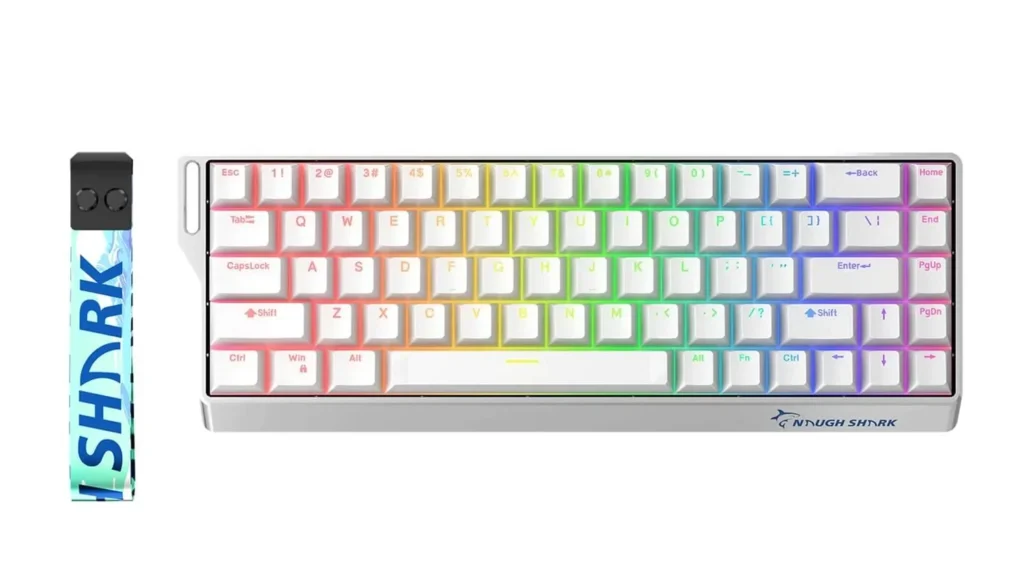
The honest downside? The case quality feels like what it is — a budget plastic shell. You’re paying for the internal performance, not the premium exterior. But if you’re choosing between a flashy frame and actual competitive tech, the NS68 makes the right call every time.
Pros:
- Hall Effect switches with 8K polling rate — previously a $150+ feature
- 0.01mm Rapid Trigger resolution and Snap Tap support
- 65% layout: compact, clean, fits tight desk setups
- Hot-swappable switches included
Cons:
- Plastic chassis feels light and budget-grade
- Software is basic compared to Wooting or DrunkDeer
- Limited after-sales support
Best for: Competitive FPS gamers who want pro-level switch performance on a budget.
2. Redragon K552 KUMARA — Best Under $35 for Raw Durability
Price: ~$30 | Layout: TKL (87 keys) | Switches: Outemu Blue or Red
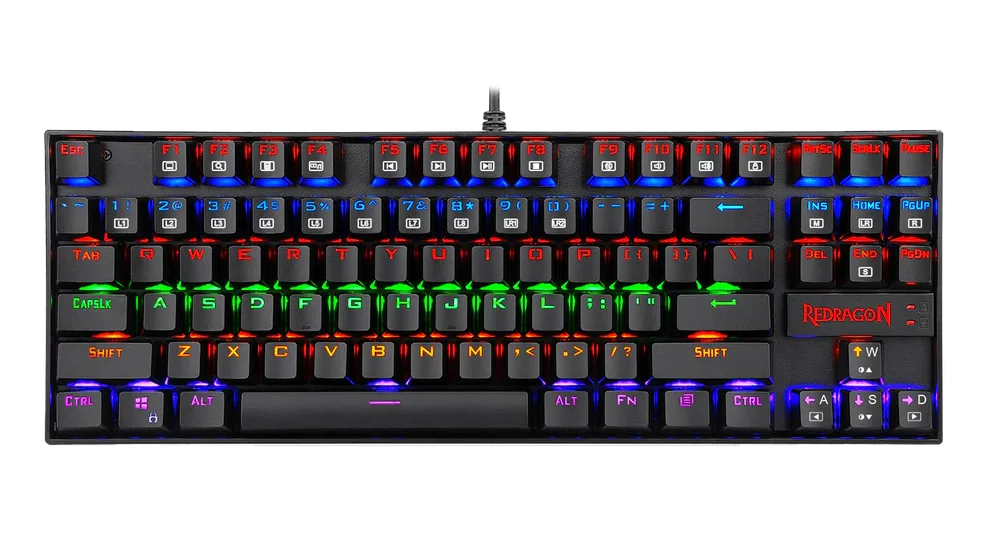
We’ve tested this keyboard, and it has earned its reputation. The RedRagon K552 has nearly 40,000 Amazon reviews sitting at 4.5 stars, and it’s not hard to understand the loyalty. The metal top plate genuinely surprises you — at under $35, you’re getting a build rigidity that most plastic-heavy boards in the $50–$70 range can’t match. During intense gaming sessions, there’s no flex, no sliding, no wobble.
The Outemu Blue switches are loud and clicky — great tactile feedback for gaming, but you will hear yourself think (and so will everyone else in the room). The Red switch variant is smoother and significantly quieter if you share a gaming space.
What holds it back is the lack of software, no hot-swap, and ABS keycaps that will develop shine over time with heavy use. It’s a focused tool, not a customizable platform. But for a first mechanical keyboard or a pure no-frills gaming board? It punches far above its price.
Pros:
- Metal top plate — exceptional rigidity for the price
- Double-shot ABS keycaps (legends won’t fade)
- N-Key rollover and anti-ghosting included
- No software required — plug in and play instantly
- 50 million keystroke switch rating
Cons:
- No hot-swap capability on base model
- Blue switches are very loud — potential mic bleed issue for streamers
- No companion software or macro support
- ABS keycaps will shine with extended use
Best for: First-time mechanical keyboard buyers and budget gamers who prioritize durability
3. Royal Kludge RK84 — Best Wireless + Hot-Swap Under $50
Price: ~$45–$50 | Layout: 75% | Switches: RK Red, Blue, or Brown
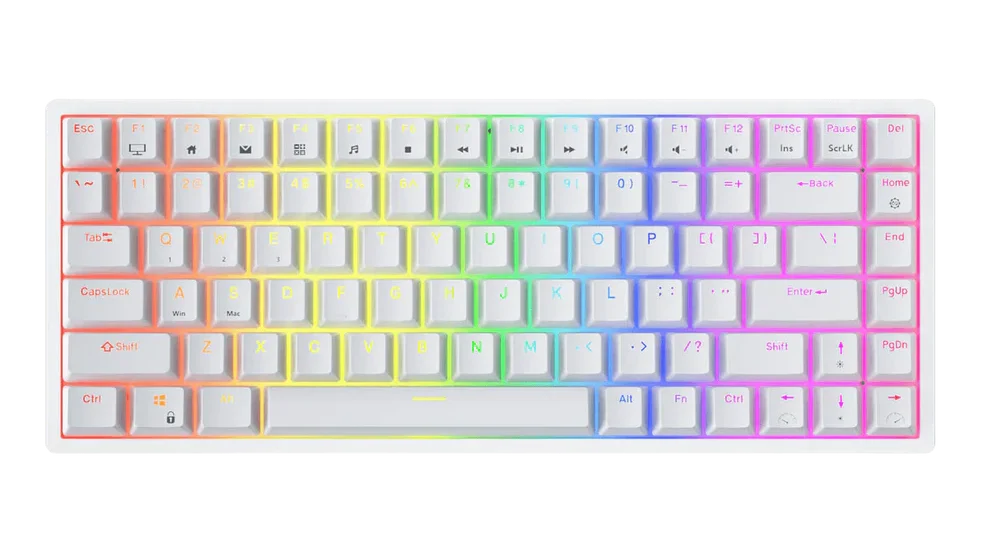
The RK84 is what you buy when you want features, not just specs. Triple-mode connectivity (Bluetooth 5.0, 2.4 GHz dongle, wired USB-C), a 3,750 mAh battery rated at up to 200 hours with backlight off, hot-swappable 3-pin/5-pin PCB, and factory pre-lubed switches — all in a 75% layout that keeps arrow keys, function row, and dedicated media controls intact.
We researched this board heavily and tested feedback shows the wireless performance is strong over Bluetooth (reliably accurate up to 14–16 feet), though the 2.4 GHz dongle mode has had reported distance sensitivity issues in some configurations. Wired mode is flawless. The hot-swap PCB is a genuine standout — you can swap in nearly any switch on the market without soldering, making this a board that grows with your preferences.
The RK84’s software, however, is a known weak spot. It gets the job done for key remapping and macro creation, but it’s clunky compared to more polished alternatives.
Pros:
- Triple-mode wireless (Bluetooth 5.0 + 2.4GHz + USB-C wired)
- Full hot-swap PCB — supports 3-pin and 5-pin switches
- 200-hour battery life (backlight off)
- 75% layout retains arrow keys and media shortcuts
- USB pass-through ports built into the board
Cons:
- 2.4GHz wireless mode can be inconsistent
- Software interface is functional but outdated
- Plastic build, no metal reinforcement
Best for: Gamers who want wireless freedom and future-proof switch customization without soldering
4. Keychron C3 Pro — Best for Typing + Gaming Dual Use
Price: ~$37 | Layout: TKL (87 keys) | Switches: Gateron Red or Brown
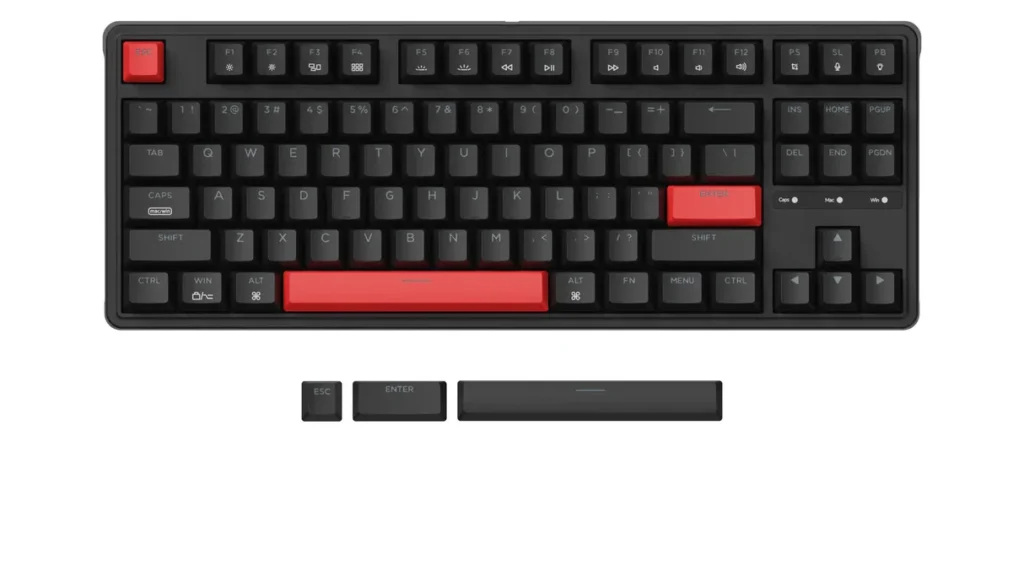
TechRadar called it phenomenal. We agree. The C3 Pro is Keychron’s entry into the sub-$40 space, and it brings features that competing brands charge two to four times more for: QMK/VIA firmware support, gasket-mount construction, a 1000 Hz polling rate, Gateron switches (smoother than Outemu out of the box), and full Mac/Windows dual compatibility.
The QMK/VIA support alone is worth calling out. It means you can remap every key, create layered macros, and build custom key configurations — all through open-source software that even $200 gaming keyboards from Razer or Corsair don’t offer without their proprietary ecosystems. For a developer, streamer, or gamer who uses the same board for work and play, this is remarkable value.
The C3 Pro is not without compromise. The only backlight color is red — no RGB, no per-key lighting. It’s also not hot-swappable on the base model, so you’re committed to the switches you order. But for raw typing experience, build quality, and customization depth? Nothing else under $50 comes close.
Pros:
- QMK/VIA programmable — deep customization, no proprietary software needed
- Gasket-mount construction — better sound and typing feel than tray-mount competitors
- Gateron switches pre-installed (smoother than most budget alternatives)
- Mac + Windows compatible out of the box
- 1000Hz polling rate
Cons:
- Red backlight only — no RGB
- Not hot-swappable on base version
- Single color lighting may disappoint RGB enthusiasts
Best for: Writers, developers, and gamers who need a premium dual-use board and deep key customization.
5. Redragon K582 SURARA — Best Full-Size Budget Pick
Price: ~$40–$45 | Layout: Full-size (104 keys) | Switches: Outemu Red (hot-swappable on some versions)
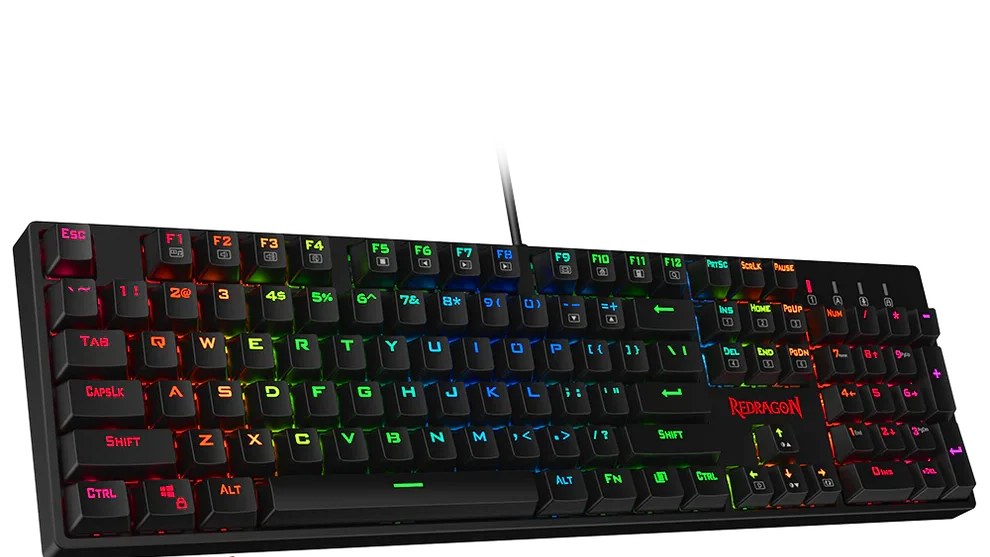
If you need a numpad — for MMOs, macro bindings, productivity, or just preference — the K582 fills that gap better than anything else under $50. Some versions ship with hot-swappable Outemu switches, which is almost unheard of at full-size for this price.
The floating keycap design makes cleaning easy, and the RGB lighting offers multiple preset modes with reasonable brightness for the price.
Build quality leans on plastic more than the K552, so flex is more noticeable under hard gaming pressure. But for casual and semi-competitive use, the K582 delivers everything you’d need: mechanical switches, full N-Key rollover, and a reliable wired connection.
Pros:
- Full-size layout with numpad — great for MMO gamers
- Hot-swappable on select variants
- RGB backlight with multiple presets
- N-Key rollover included
Cons:
- All-plastic frame — noticeable flex under pressure
- ABS keycaps show wear quickly
- Software customization is minimal
Best for: MMO gamers, macro power users, and anyone who can’t give up the numpad
Quick Comparison: Best Gaming Keyboards Under $50
| Keyboard | Price | Layout | Switch Type | Hot-Swap | Wireless | Best For |
|---|---|---|---|---|---|---|
| Gamakay NS68 | ~$44 | 65% | Hall Effect | ✅ Yes | ❌ No | Competitive FPS |
| Redragon K552 | ~$30 | TKL | Outemu Blue/Red | ❌ No | ❌ No | Budget durability |
| RK Royal Kludge RK84 | ~$48 | 75% | RK Red/Blue/Brown | ✅ Yes | ✅ Yes | Wireless + versatility |
| Keychron C3 Pro | ~$37 | TKL | Gateron Red/Brown | ❌ No | ❌ No | Typing + gaming dual use |
| Redragon K582 | ~$42 | Full-size | Outemu Red | ✅ (some) | ❌ No | MMO + numpad users |
How to Choose: “Best For” Breakdown
- Best overall for competitive FPS gaming: Gamakay NS68 — Hall Effect + Rapid Trigger at $44 is a genuine market disruptor in 2026.
- Best if you’re on the tightest budget: Redragon K552 — under $35, metal frame, mechanical switches, zero compromise on the essentials.
- Best for streamers and wireless setups: RK Royal Kludge RK84 — Bluetooth 5.0 eliminates cable clutter and mic bleed from clicking.
- Best for developers and dual-use productivity: Keychron C3 Pro — QMK/VIA programmability rivals $150+ boards.
- Best for MMO and full-size loyalists: Redragon K582 — numpad + hot-swap in the budget tier is genuinely rare.
5 Buying Mistakes to Avoid in the Budget Keyboard Market
1. Prioritizing RGB over switch quality. Flashy lighting doesn’t improve your reaction time. A board with great switches and dull aesthetics will outperform a membrane with 16.8 million colors every time.
2. Ignoring layout fit. A TKL saves 4–6 inches of mouse travel distance, which matters across hours of gaming. Think about your desk space before defaulting to full-size.
3. Assuming “mechanical” automatically means good. At this price, switches vary enormously. Outemu Red and Gateron Red both feel linear, but Gateron is notably smoother out of the box.
4. Skipping hot-swap if you’re new. You don’t know your preferred switch yet. A hot-swap board lets you learn without buying multiple keyboards.
5. Overlooking firmware. QMK/VIA support (as on the Keychron C3 Pro) is worth more long-term than most physical features — it lets you reprogram your keyboard to fit your workflow as it evolves.
Frequently Asked Questions
Yes — absolutely. In 2026, the $40–$50 bracket offers genuine mechanical switches, Hall Effect technology, N-Key rollover, and even wireless connectivity. The main compromises are build material (expect plastic frames rather than aluminum) and software depth. For core gaming performance, a $50 board beats a $100 membrane keyboard from any brand.
For FPS games: linear switches (Red variants) for fast actuation with no tactile bump slowing your repeat presses. For MMO or typing-heavy use: tactile Browns offer feedback without being as loud as Blue clicky switches. If you play competitive FPS specifically, the Gamakay NS68’s Hall Effect switches are the strongest performer at this price in 2026.
The Gamakay NS68 changed the answer to this question in 2026. For around $44, it delivers 8,000 Hz polling, 0.01mm Rapid Trigger, and Snap Tap — features that required a $150+ investment just 18 months ago. The trade-off is a budget plastic chassis, but the performance internals are legitimate.
Yes, with the right pick. The Keychron C3 Pro is specifically built for this. Its QMK/VIA support, Mac/Windows compatibility, and Gateron switches make it one of the best dual-use keyboards at any price — not just under $50.
N-Key rollover (NKRO) means every key you press simultaneously is registered accurately, no matter how many keys are held down at once. For gaming, this means rapid ability combos or movement inputs won’t ghost or drop. Every keyboard on this list includes NKRO — it’s now standard across mechanical budget boards.
The Bottom Line: Budget Doesn’t Mean Basic Anymore
The sub-$50 gaming keyboard market in 2026 looks nothing like it did three years ago. Hall Effect switches, rapid trigger, wireless connectivity, hot-swap PCBs, and QMK firmware are all accessible at this price point. What you’re giving up is mostly premium build material and polished software ecosystems — not gaming performance.
Our top picks by priority:
- Want competitive edge on a budget? → Gamakay NS68
- Want maximum durability for minimum spend? → Redragon K552
- Want wireless freedom + future-proof switches? → RK Royal Kludge RK84
- Want the best typing experience + deep customization? → Keychron C3 Pro
- Need a numpad for MMO or productivity? → Redragon K582
Need a better keyboard? Check out our Best Gaming Keyboards for Every Budget guide for the top picks at every price point.