

I first noticed how much spatial sound could change a game while playing Horizon Forbidden West with headphones. Sounds like footsteps, machines moving around me, and distant environmental noises felt like they were coming from specific directions.
That experience made me wonder if spatial sound is actually better for gaming or if regular stereo audio is enough.
Spatial sound can improve directional audio and immersion, but it does not work perfectly for every game or every player. So, should you use spatial sound for gaming? Let’s find out.
My Quick Answer
Yes, spatial sound is worth trying for gaming, especially when using headphones and playing games with good positional audio. However, stereo can still work just as well, so use the option that makes sounds easiest for you to locate.
What Is Spatial Sound in Gaming?
Spatial sound is an audio technology that makes sounds appear to come from different positions around you. It can create the impression that a sound is coming from the front, back, sides, or even above you.
For example, imagine you are playing a first-person shooter. An enemy walks behind you and to your right. With good spatial audio, their footsteps can sound like they are coming from that direction instead of simply playing through the right side of your headphones.
Windows supports spatial sound technologies such as Windows Sonic for Headphones, Dolby Atmos, and DTS Headphone:X. These technologies can render spatial audio through headphones or compatible speaker systems.
Spatial sound is especially useful in games where knowing the direction of a sound matters.
How Does Spatial Sound Work?
Your ears use differences in timing, volume, and frequency to determine where sounds come from. Spatial audio uses these cues to place sounds in a virtual 3D space.
With headphones, software processes the game’s audio so sounds can appear to come from the front, back, sides, above, or below you. In games with native spatial audio, sounds are positioned within the 3D game world and reproduced through your headphones or speakers.
This can make footsteps, gunfire, explosions, and vehicles easier to locate.
Should You Use Spatial Sound for Gaming?
Yes, spatial sound is worth trying for gaming, especially if you use headphones and play games with good positional audio. It can make it easier to tell where certain sounds are coming from and make games feel more immersive.
A good gaming experience also depends on having a capable setup. Good gaming PCs can handle demanding games while giving you the performance you need to enjoy features such as high-quality graphics and spatial audio.
However, you should not assume that spatial sound will always sound better. Some games already have a good stereo mix, and some players may prefer the cleaner sound of stereo.
The easiest approach is to try both settings in the games you play most. Pay attention to footsteps and other directional sounds, then keep the option that makes those sounds easier for you to understand.
You also do not need a special pair of spatial audio headphones to try the feature. Microsoft says its spatial sound system can render audio through any pair of headphones using options such as Windows Sonic, Dolby Atmos for Headphones, or DTS Headphone:X.
Benefits of Spatial Sound for Gaming
Spatial sound can provide several benefits, particularly in games that rely heavily on audio cues.
1. Better Directional Awareness
The biggest benefit is being able to identify the direction of sounds more easily.
You may be able to tell that footsteps are coming from behind you or that gunfire is coming from your left. This can give you more information before you actually see an enemy.
2. Better Footstep Awareness
Footsteps are important in many competitive games. Spatial sound can help separate footsteps by direction, making it easier to work out where another player is moving.
The improvement depends heavily on the game’s audio system. Spatial processing cannot completely fix poor or unclear audio from the game itself.
3. More Immersive Audio
Spatial sound can make a game world feel larger and more realistic.
An aircraft flying overhead, an explosion behind you, or an enemy approaching from the side can feel more natural when the audio appears to come from the correct direction. Dolby also describes its headphone technology as creating three-dimensional audio with sounds that can appear around and above the listener.
4. Useful With Headphones
Headphones are a convenient way to use spatial sound because each ear receives a separate audio signal.
You can use spatial audio without setting up multiple speakers around your room. The best gaming headsets also provide clear and detailed audio, which can make footsteps and other directional sounds easier to hear. This makes them particularly useful for gamers who rely on audio cues.
Downsides of Spatial Sound
Spatial sound can improve directional audio, but it does not work equally well in every game or setup. Some players may also prefer the simpler sound of stereo audio.
- It can make some game audio sound unnatural or overly processed.
- Not every game benefits from spatial sound.
- Poorly implemented spatial audio can make footsteps harder to locate.
- It adds audio processing that some players may not like.
- Using spatial sound with another virtual surround feature can affect the audio quality.
- Some players may prefer the original stereo mix of a game.
Spatial Sound vs Stereo for Gaming
Stereo and spatial sound approach game audio differently.
| Feature | Stereo | Spatial Sound |
|---|---|---|
| Basic audio direction | Mainly left and right | Can create a 3D directional effect |
| Front and rear positioning | More limited | More pronounced |
| Vertical positioning | Limited | Can simulate sounds above or below |
| Competitive games | Can work well | Can help with positional cues |
| Immersion | Good | Can provide a stronger 3D effect |
| Processing | Little additional processing | Uses additional audio processing |
| Player preference | Often sounds clean and natural | Can sound wider and more immersive |
Stereo is not automatically worse for gaming. A good stereo mix can still provide clear directional audio.
Spatial sound adds processing to create a more three-dimensional sound field. This can help when a game has strong positional audio.
For competitive gaming, use the mode that makes important sounds easier to locate. If spatial sound makes footsteps clearer, use it. If it makes the audio confusing or unnatural, stick with stereo.
When Should You Turn Spatial Sound On?
Spatial sound is worth trying if you want clearer directional audio or a more immersive experience.
- You Use Headphones: Spatial sound can create a 3D audio effect without multiple speakers.
- You Play Competitive Shooters: It can make footsteps and gunfire easier to place.
- Your Game Supports Spatial Audio: Supported games can make better use of 3D positioning.
- You Want More Immersion: Environmental sounds can feel more realistic and directional.
- Your Game Has Vertical Areas: Spatial sound can help with sounds coming from above or below you.
When Should You Turn Spatial Sound Off?
Turn it off if it makes the audio harder to understand or you simply prefer stereo.
- The audio sounds unnatural or overly processed.
- Footsteps become harder to locate.
- The game does not seem to benefit from it.
- You prefer the game’s original stereo audio.
- Your headset already has virtual surround sound enabled.
The best way to decide is to try both modes in a game you know well. Keep the one that makes important sounds easier for you to hear and locate.
How to Turn On Spatial Sound in Windows?
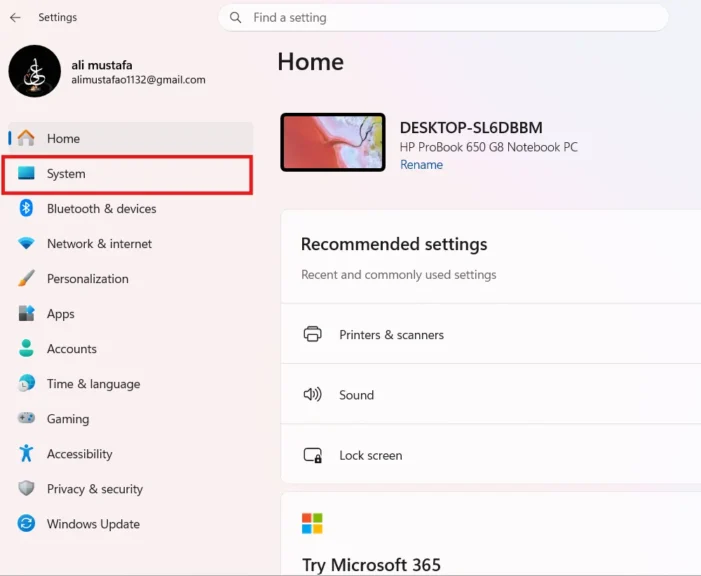
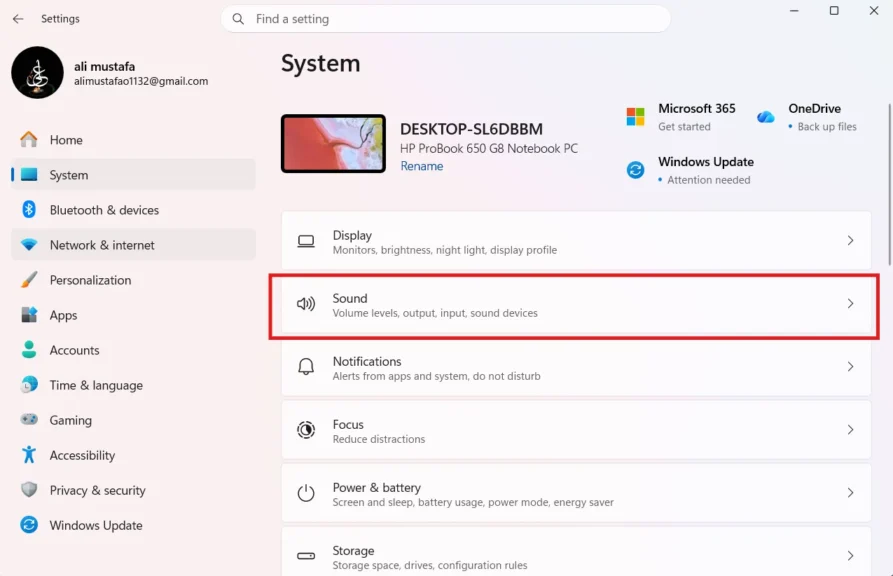
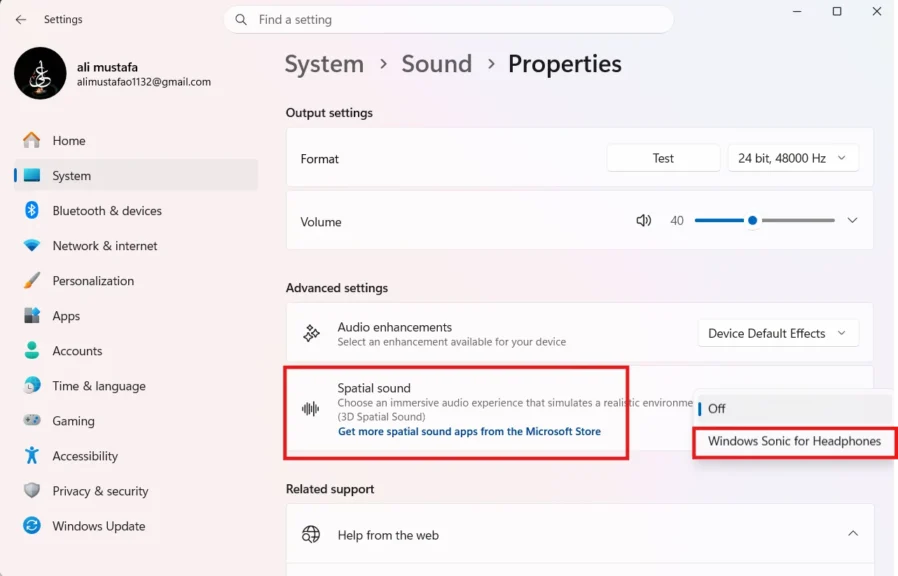
Windows includes Windows Sonic for Headphones as a built-in spatial sound option. You can turn it on through the sound settings.
- Open Settings in Windows and open System.
- Go to Sound.
- Select your headphones or other playback device.
- Open the device properties.
- Find the Spatial sound option.
- Select Windows Sonic for Headphones.
- Apply the setting if Windows asks you to.
Windows also supports other spatial sound options. Dolby Atmos and DTS Sound Unbound are available through their respective apps, and supported devices can use these technologies through Microsoft’s spatial sound framework.
If your headset already has its own surround or spatial mode, check its software before enabling another spatial effect.
Does Spatial Sound Improve Footstep Audio?
It can, but it does not guarantee better footsteps.
Spatial sound can make it easier to identify the direction of footsteps by creating a stronger sense of where the sound is coming from. This can be useful in competitive games where an enemy’s position may be revealed by their movement.
However, the game itself still matters. If its footstep audio is poorly designed or difficult to distinguish, spatial sound cannot completely fix it.
Your headphones also matter.
A good headset with clear audio can make directional sounds easier to understand, while poor audio quality can make the difference harder to notice. The best way to test it is to use a game you already know. Play with spatial sound enabled, then disable it and compare the same type of audio cues.
Final Words
Spatial sound can make gaming audio feel more natural and help you identify where important sounds are coming from. It can be especially useful with headphones and games that have strong positional audio.
However, stereo can still work very well, and some players may prefer its cleaner sound. Try both options in the games you play most and keep the one that makes footsteps, gunfire, and other sounds easiest for you to locate.
People Also Ask
Spatial sound can improve directional audio and make games feel more immersive. It is especially useful in games where footsteps and other positional sounds matter.
Spatial sound does not normally provide a meaningful FPS boost. It is an audio feature designed to change how game sounds are processed and presented.
Neither option is always better. Spatial sound can provide stronger positional cues, while stereo can sound cleaner and more natural depending on the game and player.
You do not need to turn off spatial audio for gaming. Keep it on if it makes directional sounds easier to locate, but switch to stereo if the audio sounds unnatural or confusing.
