

A high-performance gaming PC is not only about choosing the best CPUs and GPUs. Your case also needs to provide enough room for those components while keeping temperatures under control.
The Cooler Master HAF II 500 takes a very direct approach to that problem. Instead of relying on a large number of small fans, it uses two massive 220mm front intake fans and a 180mm rear exhaust fan to move a huge amount of air through the chassis.
It also offers support for large graphics cards, E-ATX motherboards, powerful air coolers, multiple 360mm radiator configurations, and multi-GPU setups. Let’s look at its design, cooling, compatibility, noise, features, and overall value.
Cooler Master HAF II 500 At a Glance
Here are the most important things to know about the Cooler Master HAF II 500:
- High-Airflow Design: The case uses a low-restriction front and rear layout designed to move large amounts of air through the chassis.
- Three Large Included Fans: You get two 220mm Mighty40 F220 intake fans at the front and one 180mm Mighty40 V180 exhaust fan at the rear.
- Large Fan Support: The case supports multiple 120mm, 140mm, 160mm, and 180mm fans depending on the mounting configuration.
- Flexible Radiator Support: It supports 240mm, 280mm, and 360mm radiators, including unusual 360mm configurations using 180mm fans.
- Large GPU Clearance: Cooler Master lists up to 430mm of graphics-card length with the stock front fans installed.
- Broad Motherboard Support: It supports Mini-ITX, Mini-DTX, Micro-ATX, ATX, CEB, and E-ATX motherboards up to 310mm wide.
- Excellent CPU Cooler Clearance: The case supports CPU air coolers up to 220mm for AMD systems and 221mm for Intel systems.
- MasterRail System: Adjustable rails provide additional flexibility for fan and radiator placement.
- Multi-GPU Support: The chassis is designed to accommodate demanding multi-GPU configurations, including two 3.5-slot cards or up to four thinner dual-slot cards.
- Large Chassis: Its 557 × 262 × 548mm dimensions give builders considerable room for large components and custom cooling configurations.
What Is the Cooler Master HAF II 500?
The Cooler Master HAF II 500 is a large mid-tower PC case designed around high airflow and high-performance hardware. It is the latest evolution of Cooler Master’s HAF series and was released in July 2026.
Unlike many modern cases that use several 120mm or 140mm fans, the HAF II 500 relies on enormous 220mm front intake fans and a 180mm rear exhaust fan. Cooler Master combines these fans with a relatively open chassis layout and a dedicated GPU airflow path.
The result is a case designed primarily for users who care about cooling performance, large components, and hardware flexibility rather than keeping their build as compact as possible.
Quick Assessment
The HAF II 500 is a particularly strong performer for high-power systems.
- GamersNexus placed it at the top of its noise-normalized case testing at the time of its review.
- Tom’s Hardware also recorded excellent CPU and GPU thermal results.
| Category | Assessment |
|---|---|
| Airflow | Excellent |
| Cooling Performance | Excellent |
| GPU Support | Excellent |
| Radiator Support | Excellent |
| Included Fans | Excellent |
| CPU Cooler Support | Excellent |
| Motherboard Compatibility | Excellent |
| Cable Management | Very Good |
| Building Experience | Very Good |
| Noise | Very Good |
| Size | Large |
| Value | Good |
The biggest advantage is that the HAF II 500 is built to move a lot of air without depending on extremely high fan speeds.
Is It Good for Gaming PCs?
Yes. The HAF II 500 is particularly well suited to high-end gaming PCs with power-hungry CPUs and GPUs.
The large front fans can move substantial amounts of air into the chassis, while the rear 180mm fan provides a correspondingly large exhaust path. The case also includes a dedicated airflow path intended to improve GPU cooling.
How Much Does the Cooler Master HAF II 500 Cost?
The Cooler Master HAF II 500 launched in North America with a $199.99 MSRP, as per the official Cooler Master site. Current retail listings have also shown it around the $200 mark.
That puts it firmly in the premium mid-tower category. You are paying more than you would for a basic airflow case, but a significant portion of the price goes toward the three large included fans, extensive hardware clearance, MasterRail system, and cooling-focused design.
Cooler Master HAF II 500 Specifications
| Specification | Cooler Master HAF II 500 |
|---|---|
| Case Type | Mid-Tower |
| Dimensions | 557 × 262 × 548mm |
| Chassis Volume | 79.98 liters |
| Material | SGCC steel, ABS, tempered glass |
| Motherboard Support | Mini-ITX, Mini-DTX, Micro-ATX, ATX, CEB, E-ATX |
| Maximum E-ATX Width | 310mm |
| Included Fans | 2 × 220mm + 1 × 180mm |
| Front Fans | 2 × 220mm |
| Top Fans | 3 × 120/140mm or 2 × 160/180mm |
| Rear Fan | 1 × 180mm |
| Maximum GPU Length | 430mm with stock front fans |
| CPU Cooler Height | 220mm AMD / 221mm Intel |
| Top Radiator | Up to 360mm |
| Front Radiator | Up to 360mm with MasterRail configuration |
| Rear Radiator | Up to 180mm |
| Expansion Slots | 8 |
| Storage | Up to 3 × 3.5-inch or 6 × 2.5-inch |
| Front I/O | 1 × USB-C, 2 × USB-A, combo audio |
| Fan/ARGB Hub | 6 × PWM + 6 × ARGB |
| PSU Clearance | Up to 210mm depending on orientation |
| Vertical GPU | Supported |
These specifications make the HAF II 500 substantially more spacious and flexible than many conventional mid-tower cases.
1. Design and Build Quality
The HAF II 500 is a large case, and its dimensions make that immediately apparent. At 557mm long, 262mm wide, and 548mm tall, it occupies considerably more desk space than compact mid-towers.
The extra width and internal volume are intentional. The chassis is designed to accommodate:
- Large graphics cards
- Oversized CPU coolers
- Multiple radiators
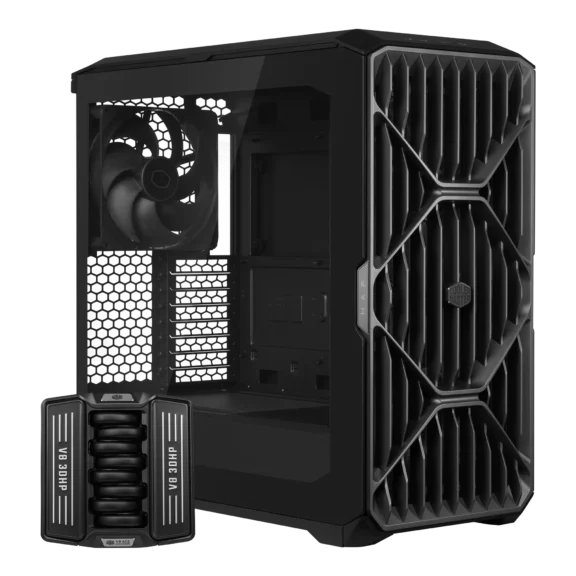
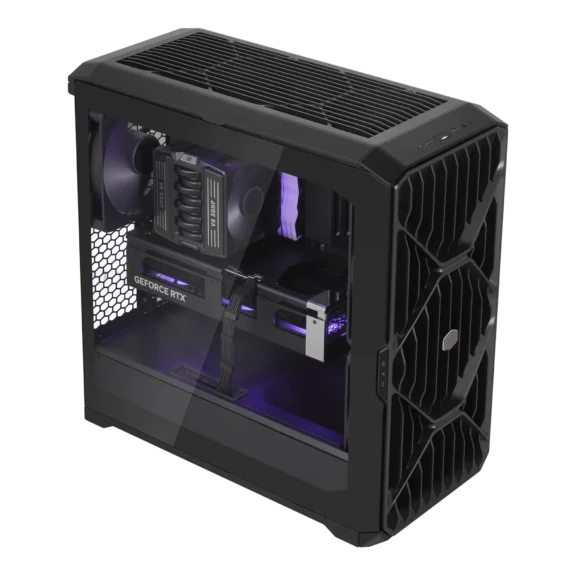
The left side uses tempered glass, while the right side is steel. The front panel is heavily focused on airflow, with the 2 enormous 220mm fans positioned behind it.
Build quality is generally solid, although independent testing has pointed out that some of the thinner metal components and small hooks used for cable straps can feel less substantial than the rest of the chassis.
Still, the overall construction is appropriate for a large enthusiast-oriented case.
2. Airflow and Thermal Performance
Airflow is the HAF II 500’s biggest selling point.
- The two 220mm Mighty40 F220 fans provide the main intake.
- The 180mm Mighty40 V180 handles exhaust at the rear.
Their enormous size allows them to move significant amounts of air without requiring the extremely high RPMs associated with smaller fans. The case also incorporates a dedicated GPU airflow path, which helps direct fresh air toward graphics cards.
Independent testing strongly supports the case’s cooling-focused design. In Tom’s Hardware testing, the HAF II 500 recorded the lowest GPU temperature among the five cases in its comparison and tied for the best CPU result in the test group.
GamersNexus likewise reported class-leading noise-normalized thermal performance in its testing. This is particularly useful for high-power GPUs, where maintaining reasonable temperatures can help prevent aggressive fan speeds and thermal throttling.
3. Included Fans
The HAF II 500 comes with three large fans:
- 2 × 220mm Mighty40 F220 front intake fans
- 1 × 180mm Mighty40 V180 rear exhaust fan
This is one of the strongest aspects of the case because you do not need to immediately spend additional money populating the basic intake and exhaust positions.
The fans are also deliberately designed around airflow rather than RGB lighting. They are black and do not provide the flashy illumination found on many gaming cases. If your priority is cooling performance rather than visual effects, this is a sensible design choice.
4. Cable Management and Building Experience
Cooler Master gives the HAF II 500 a split-level cable-routing system with dedicated routing areas and integrated cable straps.
The case provides approximately 15–40mm of cable-routing clearance depending on the location, which gives you reasonable space to hide power cables and other wiring.
The large internal dimensions also make component installation easier than in a cramped mid-tower. There is more room around the motherboard, GPU, CPU cooler, and power supply areas.
The MasterRail system is another major part of the building experience. It uses adjustable rails that can be repositioned to accommodate different fan and radiator configurations.
This makes the HAF II 500 more flexible than a case where every fan mounting position is permanently fixed.
5. Noise Levels
Despite its enormous fans, the HAF II 500 is not designed to be excessively loud.
In Tom’s Hardware’s testing, the case reached approximately 49 dBA with its included fans operating at maximum speed. The reviewer also noted that the fans produced considerable wind noise without an especially harsh mechanical character.
The important advantage is that you do not necessarily need to run these fans at maximum speed. Because the fans are so large, they can move substantial air at lower speeds. That gives you the option of creating a relatively quiet fan curve while still maintaining strong airflow.
GPU, CPU Cooler, and Radiator Compatibility of Cooler Master HAF II 500
The HAF II 500 is designed for unusually large components, which makes compatibility one of its strongest characteristics.
What Motherboards and CPUs Does It Support?
The case supports:
- Mini-ITX
- Mini-DTX
- Micro-ATX
- ATX
- CEB
- E-ATX up to 310mm wide
This gives you considerable flexibility when selecting a motherboard.
CPU compatibility itself depends on the motherboard socket and BIOS support rather than the case. You can therefore build the HAF II 500 around modern AMD Ryzen or Intel desktop processors as long as the motherboard supports the chosen CPU.
The case’s enormous 220mm AMD / 221mm Intel CPU cooler clearance is particularly impressive. It can accommodate many of the largest tower air coolers available, and leave considerably more room than the 160–180mm clearance common in many mid-towers.
One limitation is worth mentioning. The HAF II 500 does not support rear-connect motherboards, so builders using motherboards with connectors on the back should choose another chassis.
What GPUs Can You Install?
The HAF II 500 supports graphics cards up to 430mm long with the stock 220mm front fans installed. That is enough clearance for most modern high-end graphics cards, including many large enthusiast GPUs.
The case also goes considerably further than simply supporting one large GPU. Cooler Master designed it for multi-GPU configurations:
- Up to two graphics cards with approximately 72mm of thickness available per card
- Up to four graphics cards with approximately 40mm of thickness available per card
That makes the HAF II 500 particularly interesting for AI, rendering, simulation, and other GPU-compute workloads where multiple graphics cards may be required.
Can It Fit a 360mm AIO Cooler?
Yes. The HAF II 500 supports 360mm radiators in multiple configurations.
At the top, you can use a conventional 360mm radiator with three 120mm fans. The case also supports a less conventional 360mm configuration using two 180mm fans.
The front can also support 360mm radiator configurations when the MasterRail system is configured appropriately. This makes the case suitable for powerful CPUs paired with 360mm AIO CPU coolers.
The large CPU cooler clearance also means you are not forced into liquid cooling simply because you are using a high-end processor. A large tower air cooler can also be used.
Cooler Master HAF II 500 Pros and Cons
| Pros | Cons |
|---|---|
| Excellent airflow | Large and wide for a mid-tower |
| Three massive included fans | Around $200 MSRP |
| Excellent GPU cooling potential | Does not support rear-connect motherboards |
| Up to 430mm GPU clearance | Some smaller structural parts feel less substantial |
| Supports large E-ATX motherboards | Large footprint may not suit smaller desks |
| Up to 221mm CPU cooler clearance | MasterRail configurations require some planning |
| Flexible 360mm radiator support | Fans prioritize airflow over RGB aesthetics |
| Multi-GPU support | |
| Six-port PWM and ARGB hub | |
| Excellent cooling performance | |
| Flexible MasterRail system |
Is the Cooler Master HAF II 500 Worth Buying?
The Cooler Master HAF II 500 is worth considering if your priority is high airflow, powerful cooling, and support for large hardware.
Who Should Buy It?
The Cooler Master HAF II 500 is a good fit for:
- High-end gaming PC builders
- Users installing large graphics cards
- Enthusiasts using powerful CPUs
- Builders who prefer large air coolers
- Users installing a 360mm AIO
- AI and GPU-compute workstation builders
- Rendering and simulation systems
- Multi-GPU configurations
- Builders who prioritize airflow over compact dimensions
- Users who want multiple fan and radiator configuration options
Who Should Avoid It?
You may want to consider another case if you:
- Want a compact mid-tower
- Have limited desk space
- Prefer a smaller and lighter case
- Want native rear-connect motherboard support
- Prefer extensive RGB lighting
- Are building a relatively low-power PC
- Do not need substantial GPU or cooling clearance
Final Thoughts
The Cooler Master HAF II 500 is a modern interpretation of the classic HAF philosophy:
- “Move a lot of air and give powerful hardware plenty of room to breathe.”
Its two 220mm front fans and 180mm rear fan are the defining features, but the case goes beyond oversized fans with excellent GPU clearance, huge CPU cooler compatibility, flexible radiator support, E-ATX motherboard compatibility, MasterRail mounting, and multi-GPU support.
For a high-end gaming PC, workstation, AI system, or other demanding build where cooling and component space matter more than compact dimensions, the HAF II 500 is a highly capable enthusiast-focused case.
