

If you play MMOs or MOBAs, you will surely run out of buttons on the gaming mouse. Switching between abilities, weapons, spells, items, and macros can force you to constantly reach for your keyboard.
And I know the frustration you may feel at that time because I have also experienced that. The Corsair SCIMITAR ELITE WIRELESS SE solves that problem with 16 programmable buttons, including a movable 12-button side panel.
It also combines a 33,000 DPI sensor, 2.4GHz wireless, Bluetooth, USB-C connectivity, and up to 150 hours of battery life. In this guide, I have provided its complete details, and we will also see how well it actually performs for MMO, MOBA, RPG, FPS, and everyday gaming.
What is Corsair SCIMITAR ELITE WIRELESS SE?
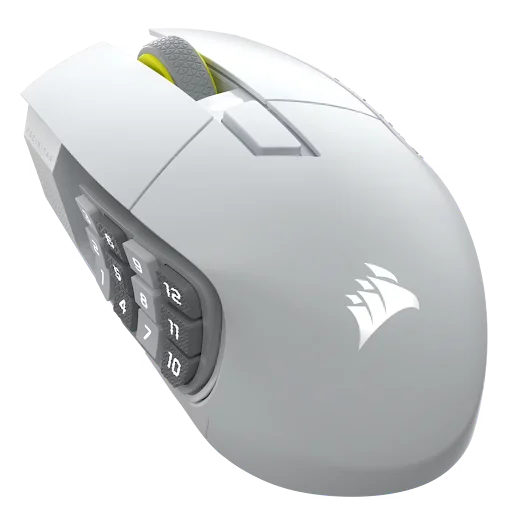
The Corsair SCIMITAR ELITE WIRELESS SE is a right-handed wireless MMO gaming mouse designed for players who need many programmable controls. It features 16 customizable buttons, a movable 12-button side panel, a 33,000 DPI sensor, and three connection methods.
| Specification | Corsair SCIMITAR ELITE WIRELESS SE |
|---|---|
| Release Date | May 19, 2025 |
| Weight | 114g |
| Dimensions | 119.23 × 73.48 × 42.17 mm |
| Sensor | Marksman S 33K |
| Maximum DPI | 33,000 DPI |
| Programmable Buttons | 16 |
| Connectivity | 2.4GHz, Bluetooth, USB-C |
| Polling Rate | Up to 1,000Hz |
| Battery Life | Up to 150 hours at 2.4GHz |
| Price | $139.99 MSRP |
Price of SCIMITAR ELITE WIRELESS SE MMO Gaming Mouse
The SCIMITAR ELITE WIRELESS SE launched on May 19, 2025, at $139.99. Corsair currently lists some color variants at $139.99 MSRP, while its official store has also been showing promotional pricing on selected versions.
Corsair SCIMITAR ELITE WIRELESS SE Features and Specifications
The SCIMITAR ELITE WIRELESS SE has a claw grip style, and the best part is that this mouse is not trying to compete with ultra-light FPS mice. Its design is centered around giving you more controls without needing to reach for your keyboard.
| Feature | Specification |
|---|---|
| Sensor | Marksman S 33K Optical |
| Maximum DPI | 33,000 DPI |
| Tracking Speed | 750 IPS |
| Maximum Acceleration | 50G |
| Polling Rate | Up to 1,000Hz |
| Programmable Buttons | 16 |
| Side Buttons | 12 |
| Switches | Corsair Optical |
| Switch Rating | Up to 100 million clicks |
| Wireless | SLIPSTREAM 2.4GHz |
| Bluetooth | Yes |
| Wired | USB-C |
| Battery | Up to 150 hours at 2.4GHz |
| Bluetooth Battery | Up to 500 hours |
| RGB | Yes |
| Software | Corsair iCUE |
| Stream Deck Integration | Yes |
1. 16 Programmable Buttons
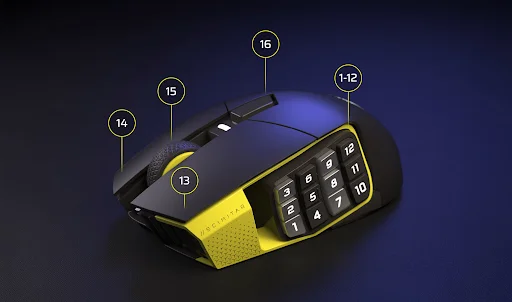
The main reason to buy the SCIMITAR ELITE WIRELESS SE is its 16 programmable buttons.
12 of them are arranged on the left side in a 4 × 3 grid, which gives you quick access to abilities, spells, macros, inventory items, or other commands without moving your hand to the keyboard.
This is particularly useful in games where you regularly have more commands than a conventional mouse can accommodate.
For World of Warcraft, Final Fantasy XIV, Guild Wars 2, or other MMOs on gaming PCs, the side panel can become a dedicated ability bar under your thumb.
2. Adjustable Key Slider
The 12-button side panel isn’t fixed in one position. You can slide it forward or backward and lock it into the position that feels most comfortable for your hand.
This matters because the wrong side-button position can make a 12-button mouse frustrating to use. The adjustable panel gives you some control over where your thumb naturally rests.
3. Marksman S 33K Sensor
Corsair equips the mouse with its Marksman S 33K optical sensor.
It reaches up to 33,000 DPI, 750 IPS tracking speed, and 50G acceleration. In real use, this gives the mouse accurate tracking for gaming as well as normal desktop work. Tom’s Hardware found the sensor accurate and consistent across different surfaces during testing.
You don’t need anywhere close to 33,000 DPI for most games, but the sensor provides plenty of performance headroom.
4. Three Connectivity Options
The SCIMITAR ELITE WIRELESS SE gives you 3 ways to connect:
| Connection | Best Use |
|---|---|
| 2.4GHz SLIPSTREAM | Gaming |
| Bluetooth | Laptop/travel/general use |
| USB-C | Wired gaming and charging |
The 2.4GHz SLIPSTREAM connection is the option you should use for gaming when you want the lowest-latency wireless experience. Bluetooth is more useful when on gaming laptops because battery life and convenience matter more than gaming latency.
5. Long Battery Life
Battery life is another strong point.
Corsair rates the mouse for up to 150 hours over 2.4GHz wireless with lighting turned off and up to 500 hours over Bluetooth.
That makes the SCIMITAR ELITE WIRELESS SE practical for long gaming sessions without constantly thinking about charging it.
6. Stream Deck Integration
The SCIMITAR ELITE WIRELESS SE can also work with Elgato Stream Deck functionality through Corsair’s software ecosystem.
That means you can use its programmable buttons for more than in-game commands. Streamers can assign functions such as launching applications, controlling OBS scenes, changing audio settings, or triggering other shortcuts.
PC Gamer described the mouse as effectively combining many of the functions of a Stream Deck with a gaming mouse.
For someone who games and streams from the same gaming PC, this is one of the more unusual advantages of the mouse.
Corsair SCIMITAR ELITE WIRELESS SE Performance Benchmarks
The SCIMITAR ELITE WIRELESS SE is designed around button-heavy gaming rather than ultra-fast mouse movement. Here is how it performs in the areas that matter most.
1. Wireless Performance
| Factor | Result |
|---|---|
| 2.4GHz Wireless | Yes |
| Bluetooth | Yes |
| Wired | USB-C |
| Maximum Polling | 1,000Hz |
| Gaming Connection | SLIPSTREAM 2.4GHz |
| Competitive FPS | Capable, but not ideal |
The 2.4GHz connection provides the responsiveness you need for normal gaming, and Tom’s Hardware reported a stable connection during testing with no noticeable latency or connection drops.
However, the 1,000Hz maximum polling rate and 114g weight tell you where this mouse is positioned.
- Gaming Takeaway: It is perfectly capable for normal FPS gaming, but it is not designed to compete with lightweight esports mice built specifically around fast flicks and rapid repositioning.
2. Battery Life
| Connection | Rated Battery Life |
|---|---|
| 2.4GHz wireless | Up to 150 hours |
| Bluetooth | Up to 500 hours |
The 150-hour 2.4GHz rating is already enough for long gaming sessions, while the 500-hour Bluetooth rating makes the mouse particularly convenient when you are using it away from your gaming PC.
Unlike the Razer Viper V2 Pro, Corsair SCIMITAR ELITE WIRELESS SE has RGB lighting. Keep in mind that the RGB usage conditions can also affect actual battery life.
- Battery Takeaway: Battery life is one of the mouse’s practical strengths, especially when used at 2.4GHz with lighting disabled.
3. Gaming Performance
Similar to Logitech G903, which weighs 110g, the SCIMITAR ELITE WIRELESS SE weighs 114g and is quite heavy. That’s why it performs very differently depending on the type of game.
| Game Type | Suitability | Main Reason |
|---|---|---|
| MMO | Excellent | 12-button side panel |
| MOBA | Excellent | Easy access to abilities and items |
| RPG | Excellent | Macros and additional controls |
| ARPG | Excellent | Many accessible commands |
| GTA V | Good | Accurate sensor, but extra buttons aren’t essential |
| COD / Warzone | Good | Accurate sensor, but 114g is heavy |
| Valorant / CS2 | Average | Heavy body and 1KHz polling |
| Casual Gaming | Very Good | Comfortable and highly customizable |
- For MMOs, this is where the SCIMITAR ELITE WIRELESS SE makes the most sense. Having 12 commands under your thumb can significantly reduce how often you need to move your hand between the mouse and keyboard.
- For MOBAs, the same principle applies. You can assign abilities, items, communication commands, and other frequently used actions to the side panel.
- For RPGs and ARPGs, the additional buttons are useful when a game has a large number of abilities or shortcuts. The comfortable palm-oriented shape also works well for longer sessions. Tom’s Hardware found it performed well in MMOs and RPGs.
- For COD and other FPS games, the mouse is accurate and responsive enough to play comfortably, but its 114g weight makes it noticeably less suitable for rapid flicking and large low-sensitivity movements than a lightweight FPS mouse. PC Gamer similarly found it less suited to esports-style fast movement.
- For Valorant and CS2, you can certainly play with it, but the design is solving a different problem. These games generally benefit more from a lightweight mouse with fewer buttons than from a 16-button MMO layout.
- For GTA V, the SCIMITAR ELITE WIRELESS SE is more than capable. Its sensor provides accurate movement, but most of its extra buttons will not be particularly important unless you specifically want to assign additional commands or macros.
Should You Buy Corsair SCIMITAR ELITE WIRELESS SE?
The answer depends heavily on the games you play.
| If You Mainly Play… | Is It a Good Fit? | Why |
|---|---|---|
| MMOs | Yes | 12-button panel is extremely useful |
| MOBAs | Yes | Easy access to abilities and items |
| RPGs | Yes | Excellent number of programmable controls |
| ARPGs | Yes | Macros and shortcuts are easy to access |
| GTA V | Yes | Good performance, although buttons are underused |
| COD / Warzone | Maybe | Capable, but heavy for fast FPS play |
| Valorant / CS2 | Not ideal | Better suited to lighter competitive mice |
| Streaming | Yes | Stream Deck integration adds useful controls |
At its $139.99 MSRP, the SCIMITAR ELITE WIRELESS SE is primarily worth considering if you actually need its large number of programmable buttons.
- If your biggest problem is constantly reaching for the keyboard to activate abilities, macros, or shortcuts, the 12-button side panel directly addresses that problem.
- If your priority is simply getting the fastest possible mouse for competitive FPS gaming, its 114g weight and MMO-focused design make it a less natural choice.
Pros and Cons of Corsair SCIMITAR ELITE WIRELESS SE
| Pros | Cons |
|---|---|
| 16 programmable buttons | 114g weight is heavy for FPS gaming |
| Adjustable 12-button side panel | Large body may not suit smaller hands |
| Up to 150 hours over 2.4GHz | |
| 33,000 DPI Marksman S sensor | |
| 2.4GHz, Bluetooth, and USB-C connectivity |
Final Thoughts
The Corsair SCIMITAR ELITE WIRELESS SE is built for games that need more controls than a conventional gaming mouse provides.
Its 16 programmable buttons, adjustable 12-button side panel, 33,000 DPI Marksman S sensor, and long battery life make it particularly useful for MMO, MOBA, RPG, and ARPG players.
The 2.4GHz wireless connection is responsive enough for gaming, while Bluetooth and USB-C add flexibility. It can handle FPS games and GTA V without problems, but its 114g weight makes it less suitable for players who prioritize fast flicks and lightweight movement.
If you need lots of buttons, however, its design is much easier to justify than a conventional gaming mouse with only a few controls.
People Also Ask
The SCIMITAR ELITE WIRELESS SE has 16 programmable buttons, including a 12-button adjustable side panel.
Yes, its 12-button side panel is specifically designed to give MMO players quick access to abilities, items, and macros.
The mouse weighs 114g without its cable.
Corsair rates it for up to 150 hours over 2.4GHz wireless and up to 500 hours over Bluetooth.
It can handle FPS games well, but its 114g weight and MMO-focused button layout make it better suited to MMOs, MOBAs, and RPGs than competitive esports FPS games.
Corsair lists the regular MSRP at $139.99, although its official store is currently showing selected variants at $79.99 during a sale.
