

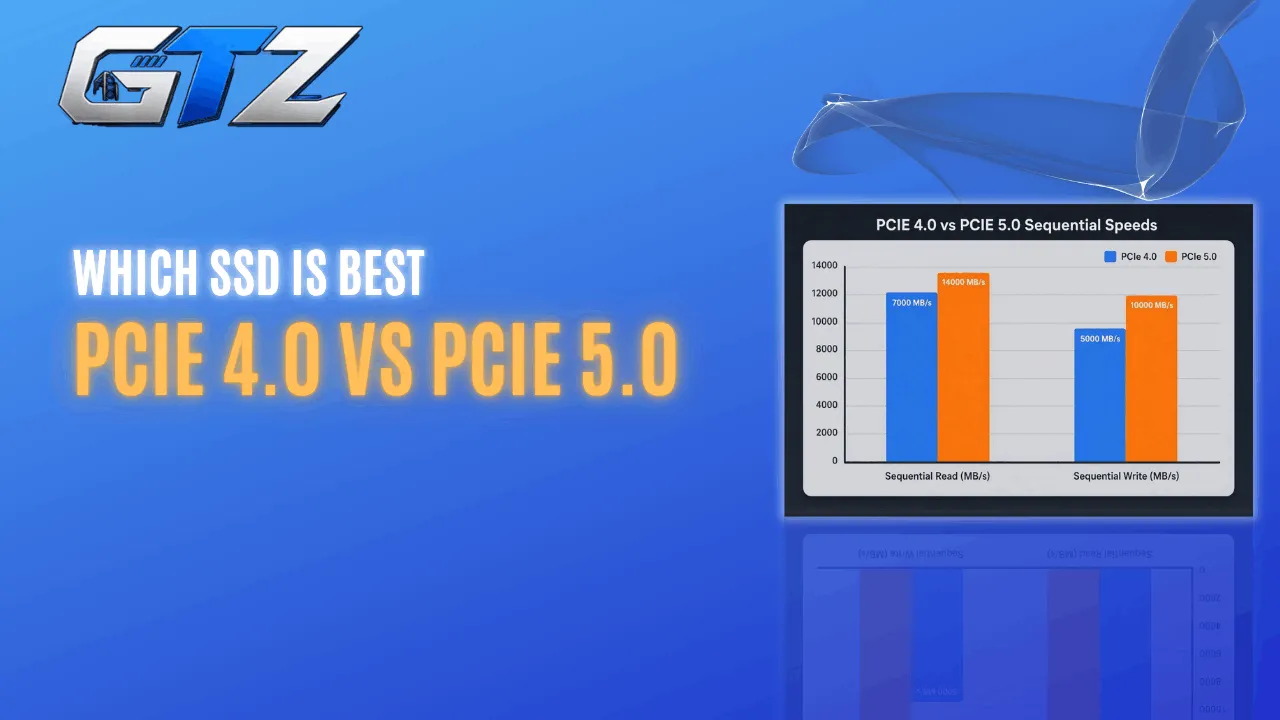
After comparing PCIe 4.0 and PCIe 5.0 SSDs in my gaming PC, I found that the huge difference in advertised speeds rarely translates into a noticeably better gaming experience.
Modern PCIe 5.0 drives can exceed 14,000 MB/s in synthetic benchmarks, but game load times and frame rates stay surprisingly close to a good PCIe 4.0 SSD.
If you’re deciding which SSD to buy in 2026, this guide compares real gaming performance, pricing, thermals, and upgrade value so you can spend your budget where it makes the biggest difference.
Quick Glance
| Category | PCIe 4.0 | PCIe 5.0 |
|---|---|---|
| Sequential read (2TB class) | ~7,000–7,500 MB/s | ~12,000–14,900 MB/s |
| Real-world FPS impact | None | None |
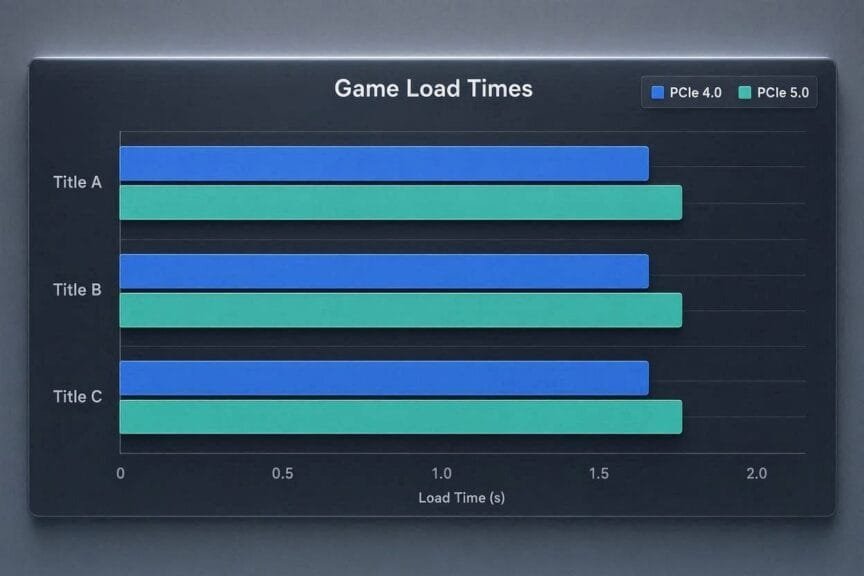
| Game load time difference | Baseline | Marginal — often under a second |
| Cooling needs | Low, usually passive | High — active/heatsink cooling recommended |
| Price per GB | Lower | 2–3x higher |
| Best for | Pure gaming builds | Gaming + content creation or large-file workloads |
What Are PCIe 4.0 and PCIe 5.0 SSDs?
Before comparing performance, it helps to know what these labels actually mean. PCIe generation refers to the data interface your SSD uses to talk to the rest of your system — not the storage type itself.
What is a PCIe 4.0 SSD?
A PCIe 4.0 SSD is an NVMe drive that connects over the fourth-generation PCI Express bus, delivering up to roughly 7,000–7,500 MB/s of sequential throughput on today’s top drives. It’s been the mainstream standard for gaming PCs since 2020 and remains the most common interface in current builds.
Best for:
- Gaming builds on Intel 11th–14th Gen or AMD Ryzen 5000/7000-series platforms
- Anyone who doesn’t need extreme sequential speeds for creative workloads
- Builders prioritizing thermals and value over peak benchmark numbers
What is a PCIe 5.0 SSD?
A PCIe 5.0 SSD uses the newer fifth-generation PCI Express bus, roughly doubling PCIe 4.0’s per-lane bandwidth to hit sequential speeds north of 12,000–14,900 MB/s on current flagship drives. It requires a motherboard and CPU platform built to support Gen5 (common on Intel Z790/Z890 and AMD X670/X870 boards).
Best for:
- Builders with an open Gen5 M.2 slot who want the fastest available drive
- Content creators moving very large files alongside gaming
- Future-proofing for DirectStorage-heavy titles down the road
Can You Use a PCIe 5.0 SSD in a PCIe 4.0 Slot?
Yes. PCIe is backward compatible. A PCIe 5.0 SSD works perfectly in a PCIe 4.0 M.2 slot but operates at PCIe 4.0 speeds. This makes future upgrades easier if you plan to move the SSD into a newer motherboard later.
Does PCIe 5.0 Improve Gaming Performance?
This is the question most builders actually care about, and the testing is consistent across independent reviewers: PCIe 5.0 does not meaningfully change what you feel while playing.
The bandwidth advantage is real on paper, but games don’t move data the way benchmark tools do.
Does PCIe 5.0 increase FPS in games?
No. Frame rates are set by your GPU and CPU, not your storage interface. Testing across current titles consistently shows the difference between PCIe 4.0 and PCIe 5.0 drives is negligible — typically within a percentage point or two, which is inside normal run-to-run variance.
What actually moves your FPS:
- Your GPU: by far the biggest factor
- Your CPU and RAM speed, especially in CPU-bound titles
- Game settings and resolution
- Not your SSD’s PCIe generation
Notes: Microsoft’s DirectStorage API, which lets games stream and decompress assets more efficiently, could make NVMe speed matter more for FPS-adjacent stutter over time.
As of 2026, only a handful of shipped titles use it meaningfully, so the impact today is limited.
Is PCIe 5.0 SSD Worth It for Gaming?
For most gamers, no. A quality PCIe 4.0 SSD already delivers excellent game load times and smooth gameplay at a much lower cost. Unless you regularly edit large videos, transfer huge files, or simply want the fastest storage available, the extra money is usually better spent on a faster GPU, CPU, or more RAM.
Do You Need PCIe 5.0 for DirectStorage?
No. Microsoft DirectStorage works with both PCIe 4.0 and PCIe 5.0 NVMe SSDs. While faster SSDs may offer more headroom as future games become more demanding, current DirectStorage titles already perform very well on quality PCIe 4.0 drives.
Do PCIe 5.0 SSDs reduce game load times?
Barely. Independent testing across AAA titles shows load-time gaps of well under two seconds — often under a second — between a premium PCIe 4.0 drive and a PCIe 5.0 drive.
Game engines are bottlenecked by asset decompression and CPU processing, not raw sequential throughput.
Where the gap actually shows up:
- Installing or patching very large games (100GB+ downloads)
- Copying or cloning a full game library
- Not cold boots, fast travel, or level transitions — those stay nearly identical
Caveats: Without a heatsink or adequate motherboard cooling, many PCIe 5.0 drives throttle under sustained writes and fall back toward PCIe 4.0-class speeds — erasing even the small advantage they have.
PCIe 4.0 vs PCIe 5.0 Gaming Benchmarks
Here’s how the specs actually stack up between current-generation drives. Speeds are manufacturer-rated sequential figures for 2TB models where available.
| Drive | Interface | Seq. Read | Seq. Write | Price (2TB) |
|---|---|---|---|---|
| Samsung 990 Pro | PCIe 4.0 | 7,450 MB/s | 6,900 MB/s | $389.99 |
| WD Black SN850X | PCIe 4.0 | 7,300 MB/s | 6,300 MB/s | $348 |
| Crucial T705 | PCIe 5.0 | 14,500 MB/s | 12,700 MB/s | $385 |
| WD Black SN8100 | PCIe 5.0 | ~14,900 MB/s | ~11,000 MB/s | $399 |
| Samsung 9100 Pro | PCIe 5.0 | 14,800 MB/s | 13,400 MB/s | $399.99 |
Prices listed above were accurate as of August 2, 2026. SSD prices change frequently, so check current pricing before making your purchase.
How much faster is PCIe 5.0 on paper vs in actual games?
On paper, PCIe 5.0 drives roughly double PCIe 4.0 sequential speeds. In gaming that gap almost never shows up, because games rarely perform the kind of sustained, large-block sequential transfers that showcase Gen5’s advantage.
Where the raw numbers do matter:
- Large sequential file transfers and backups
- Video editing with big 4K/8K project files
- AI/ML workloads and large dataset handling
Best SSD for Gaming: PCIe 4.0 and PCIe 5.0 Picks
Picking a drive comes down to matching the generation to what you actually do with your PC, not chasing the biggest number on the box.
What’s the best PCIe 4.0 SSD for gaming?
The Samsung 990 Pro and WD Black SN850X are the two standout PCIe 4.0 picks for gaming in 2026.
Both deliver essentially identical real-world gaming performance, with the SN850X running slightly cooler and the 990 Pro edging ahead in sustained write workloads.
Best for: builders who want top-tier gaming performance without the Gen5 price or heat premium
| Pros | Cons |
|---|---|
| Matches PCIe 5.0 in real gaming performance | Lower peak sequential speed on paper |
| Runs cool without active cooling | Slower for huge file transfers |
| Mature pricing and proven reliability | Not future-proofed for heavy DirectStorage titles |
What’s the best PCIe 5.0 SSD for gaming?
The WD Black SN8100 and Crucial T705 lead the current PCIe 5.0 field for gamers who want the fastest drive available and are willing to pay for it.
Both need proper cooling to sustain their rated speeds and offer little practical gaming benefit over a good Gen4 drive today.
Best for: creator-gamers, early DirectStorage adopters, and no-compromise flagship builds
| Pros | Cons |
|---|---|
| Fastest available sequential speeds | 2–3x higher cost per GB |
| Headroom for future DirectStorage titles | Runs hot; throttles without a heatsink |
| Excellent for large-file creative work | Minimal difference in actual games today |
What’s the best budget SSD for gaming?
For tighter budgets, drives like the Crucial P3 Plus and WD Black SN770 deliver the bulk of the gaming experience — fast enough load times and smooth texture streaming — at a noticeably lower price per gigabyte than flagship Gen4 drives.
Best for:
- Budget builds
- Secondary game-library drives
- Upgrading from SATA
Should You Upgrade to PCIe 5.0 for Gaming?
Before spending the premium on a Gen5 drive, it helps to know which scenarios actually justify it and which upgrade mistakes waste your budget.
If you haven’t finalized the rest of your build yet, our guide on how to choose PC parts and how to upgrade your gaming PC covers the bigger-picture priorities.
When does PCIe 5.0 actually make sense?
PCIe 5.0 is worth it when your workload goes beyond pure gaming — regular large file transfers, video editing, or dataset-heavy creative work — or when you already have an open Gen5 slot on your motherboard and budget left over after your GPU and CPU.
PCIe 5.0 is best for:
- Creators who also game on the same rig
- Builders future-proofing for DirectStorage-heavy titles down the road
- Anyone with a Gen5 slot going unused anyway
Common mistakes when upgrading gaming storage
Skipping the platform check is the biggest one: PCIe 5.0 support depends on your motherboard and CPU platform, so confirm compatibility using our how to pick a CPU guide before buying a drive.
Mistakes to avoid:
- Buying a PCIe 5.0 drive without budgeting for a heatsink or active cooling
- Prioritizing peak speed over capacity — 1TB fills up fast with modern 100GB+ installs
- Assuming a storage upgrade will raise your FPS
Who Should Buy Which?
Buy PCIe 4.0:
- Gamers
- Budget builders
- First PC build
- Upgrading from SATA
Buy PCIe 5.0?
- Video editors
- Unreal Engine developers
- AI workloads
- Heavy file transfers
- Future-focused enthusiasts
Upgrading Suggestion
- SATA → PCIe 4.0: The most sensible upgrade for most gamers. You get much faster storage while keeping costs and thermals under control.
- PCIe 4.0 → PCIe 5.0: Upgrade only if you regularly handle large file transfers, video editing, AI workloads, or want extra headroom for future DirectStorage-heavy games.
- Stay with PCIe 4.0: If your PC is used mainly for gaming, there is little reason to upgrade. Current games show minimal load-time differences and no meaningful FPS improvement with Gen5.
- Before upgrading: Check that your motherboard and CPU support the required PCIe generation, and budget for proper cooling if you choose a Gen5 SSD.
Bottom Line: Should You Upgrade?
For gaming alone, PCIe 4.0 remains the smarter buy in 2026. The benchmarks are consistent across independent testing: FPS is unaffected, load-time gaps are marginal, and a top drive like the Samsung 990 Pro or WD Black SN850X costs less, runs cooler, and performs within a hair of any Gen5 drive in actual games.
PCIe 5.0 earns its premium if you also edit video, work with large datasets, or want to be ahead of the DirectStorage curve—it’s not for gaming performance on its own.
If you’re planning the rest of your build, start with the components that actually move your frame rate, then decide on storage last.
People Also Ask About PCIe 4.0 vs PCIe 5.0 SSDs
Not meaningfully. FPS depends on your GPU and CPU, and load-time differences versus a good PCIe 4.0 drive are typically under a second in current games.
No. A PCIe 4.0 platform handles current games just as well, and PCIe 5.0 drives are backward compatible — they’ll just run at Gen4 speeds in a Gen4 slot.
Yes. It remains the value sweet spot for gaming, delivering load times and asset streaming that are effectively indistinguishable from PCIe 5.0 in real titles.
Yes. Gen5 drives generate significantly more heat under sustained load and typically need a heatsink or active cooling to avoid throttling back toward Gen4-level speeds.
Generally no. Unless you also do content creation or large-file work, that budget is better spent on your GPU, CPU, or RAM — all of which affect gameplay more directly than storage generation.
