

Minecraft is already packed with things to explore, build, and discover, but the right mods can make the experience even better. With mods, you can:
- Improve the graphics
- Add new creatures
- Explore unfamiliar dimensions
- Make everyday tasks much easier
I like the idea of customizing Minecraft to suit the way you actually play, whether you enjoy survival challenges or spend most of your time building. The best part is that you do not need to change everything at once.
In this guide, I’ll cover 10 popular Minecraft mods worth exploring and explain what each one brings to your world.
What Are Minecraft Mods?
Minecraft mods are community-created modifications that change or expand the original game.
Depending on the mod, you might get new items, improved graphics, additional dimensions, different creatures, or quality-of-life features that make playing more convenient.
Before installing anything, remember that mod compatibility matters.
- Some mods require a specific Minecraft version or a mod loader such as Minecraft Forge or Fabric.
- Others may be designed for particular editions, so check the installation requirements first.
Which Minecraft Mods Should You Install First?
With so many options available, I recommend starting with mods that address what you want to improve. You do not need many of them installed at once.
Here is how you should choose based on your preferred playstyle.
| Your Goal | Recommended Mods |
|---|---|
| Improve performance | Sodium |
| Enhance graphics | Iris Shaders |
| Simplify crafting | Just Enough Items |
| Navigate more easily | Xaero’s Minimap or JourneyMap |
| Discover new environments | Biomes O’ Plenty |
| Build automated machines | Create |
| Add more wildlife | Alex’s Mobs |
| Explore dungeons and bosses | The Twilight Forest |
| Travel between bases | Waystones |
Where Should You Download Minecraft Mods?
I recommend using established mod platforms such as CurseForge and Modrinth.
- Check the publisher’s project page.
- Select the correct Minecraft version.
- Confirm the required mod loader before downloading.
Among all the games like Minecraft, the level of customization you get in Minecraft is simply unmatched. Always back up your existing worlds before installing major gameplay or world generation mods.
Adding several mods simultaneously can also make troubleshooting more difficult, so install them gradually and test your game after each addition.
10 Best Minecraft Mods for Better Gameplay and Experience
In the under section, I have explained the 10 best Minecraft mods that will help you improve your experience and enjoy the exciting gameplay.
1. Sodium: Improve Minecraft Performance
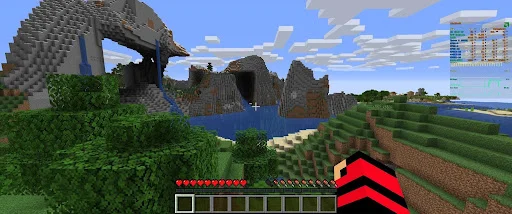
If Minecraft feels sluggish on your computer, you should start with Sodium. This performance mod improves the game’s rendering engine and helps it display the world more efficiently.
It is particularly useful if you experience frame rate drops while exploring large areas or playing with a high render distance.
Sodium does not add new creatures, blocks, or dimensions. Instead, it focuses on making the game run more smoothly without changing its familiar appearance.
What Makes Sodium Worth Installing?
The biggest advantage is that you can improve your playing experience without completely changing Minecraft. Better rendering performance can make exploring, building, and fighting mobs feel more responsive, although the actual improvement depends on your hardware and settings.
I recommend considering Sodium if you play Minecraft Java Edition on a computer that struggles with performance. It is also a useful starting point before adding larger mods.
2. Iris Shaders: Give Minecraft a Visual Upgrade
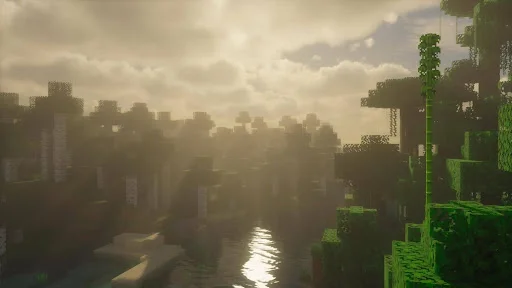
Minecraft has a distinctive blocky appearance, but that does not mean its world cannot look beautiful. Iris Shaders lets you use compatible shader packs that introduce more realistic lighting, shadows, water reflections, and atmospheric effects.
I particularly recommend looking into shaders if you enjoy building detailed houses, exploring mountains, or taking screenshots of your favorite worlds. The right shader pack can make familiar landscapes feel completely different.
Why Should You Try Iris Shaders?
Iris is a shader loading solution rather than a complete graphics overhaul on its own. You install a compatible shader pack separately to achieve the visual style you want. Iris is commonly paired with Sodium for rendering performance.
Keep in mind that shaders can demand additional processing power. If your gaming PC already struggles to run Minecraft, begin with lighter shader settings before trying more demanding options.
3. Just Enough Items: Make Crafting Easier
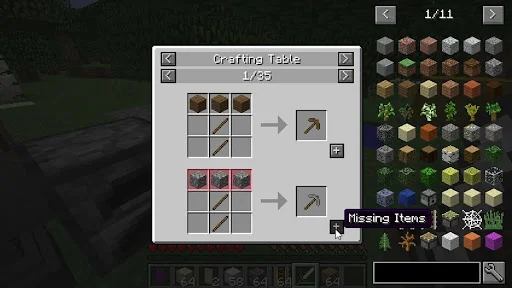
Have you ever collected a pile of materials but forgotten how to craft the item you actually need? Just Enough Items, commonly known as JEI, helps solve that problem by displaying items and their crafting recipes in an easy-to-browse interface.
Minecraft contains numerous recipes, and the number grows considerably when you install additional content mods. Rather than repeatedly searching online for crafting instructions, you can use JEI to find the information while playing.
How Does JEI help?
JEI lets you browse available items and inspect their recipes. This becomes especially helpful when you install mods that introduce unfamiliar machines, tools, ingredients, or building materials.
I would consider this one of the most practical additions for beginners because it reduces guesswork. You can spend more time gathering resources and building your world instead of leaving the game to look up recipes.
Make sure you choose a version compatible with your Minecraft installation and mod loader.
4. Xaero’s Minimap: Never Lose Your Way
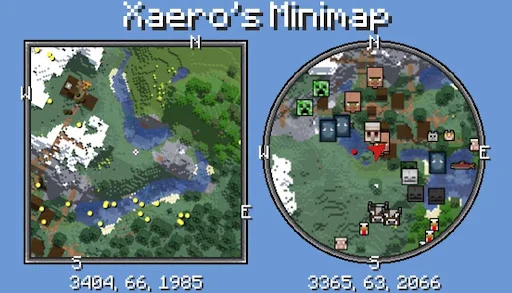
Getting lost is part of Minecraft’s adventure, but it can become frustrating when you have spent hours building a home or collecting valuable resources. Xaero’s Minimap adds a small map to your screen, which helps you keep track of the surrounding terrain while you explore.
It can display nearby landscape information and supports useful navigation features, including waypoints. These make it easier to mark important locations and find your way back later.
What Can You Do With Xaero’s Minimap?
You can use this mod to mark your:
- Base
- Villages
- Interesting caves
- Resource gathering locations
Instead of relying entirely on memory, you can keep track of places worth revisiting.
It is especially useful when exploring unfamiliar terrain or travelling long distances in survival mode. You can also pair it with Xaero’s World Map if you want a larger map view.
5. Biomes O’ Plenty: Discover New Landscapes
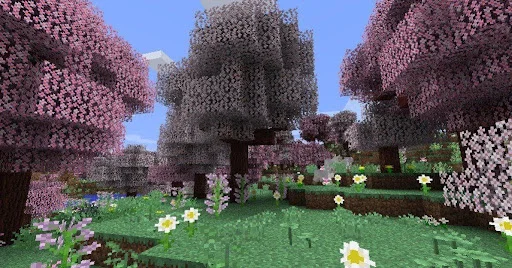
If you enjoy exploring but find the usual landscapes repetitive, Biomes O’ Plenty is worth considering. This world generation mod introduces additional biome variety, which gives you more environments to discover as you travel across your Minecraft world.
Depending on the version you install, you can encounter distinctive forests, unusual vegetation, and landscapes that make exploration feel fresh again.
Why Does Biomes O’ Plenty Improve Exploration?
The main attraction is variety. Instead of seeing familiar terrain repeatedly, you can explore different environments and find new locations for your next building project.
I think this mod is particularly appealing to players who enjoy creating themed bases. A forest retreat, a colourful garden, or a house surrounded by unusual vegetation can give your world a stronger identity.
Keep in mind that world generation mods can affect how terrain is created. I recommend checking compatibility before adding one to an existing save. Starting a new world is often the simpler option when you want to experience its full range of biomes.
6. Create: Build Machines and Automate Tasks
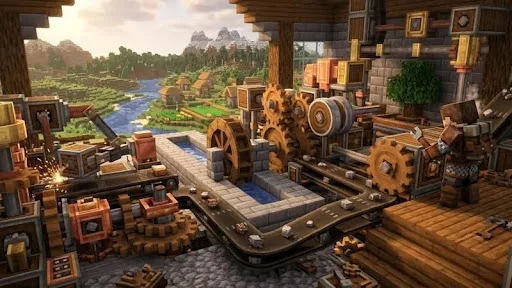
Create is an excellent choice if you want Minecraft to involve more than mining resources and building ordinary structures. It introduces mechanical components that you can combine to construct moving machinery, production systems, and elaborate contraptions.
Rather than simply placing a machine and letting it do everything, you can experiment with how different components work together. That makes designing your own systems a rewarding part of the experience.
What Can You Build With Create?
You can experiment with rotating mechanisms, conveyor systems, mechanical arms, and automated production setups. With enough planning, you can turn a basic workshop into a working factory.
I would recommend Create to players who enjoy engineering challenges and solving practical problems. You might begin with a simple machine and gradually develop a much larger production system as you understand its mechanics.
However, Create is more involved than a basic utility mod. Check the supported Minecraft version and mod loader before downloading it on your PCs or gaming laptops, particularly if you want to combine it with other major content mods.
7. Alex’s Mobs: Add More Wildlife
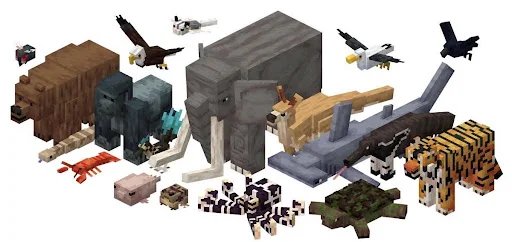
Minecraft already features familiar animals and hostile creatures, but Alex’s Mobs adds a broader selection of wildlife to explore. It introduces additional creatures with distinct appearances and behaviours and helps the environment feel more varied.
This mod is a good fit if you enjoy discovering animals while travelling through different biomes. It can also give you more inspiration for building wildlife areas, zoos, or nature-themed bases.
What Makes Alex’s Mobs Interesting?
The appeal goes beyond simply adding more creatures. Different animals can bring their own interactions and characteristics, which gives you more reasons to pay attention to your surroundings.
You can choose this mod if you want exploration to feel less predictable without turning Minecraft into an entirely different game. It complements worlds focused on wildlife, discovery, and environmental variety.
Before installing it, check which Minecraft versions and mod loaders are supported. Compatibility can vary, especially when you are combining it with other creature or world generation mods.
8. The Twilight Forest: Explore a New Dimension
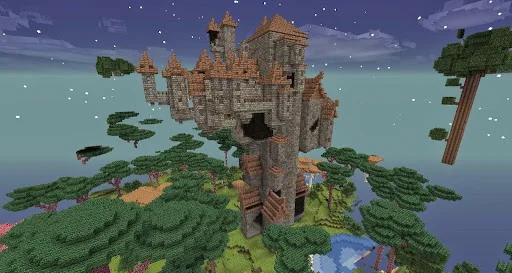
Sometimes, you want more than another forest or mountain to explore. The Twilight Forest adds a separate fantasy dimension filled with distinctive landscapes, dungeons, powerful enemies, and boss encounters.
It offers a more adventure-focused experience and gives you reasons to prepare your equipment, explore unfamiliar locations, and take on challenges beyond ordinary survival gameplay.
What Can You Expect From The Twilight Forest?
The dimension features unusual environments and structured adventures that encourage you to progress through its challenges. Rather than simply wandering around, you can explore dungeons and work towards encounters with powerful bosses.
I would recommend this mod once you feel comfortable with Minecraft’s basic survival mechanics. It gives experienced players new goals without requiring them to abandon the familiar building and crafting systems entirely.
Because it introduces a separate dimension and additional content, make sure the version you download supports your Minecraft installation.
9. Waystones: Travel Between Important Locations
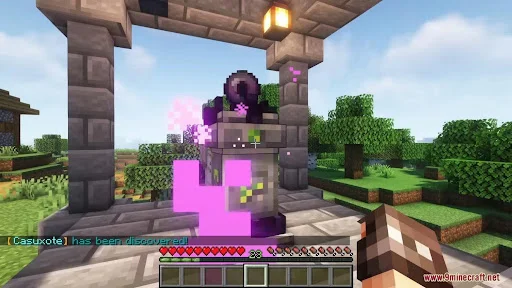
Travelling across a huge Minecraft world can take considerable time, especially when your main base is far from a village, mining area, or another important location. Waystones offer a convenient solution by introducing special structures that let you travel between established destinations.
The exact travel requirements can depend on the mod configuration and version, but the main idea is simple: establish useful waypoints and use them to make returning to important places easier.
How Can Waystones Save Time?
Imagine building your main base near a forest, finding a village several thousand blocks away, and discovering another valuable location during your travels. Without convenient fast travel, revisiting these places can involve a long journey.
With Waystones, you can establish travel points and reduce the need to retrace every step. I find this especially appealing for worlds with multiple bases or large building projects.
Check whether the mod requires installation on both the server and your own game when playing multiplayer. You should also confirm that its version matches your other mods.
10. JourneyMap: Explore With a Detailed World Map
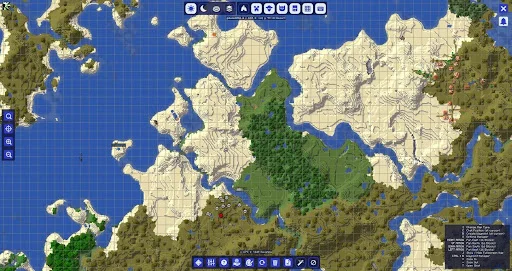
If you prefer seeing a broader picture of the world rather than relying on a small minimap, JourneyMap is another useful option. It provides mapping features that help you understand the terrain around you and keep track of places you have explored.
For players who enjoy long expeditions, it can make navigation more organised. You can review the surrounding landscape, identify important locations, and use waypoints to help plan future journeys.
Why Choose JourneyMap?
You should consider JourneyMap when exploration is a major part of your playstyle. A larger map can help you understand how different locations relate to one another, which is useful when planning settlements, connecting bases, or revisiting discoveries.
JourneyMap and Xaero’s Minimap offer overlapping features, so most players do not need both. I suggest choosing the interface you find easier to use rather than installing several mapping mods that perform similar jobs.
Final Thoughts on Minecraft Mods
Minecraft mods give you the freedom to shape the game around your interests. Whether you want smoother performance, better graphics, easier crafting, or entirely new adventures, there is a mod that can make your experience more enjoyable.
I recommend starting with one or two that solve your biggest problems before building a larger collection. Remember to check version compatibility and back up your worlds before making major changes.
You do not need dozens of mods to transform your experience. Choose the ones that suit your playstyle, load up your world, and discover how much more Minecraft can offer.
