

Every time I sit down at my brother’s setup for a few rounds of Valorant, or to grind through an open-world stretch of Red Dead Redemption 2, it’s his Attack Shark X68 HE doing the work under my fingers. After three months of borrowing it more than he’d probably like, I’ve got real hands-on time with this budget hall effect keyboard — and it’s earned a spot on my shortlist of boards actually worth your money.
This Attack Shark X68 HE review covers what it is, what it costs, how the specs hold up, how to set it up, and whether it’s worth buying in 2026.
Quick Glance
| Spec | Attack Shark X68 HE |
|---|---|
| Layout | 60% compact, 66 keys |
| Switch type | Hall Effect magnetic, linear |
| Actuation range | 0.1mm–3.4mm, 0.01mm accuracy |
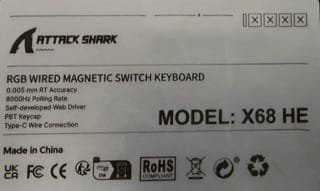
| Polling rate | 8000Hz (wired) |
| Key features | Rapid Trigger, Snap Tap, DKS, hot-swap |
| Price | ~$53–$60 on the official store; varies by color and retailer |
| Best for | Budget-focused FPS and competitive gaming |
How Did I Choose This Keyboard?
This review is based on my personal experience using the Attack Shark X68 HE over the past three months on my brother’s gaming setup. During that time, I used it extensively in games like Valorant and Red Dead Redemption 2, while also testing its Hall Effect features, Rapid Trigger, RGB lighting, and everyday typing performance.
Alongside my hands-on testing, I verified the keyboard’s specifications, features, software, and pricing using official Attack Shark resources and trusted retailers to ensure the information in this review is accurate and up to date.
What Is the Attack Shark X68 HE?
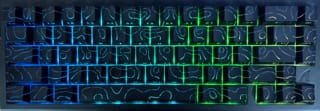
The Attack Shark X68 HE is a 60% wired gaming keyboard built around Hall Effect magnetic switches instead of traditional mechanical ones. It’s positioned as a budget entry point into magnetic-switch keyboards — the same underlying switch technology found in far pricier boards.
When Was the X68 HE Released?
Attack Shark first listed the X68 HE in its official product catalog on December 30, 2024, alongside its dedicated web driver software and manual.
It’s since become one of the brand’s best-selling hall effect boards, with spin-off versions like the X68 Pro HE and X68 Max HE following through 2025.
What Is the Price of the X68 HE?
On Attack Shark’s official store, the X68 HE runs from a sale price around $59.99 up to a regular price of $69.99, depending on colorway.
Price varies by:
- Colorway (Black, White, Black Gradient, and shine-through Contour keycaps)
- Retailer — Amazon, Walmart, and Newegg list it anywhere from roughly $45 to $90+, especially in mouse-combo bundles
- Cable style (standard vs the upgraded coiled C01/C01 Pro cable)
Here is the detailed guide on keyboards under $100 if you want a broader comparison.
How Is the Gaming Performance of the X68 HE?
The X68 HE performs like a genuine competitive board, not just a budget one. Its 8000Hz polling rate, 0.01mm Rapid Trigger accuracy, and debounce-free Hall Effect switches combine for a manufacturer-rated 0.125ms latency — fast enough for Valorant, CS, Apex, and rhythm games like osu!.
Ideal For:
- Fast-paced FPS and rhythm titles where reset speed matters
- Players upgrading from a standard mechanical board who want a noticeable response upgrade
What Are the Specifications of the X68 HE?
Beyond the headline Rapid Trigger and 8000Hz numbers, it’s the build quality and switch design that actually determine how the board feels day to day.
| Category | Detail |
|---|---|
| Case/plate | Aluminum top case and plate |
| Keycaps | Doubleshot PBT, side-printed; shine-through on Contour colorways |
| Switches | Attack Shark Hall Effect linear magnetic switches |
| Actuation force | ~40±5gf |
| Rated lifespan | Up to 100 million keystrokes |
| Hot-swappable | Yes |
| Connectivity | USB-C wired, coiled cable included |
| Scan rate | 128KHz |
| RGB | 16.8M colors, 20+ effects |
| Software | Web-based driver (qmk.top), Windows + Mac |
What’s the Build Quality Like?
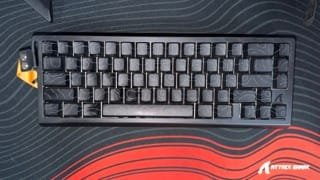
The X68 HE uses an aluminum top case and plate instead of the all-plastic construction common at this price, which keeps the frame rigid and cuts down on flex during aggressive gameplay. Its doubleshot PBT keycaps resist shine and wear better than the cheaper ABS caps found on many budget boards.
Does the X68 HE Have Rapid Trigger and Hall Effect Switches?
Yes. The X68 HE uses Hall Effect magnetic switches with a fully adjustable actuation point from 0.1mm to 3.4mm at 0.01mm accuracy, which is what enables genuine Rapid Trigger — keys reset the instant you lift off, instead of waiting for a fixed release point.
Best for:
- Counter-strafing and fast direction changes in FPS games
- Cutting down accidental double-inputs during rapid key sequences
What Does the X68 HE Sound Like?
The X68 HE leans toward a soft, rounded “thock” rather than a sharp, hollow click, thanks to its Outemu Jade White switches and doubleshot PBT keycaps working together with the aluminum plate. It’s a quieter, less fatiguing sound signature than most budget boards default to.
Best for:
- Shared rooms or voice-chat sessions where a loud, clacky board would be distracting
- Long sessions where sound fatigue is a factor
What Polling Rate and Snap Tap Support Does It Have?
The X68 HE runs an 8000Hz wired polling rate with a 128KHz scan rate, and supports Snap Tap (last-input-priority), plus Dynamic Keystrokes (DKS), Mod-Tap (MT), and Toggle (TGL) — all configurable through the web driver, with no extra hardware required.
How to Use the Attack Shark X68 HE?
Most of the X68 HE’s advanced features live inside its web-based driver rather than a bulky downloaded app, and a handful of onboard FN shortcuts cover the basics without opening software at all.
How Do You Download the Software for the X68 HE?
You don’t need a traditional install — Attack Shark runs X68 HE configuration through a web driver at qmk.top, which works in a Windows or Mac browser for actuation tuning, macros, RGB, and key remapping.
How Do You Set Up the Attack Shark X68 HE?
Setup is plug-and-play: connect the included coiled USB-C cable to the keyboard and your computer, and it works immediately at default settings. Open the web driver afterward for deeper tuning.
Setup steps:
- Connect the coiled cable to the keyboard’s USB-C port, then to your PC or Mac
- Let your OS auto-detect it — no drivers needed for basic typing
- Visit the web driver at qmk.top for actuation, RT, and lighting setup
- Save your profile to onboard memory so settings persist across computers
How Do You Turn On Rapid Trigger?
- Connect your Attack Shark X68 HE to your PC.
- Open the QMK web driver (qmk.top) in a supported browser.
- Select your X68 HE keyboard.
- Go to the Actuation or Rapid Trigger settings.
- Enable Rapid Trigger.
- Adjust the actuation point and reset sensitivity for individual keys or the entire keyboard.
- Save the settings to the keyboard’s onboard memory.
How Can You Enable Snap Tap on the X68 HE?
- Connect your Attack Shark X68 HE to your PC.
- Open the QMK web driver (qmk.top).
- Select your X68 HE keyboard.
- Navigate to the Advanced Key Settings or Snap Tap section.
- Pair the two keys you want to use (for example, A and D).
- Enable Last Input Priority (Snap Tap).
- Save the configuration to the keyboard’s onboard memory.
Why Are the Number Keys Not Working on the X68 HE?
- Press FN + Right Shift.
- Check if the top-row keys now type numbers instead of symbols or media controls.
- If needed, press FN + Right Shift again to switch back to the alternate mode.
How Can You Turn On RGB on the X68 HE?
- Press FN + Backspace to turn the RGB backlight on or off.
- Press FN + Up/Down to increase or decrease brightness.
- Press FN + Left/Right to adjust the lighting effect speed.
- Press FN + \ to cycle through lighting modes.
- Press FN + Enter to change RGB colors.
- Open the QMK web driver (qmk.top) for advanced lighting customization and profiles.
My Honest Review of the Attack Shark X68 HE
After a few months of using this keyboard whenever I’m at my brother’s setup, my honest take is that it’s one of the more convincing budget hall effect keyboards out there. It handles fast-paced titles like Valorant with a snappy, consistent response you’d expect from something pricier, and it holds up just as well in a slower, open-world game like Red Dead Redemption 2, mixing quick reactions with longer menu sessions.
The sound is a pleasant surprise, too — a satisfying, slightly deep tone rather than the sharp clack that makes some budget boards annoying to sit next to. The RGB looks clean without being distracting, and across FPS rounds and slower RPG sessions alike, I haven’t noticed missed inputs or ghosting.
Pros and Cons of Attack Shark X68 HE
| Pros | Cons |
|---|---|
| Genuinely fast, consistent Hall Effect response | Rapid Trigger and Snap Tap require the web driver — no onboard toggle |
| Solid aluminum build for the price | 60% layout means a learning curve if you rely on F-keys or a nav cluster |
| Pleasant, non-fatiguing sound signature | Wired only at this price tier — no wireless version |
| Hot-swappable switches | – |
Who Should and Should Not Buy This Keyboard?
Buy it:
- Gamers who want an affordable Hall Effect gaming keyboard
- Competitive FPS players who benefit from Rapid Trigger and 8000Hz polling
- Players upgrading from a traditional mechanical keyboard
- Anyone looking for a premium-feeling keyboard without spending over $100
- Users who prefer a compact 60% layout for extra mouse space
- Gamers who don’t mind a wired connection for the lowest possible latency
Skip it:
- Users who need Bluetooth or 2.4GHz wireless connectivity
- Anyone who relies on dedicated F-keys, navigation keys, or a numpad
- People who want all settings adjustable directly from the keyboard without using the web driver
- Productivity-focused users who spend more time typing than gaming
- Buyers who prefer a 65%, TKL, or full-size keyboard layout
People Also Ask About the Attack Shark X68 HE
Start by trying a different USB port or cable and rebooting your PC, since most connection issues trace back to the cable or port rather than a hardware fault. If it still won’t register, check for a web driver firmware update or test the board on a second computer to isolate the problem.
Yes — its 0.01mm Rapid Trigger accuracy and 8000Hz polling rate are built for exactly this kind of fast, precision-dependent gameplay, which is why it’s a common pick among budget-focused competitive players.
Yes, it’s compatible with both Windows and Mac, and the web driver runs in-browser on either system. A dedicated key combination switches the board between Windows and Mac key layouts.
Yes, the board ships hot-swappable, so you can pull the stock Hall Effect switches with the included puller and install compatible magnetic switches without any soldering.
The standard X68 HE is wired-only, while the X68 Pro HE adds tri-mode connectivity (Bluetooth, 2.4GHz wireless, and wired) plus a built-in battery, at a higher price point.
Bottom Line: Is the Attack Shark X68 HE Worth It?
After spending around three months gaming on my brother’s Attack Shark X68 HE, I can confidently say it’s one of the best budget Hall Effect keyboards I’ve used. From competitive Valorant matches to long Red Dead Redemption 2 sessions, it consistently felt fast, responsive, and comfortable.
The aluminum build gives it a premium feel, while features like Rapid Trigger, adjustable actuation, and 8000Hz polling provide a noticeable advantage in fast-paced games. At its price, it’s hard to find another keyboard that offers this combination of performance and build quality.
If you want wireless connectivity or a larger layout, the X68 Pro HE is worth considering instead.
