

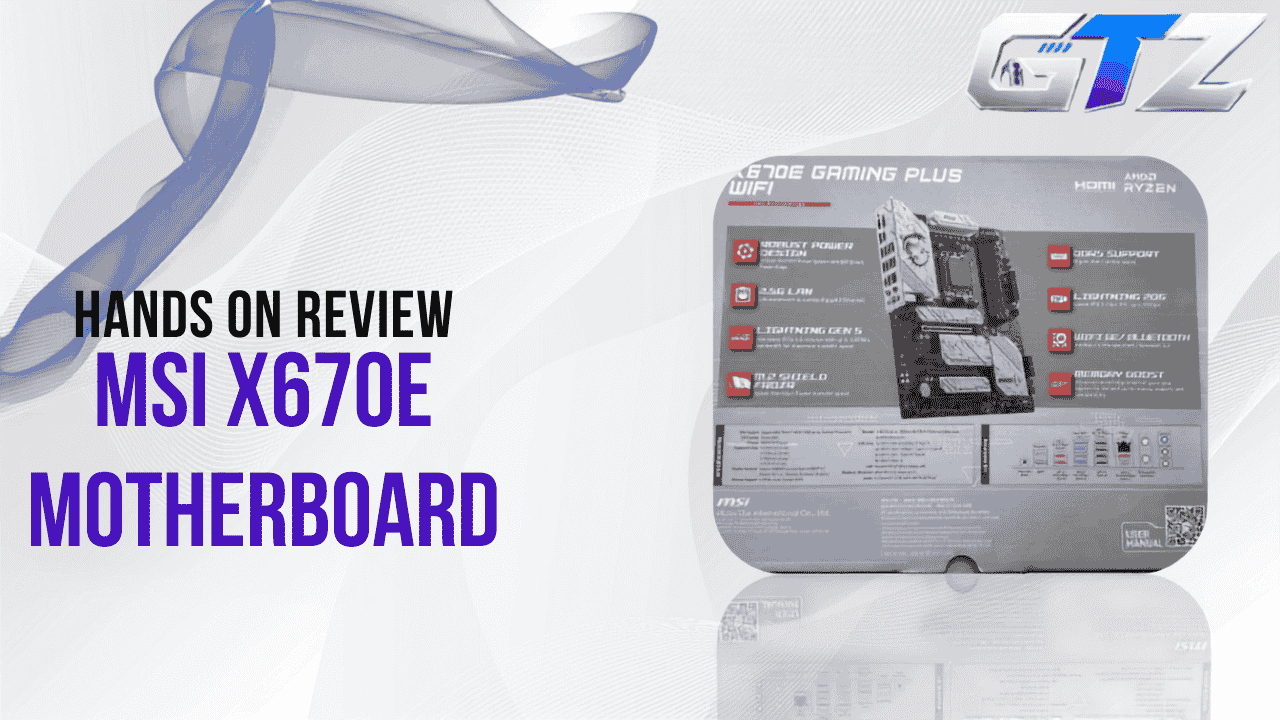
I picked up the MSI X670 motherboard for a fresh AM5 build paired with the Ryzen 7 9800 X3D, and after living with it day to day, playing several games and recording videos, I wanted to break down exactly what you’re getting.
This review covers the MSI X670 motherboard, specifically the X670E Gaming Plus WiFi. I’ll explain its specifications, current pricing, and how it performs in everyday gaming.
Quick Overview
| Feature | Details |
|---|---|
| Model | MSI X670E Gaming Plus WiFi |
| Socket | AM5 |
| CPU Support | AMD Ryzen 7000 / 8000 Series (Ryzen 9000 desktop ready per box labeling) |
| Chipset | AMD X670 |
| Memory | 4x DIMM, Dual Channel DDR5 |
| Storage | 1x M.2 Gen5 x4 (128Gbps) + 3x M.2 Gen4 x4 (64Gbps), 4x SATA 6Gb/s |
| Wireless | AMD Wi-Fi 6E, Bluetooth 5.3 |
| Release | January 2024 |
| Price | ~$219 |
Hands-on Experience
This review is based on my personal experience using the MSI X670E Gaming Plus WiFi in my primary gaming PC. Along with daily use and real-world testing in games like Valorant and FiveM (GTA V), I also verified the motherboard’s specifications and compared my observations with MSI’s official documentation and trusted hardware sources where appropriate.
What is MSI X670?
The MSI X670 motherboard, sold under the name X670E Gaming Plus WiFi, is an ATX board built around AMD’s X670E chipset for the AM5 platform. It’s a mid-range gaming motherboard with PCIe 5.0 support, DDR5 memory, and MSI’s Lightning Gen5 M.2 slot. It offers a strong foundation for Ryzen 7000 and newer AM5 builds without the cost of a flagship board.

MSI X670 release date
The MSI X670E Gaming Plus WiFi first hit the market in January 2024, launching alongside the broader wave of AM5 motherboards built for AMD’s Ryzen 7000 series. It’s held up well since, with MSI continuing to ship BIOS updates that extend support to newer Ryzen 8000 and 9000 desktop chips.
Key timeline points:
- Originally launched for Ryzen 7000 series
- Later validated for Ryzen 8000 series “Hawk Point” APUs
- Box confirms Ryzen 9000 Desktop Ready status with current BIOS
MSI X670E price?
Pricing on this board has moved around a fair amount since launch. It listed at $219.00 at major retailers, though it has dipped as low as $189.99 and spiked as high as $589.12 during periods of limited stock.
What affects the price you’ll see:
- Retailer stock levels (some listings show “limited stock” or “sold out” status)
- Regional availability and import costs
- Bundle deals with CPUs or RAM kits
- $149.99 on amazon
MSI X670 Motherboard specifications
Below is the full spec breakdown taken directly from the retail packaging, section by section.
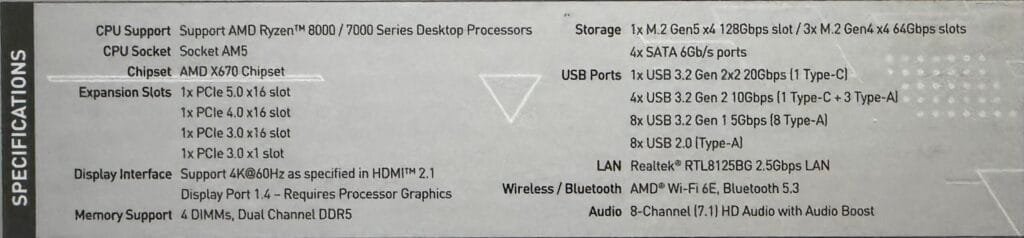
CPU support
Ryzen 9000 processors may require a BIOS update before the first boot. Fortunately, the Flash BIOS button lets you update the BIOS without installing a CPU.
Best for:
- Builders on Ryzen 7000, 8000, or 9000 series chips
- Anyone wanting a single AM5 board that spans three CPU generations
Caveats: Ryzen 9000 series support may require a BIOS update before first boot—the flash BIOS button on the I/O panel makes this possible without a CPU installed. This applies directly if you’re running a Ryzen 7 9800X3D like I am, since it’s part of the newer 9000 series lineup
CPU socket
This board uses Socket AM5, AMD’s current desktop platform socket shared across Ryzen 7000, 8000, and 9000 series processors.
Best for: Anyone building fresh on AM5 or upgrading within the AM5 ecosystem
Chipset
The X670E Gaming Plus WiFi runs on the AMD X670 chipset, the higher tier of AMD’s AM5 chipset lineup, positioned above B650 for boards needing more PCIe lanes and connectivity.
Best for:
- Builders who want native PCIe 5.0 across both GPU and storage
- Multi-GPU or heavy expansion-slot setups
Slots
Expansion is handled through four PCIe x16-length slots split across generations, giving you flexibility for both a primary GPU and secondary expansion cards.
Slot breakdown:
- 1x PCIe 5.0 x16 slot
- 1x PCIe 4.0 x16 slot
- 1x PCIe 3.0 x16 slot
- 1x PCIe 3.0 x1 slot
Best for: A single high-end GPU in the PCIe 5.0 slot plus room for capture cards, sound cards, or older PCIe peripherals
Display interface
Display output supports 4K at 60Hz as specified in HDMI 2.1, along with a DisplayPort 1.4 output—though both require a processor with integrated graphics since the chipset itself has no onboard GPU.
Caveats: Only usable if you’re running a Ryzen chip with integrated graphics (APU); a standard Ryzen 7000/9000 non-G CPU won’t output video through these ports.
Storage
The storage configuration is generous for this price. You get one Gen5 NVMe slot, three Gen4 NVMe slots, and four SATA ports.
Storage breakdown:
- 1x M.2 Gen5 x4 slot (128Gbps)
- 3x M.2 Gen4 x4 slots (64Gbps)
- 4x SATA 6Gb/s ports
Best for: Builders wanting one ultra-fast boot/game drive plus room to expand with three additional NVMe drives and SATA storage for bulk data
RAM support
The board supports 4 DIMM slots running dual-channel DDR5 memory, letting you scale up to high-capacity, high-speed memory kits as DDR5 pricing and speeds continue to improve.
Best for: Builders planning DDR5 kits for gaming or content workflows that benefit from higher memory bandwidth
Wifi support
Wireless connectivity comes from an AMD Wi-Fi 6E module paired with Bluetooth 5.3, alongside a Realtek RTL8125BG 2.5Gbps LAN controller for wired connections.
Best for:
- Gamers wanting low-latency wireless as a backup to wired Ethernet
- Setups without easy access to a wired LAN drop
Caveats: This is Wi-Fi 6E, not Wi-Fi 7 — worth checking before buying if you specifically need Wi-Fi 7 support, since some retailer listings for this exact model have incorrectly advertised Wi-Fi 7
PROS and CONS of The MSI X670E
| Pros | Cons |
|---|---|
| Supports AMD Ryzen 7000, 8000, and 9000 series processors. | Ryzen 9000 CPUs may require a BIOS update before first boot. |
| Full PCIe 5.0 support for GPUs and NVMe SSDs. | Uses Wi-Fi 6E instead of the newer Wi-Fi 7 standard. |
| Four M.2 slots offer plenty of storage expansion. | Costs more than many B650 motherboards with similar gaming performance. |
| Built-in Wi-Fi 6E, Bluetooth 5.3, and 2.5Gb Ethernet. | Premium features may be unnecessary for budget-focused builds. |
| Flash BIOS button enables CPU-free BIOS updates. | Limited RGB lighting compared to some competing gaming motherboards. |
My Gaming Experience with X670
My build pairs the X670E Gaming Plus WiFi with a Ryzen 7 9800X3D, an EVGA RTX 3080, and a Cougar GEX 850 power supply — so this section reflects that specific combination rather than a generic setup.
On FiveM (GTA V online multiplayer mode), I get straight 160 to 170 FPS with 55% GPU usage, and in Valorant, I get around 300 to 400 FPS.

Running this pairing day to day, the 9800X3D’s single-core strength lines up well with the board’s power delivery, and the RTX 3080 slots into the PCIe 5.0 x16 slot without any issue, however I do feel a bottleneck in some games like Resident Evil Requiem because it is a GPU-intensive game and my GPU is PCIe 4.0. The Cougar GEX 850 comfortably covers the power draw of this pairing, giving good power to the overall build.
Who Should and Should Not Buy it?
Buy it if:
- Want a future-ready AM5 motherboard for Ryzen 7000, 8000, or 9000 series processors.
- Plan to use DDR5 memory and take advantage of PCIe 5.0 support for next-generation GPUs and SSDs.
- Need multiple storage options, including one PCIe Gen5 M.2 slot, three Gen4 M.2 slots, and four SATA ports.
- Want built-in Wi-Fi 6E, Bluetooth 5.3, and 2.5Gb Ethernet without buying additional expansion cards.
- Intend to keep the same motherboard through future CPU upgrades, thanks to AM5 platform support and ongoing BIOS updates.
Skip it if:
- Are building on a tight budget and don’t need premium features like PCIe 5.0 or four M.2 slots, as a B650 motherboard may offer better value.
- Already own a capable AM4 system and don’t plan to upgrade to the AM5 platform anytime soon.
- Specifically want Wi-Fi 7, since this model includes Wi-Fi 6E instead.
- Only need a basic PC for everyday tasks, where the extra connectivity and expansion features of the X670E chipset would likely go unused.
People also ask about the MSI X670 motherboard
MSI is one of the established players in the motherboard space, alongside ASUS, Gigabyte, and ASRock, with a long track record in the AM5 and gaming hardware space. Build quality on boards like the X670E Gaming Plus WiFi reflects that — solid VRM design and M.2 Shield Frozr thermal protection are standard at this tier.
MSI is one of the established players in the motherboard space, alongside ASUS, Gigabyte, and ASRock, with a long track record in the AM5 and gaming hardware space. Build quality on boards like the X670E Gaming Plus WiFi reflects that — solid VRM design and M.2 Shield Frozr thermal protection are standard at this tier.
The X670E Gaming Plus WiFi supports AMD Ryzen 7000, 8000, and 9000 series desktop processors on Socket AM5, based on the specifications printed on the retail packaging.
Yes — as an AM5 board, it’s compatible with standard AM5 liquid cooling brackets and AIO coolers, since cooler compatibility is determined by the socket, not the motherboard model itself. [VERIFY specific mounting hardware/bracket compatibility with your cooler brand before installing]
Most motherboards remain functional for 7–10 years under normal use, though practical lifespan is often decided by chipset and CPU-generation support ending rather than hardware failure. The X670E Gaming Plus WiFi’s continued BIOS updates through the Ryzen 9000 series suggest a healthy support window from MSI.
Final Verdict on The MSI X670E
The MSI X670 motherboard, in the form of the X670E Gaming Plus WiFi, earns its place as a mid-range AM5 board by combining genuine PCIe 5.0 support, four M.2 slots, and DDR5 memory headroom — all backed by continued BIOS support across three Ryzen generations.
That combination of Gen5 storage speed and multi-generation CPU support is the strongest reason to consider it, especially if you’re building once and expecting to upgrade your CPU down the line without replacing the board.
Ready to build your next AM5 rig?
